TL;DR
Most HVAC contractors don't need 9 AI tools, they need 3 that work, deployed in the right order, costing about $250 to $400/mo. The four highest-ROI uses for AI in an HVAC business in 2026 are: AI receptionist for after-hours and overflow calls, AI chatbot on the website for lead capture, AI-drafted GBP posts plus service-page content, and AI-drafted email replies for the office. Three to actively skip: predictive equipment-failure AI (still too early), AI-generated stock images of your "team" (customers can tell, and it kills trust), and fully autonomous AI sales agents (booking yes; selling no).
If you want a working HVAC marketing consultant to deploy the AI receptionist and lead-capture stack described here for your shop, that is our standard engagement.
\nAI leverage compounds when it plugs into modern HVAC website design, not a template site stuck in 2018.
If you want a quick 30-minute audit of where AI would actually pay back in your specific HVAC business, book a free strategy call, we'll map your stack on the call, no follow-up sales sequence.
Why now (and why not all the hype)
Two years ago, "AI for HVAC" was a marketing slide deck with no real product behind it. In 2026, it's a real category: there are working AI receptionists answering calls 24/7 for trade businesses, real AI chatbots that book service appointments without a human in the loop, and real AI tools that draft your weekly Google Business Profile posts in 30 seconds.
There is also a tremendous amount of garbage. AI tools that promise to "10x your HVAC business" by automating things that don't need to be automated. AI-generated content that hallucinates certifications you don't have. AI image tools that produce uncanny-valley fake "team photos" that visibly aren't your team.
This post is the honest version: what's working, what's not, what to skip, and what a realistic AI stack looks like for a 5-truck HVAC operator in 2026.
The 9 AI use cases, ranked by ROI for HVAC
Each use case ranked by what we've seen actually move the needle for HVAC clients at SkillMammoth's HVAC + Mechanical practice. 2026 US benchmarks.
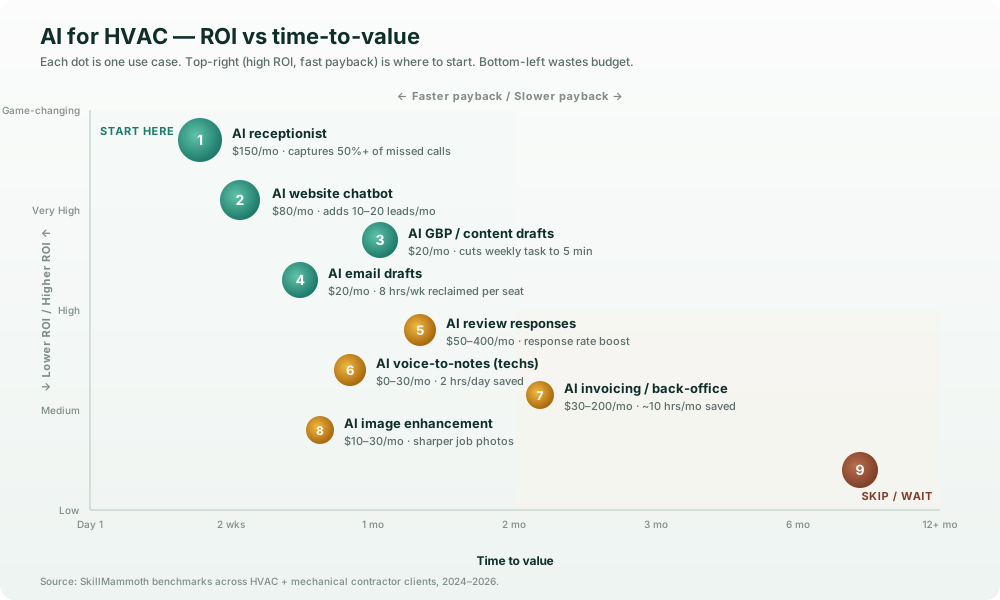
AI use cases for HVAC, plotted by ROI vs time-to-value. Top-right quadrant (high ROI, fast payback) is where to start. Bottom-left is where most operators waste budget.
1. AI receptionist (24/7 phone answering), payback in days
What it does: picks up after-hours and overflow calls, answers basic questions, schedules service appointments, captures lead details, hands warm leads back to your team. Tools like Goodcall, Phonely, or Vapi.ai do this well in 2026.
ROI: missed calls = missed revenue. The average HVAC contractor misses 20 to 40% of after-hours calls; many of those callers move on to a competitor. An AI receptionist that captures even 50% of those is worth $5,000 to $15,000/mo for a typical 5-truck operation.
Cost: $80 to $300/mo depending on call volume and feature set.
Time-to-value: 1 to 2 weeks setup, immediate ROI thereafter.
Where it fails: badly trained AI receptionists that hallucinate pricing or commit the business to appointments outside service area. Train it on your actual scripts, not generic templates.
2. AI chatbot on your website, payback in weeks
What it does: captures leads on your website 24/7, answers FAQ ("Do you service my zip code?", "What's your service call cost?"), books service appointments through an integrated calendar, hands warm leads to your team.
ROI: for a website doing 1,000 monthly visitors at a 2% conversion rate (20 leads/mo), a chatbot that captures another 10 to 20 leads/mo is essentially free leads. Most HVAC chatbots pay back in the first month they're live.
Cost: $50 to $200/mo for tools like Intercom, Tidio, or HVAC-specialized like ServiceTitan's chat. We typically recommend starting with the cheapest viable option and upgrading as call volume grows.
Time-to-value: 3 to 7 days.
Where it fails: generic chatbots that don't know your service area, can't book appointments, or feel obviously robotic. The bar in 2026 is genuinely high, bad chat hurts more than no chat.
3. AI-drafted GBP posts + service descriptions, payback in 1 to 2 months
What it does: drafts your weekly Google Business Profile posts (you edit and post), drafts service page copy, drafts blog post outlines, generates meta descriptions and alt text at scale.
ROI: consistency on GBP is a major local SEO factor. Operators who post 1 to 2x/week rank measurably higher than those who post never. AI cuts the 30-minute weekly task to 5 minutes.
Cost: ChatGPT or Claude at $20/mo, plus optional GBP-specific tools like Birdeye or Podium.
Time-to-value: immediate, but rankings compound over 60 to 90 days.
Where it fails: publishing AI output without a human pass. Hallucinations about your services or certifications will hurt you. Always edit. The "1-minute AI post" workflow only works if there's a 4-minute editing pass after.
4. AI-drafted email replies for the office, payback in 1 month
What it does: drafts replies to common customer emails ("when can you come?", "what does the service cost?"), summarizes long email threads, drafts proposal language for installation jobs.
ROI: office staff time is the main cost here. A dispatcher answering 50 emails/day at 3 minutes each is 2.5 hours/day. AI-drafted replies (with human edit and send) cut that to ~45 minutes. That's 8 hours/week reclaimed per office staff member.
Cost: ChatGPT, Claude, or Gemini at $20/mo per seat. Or built-in tools like Apple Intelligence and Gmail Smart Replies (free with Workspace).
Time-to-value: 1 week to build the prompt library, ongoing ROI.
Where it fails: sending AI drafts unedited. Customer-facing email needs a human touch, the AI drafts the structure, you adjust the voice.
5. AI review responses, payback in 1 to 2 months
What it does: drafts personalized responses to Google reviews (positive and negative), maintains tone consistency, surfaces common complaint patterns.
ROI: review response rate is a confirmed local SEO factor. Operators who respond to 100% of reviews rank higher than those who respond to 50%. AI cuts response time from 5 minutes to 30 seconds.
Cost: built into review tools like NiceJob, Birdeye, Podium ($150 to $400/mo). Or DIY with ChatGPT for free.
Time-to-value: immediate.
Where it fails: copy-paste robotic responses. Customers and Google can both tell. AI drafts the response; you customize the specifics.
6. AI voice-to-notes for field techs, payback in 1 to 2 months
What it does: field techs dictate job notes to their phone after a service call; AI transcribes and structures the notes into the format your CRM/FSM expects.
ROI: if your techs currently write notes for 2 to 3 minutes after each job, AI dictation cuts that to 30 seconds and produces better-structured notes. For a 5-truck operation doing 10 jobs/day per truck, that's ~2 hours/day saved.
Cost: $0 to $30/mo. iPhone has it built in (Voice Memos + Apple Intelligence). Otherwise tools like Otter.ai or Workflowy AI.
Time-to-value: 1 day.
Where it fails: noisy job sites plus low-quality phone mics = bad transcription. Fix the mic first.
7. AI for invoicing + back-office, payback in 2 to 3 months
What it does: auto-categorizes expenses in QuickBooks, drafts invoices from job notes, reconciles bank transactions, flags anomalies.
ROI: mostly time savings on back-office work. For a bookkeeper-shy operator, AI bookkeeping tools can replace 5 to 10 hours/month of manual work.
Cost: $30 to $200/mo (QuickBooks AI features, Bench, Pilot, etc.).
Time-to-value: 2 to 4 weeks setup, immediate ROI thereafter.
Where it fails: trusting AI categorization without a human pass at month-end. AI is right ~95% of the time; the 5% it's wrong is what gets you in trouble at tax time.
8. AI image enhancement for job photos, payback in 1 to 3 months
What it does: brightens, color-corrects, and de-clutters the photos your techs take on job sites for use on your website and social posts.
ROI: real photos outconvert stock by ~3x. Real photos that look professionally edited convert better still. AI tools like Lightroom AI and Photoroom turn snap-and-shoot phone photos into website-ready assets.
Cost: $10 to $30/mo (Adobe Lightroom AI, Photoroom, etc.).
Time-to-value: immediate.
Where it fails: over-editing (the photo no longer looks real) or AI-generated "lifestyle" images that aren't actually your team. Edit, don't fabricate.
9. AI for predictive equipment failure, payback unclear, still early
What it does: in theory, monitors smart-thermostat data and equipment runtime to predict failures before they happen, generating maintenance leads.
ROI: real promise here, but the tooling in 2026 is still rough and customer-facing privacy concerns are nontrivial. A few large enterprise HVAC operators are running pilots; SMB operators don't have the data infrastructure to make it work yet.
Cost: $500 to $2,000/mo for the few real platforms in 2026.
Time-to-value: 6 to 12 months pilot, then maybe ROI.
Where it fails: at the SMB level, in 2026, almost everywhere. Wait 2 to 3 years.
The starter AI stack for a 5-truck HVAC operator (~$300/mo)
If you're going to spend $250 to $400/mo on AI tooling, here's how we'd allocate it:
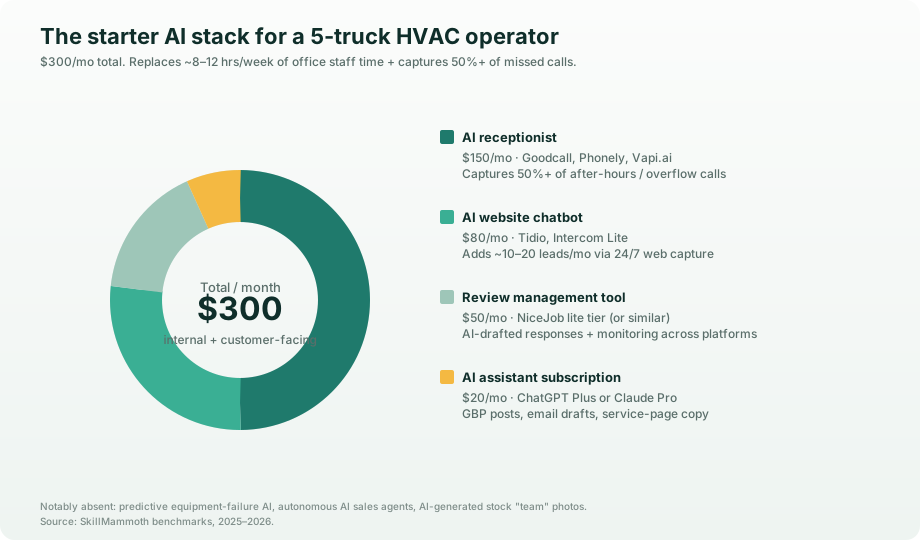
Where the $300/mo starter AI stack goes. Same pattern as the lead-gen starter stack, 3-4 high-ROI tools, deployed in the right order.
| Tool | Monthly cost | What it replaces |
|---|---|---|
| AI receptionist (Goodcall / Phonely / Vapi) | $150 | 1 to 2 missed-call leads/mo plus after-hours staffing |
| AI website chatbot (Tidio / Intercom Lite) | $80 | Cold contact form (lower-converting alternative) |
| AI assistant subscription (ChatGPT Plus or Claude Pro) | $20 | Time spent on GBP posts, emails, review replies |
| Review management tool (NiceJob lite tier) | $50 | Manual review monitoring and response |
| Total | ~$300/mo | Roughly 8 to 12 hours/week of office staff time |
That's roughly 1 lead/mo at $300 CPL to break even, and most operators see 3 to 8x that.
Notably absent: predictive maintenance AI, AI sales agents, AI-generated stock photos of your "team," fully autonomous AI dispatchers. These are the ones we've seen burn the most budget in 2026.
3 things to actively skip
1. Predictive equipment failure AI (still too early)
Promising in theory. Not ready for SMB HVAC at scale in 2026. The data plumbing required to make it work, multi-vendor smart thermostat APIs, customer privacy consent, integration with FSM software, is too hard for a 5-truck operation to manage profitably. Wait until at least 2028 unless you're a 50+ truck commercial operator with a real data team.
2. AI-generated "team photos" / stock people that aren't your team
Customers can absolutely tell. Real photos of your real team outperform AI-generated lifestyle images by 3 to 5x. The fact that the AI image is photorealistic doesn't change that, uncanny valley plus customer skepticism = trust killer. Real photos always.
3. Fully autonomous AI sales agents
There are tools in 2026 that promise to fully sell HVAC service, qualify, quote, close, without human involvement. Don't. The brand risk of an AI committing to pricing or service area you don't actually offer is way bigger than the labor savings. Use AI to book appointments. Have humans sell.
Privacy + customer trust
Two real concerns to think through before deploying AI customer-facing:
Disclosure. If a customer is talking to an AI agent (chatbot or phone), most state regulations and platform policies in 2026 require a brief disclosure. "Hi, this is our AI scheduling assistant. I can book you a service call or hand you to a human, what works?" Customers are usually fine with AI for transactional stuff if they know upfront.
Data handling. AI tools that train on customer conversations are a privacy risk. Use tools that explicitly opt out of training (most B2B tools do; most consumer tools don't). For phone-based AI receptionists, make sure call recordings are stored compliantly with your state's recording laws.
If you're nervous about privacy, start with internal-only AI use cases (back-office, tech notes) before customer-facing deployments. Build trust internally first.
Implementation timeline (90 days)
A realistic order to roll AI tools out without overwhelming your team:
Week 1 to 2: AI assistant subscription, use it for GBP posts and email drafts. (Internal only; no customer impact.)
Week 3 to 4: AI website chatbot. (Customer-facing but bounded, only your website.)
Week 5 to 8: AI receptionist for after-hours only. (Test on overflow first; expand to all hours if results are good.)
Week 9 to 12: AI review management plus AI-enhanced job photos. (Operational polish; compounding effect.)
Month 4+: Evaluate whether to expand. Most 5-truck operators stop here, the marginal returns on additional tools drop fast.
What to do this week
- Subscribe to ChatGPT Plus or Claude Pro ($20/mo). Use it daily for the next 14 days for office tasks, GBP posts, email drafts. This is your AI literacy training before deploying customer-facing tools.
- Audit your current missed-call rate. Pull last 30 days of call logs from your phone system. If it's >15%, an AI receptionist is your highest-ROI next move.
- Add an AI chatbot to your website for the lowest-friction win. Start with Tidio at $0/mo (free tier) to test, upgrade to a paid tier when you outgrow it.
- Skip everything in the "skip" section above for at least the rest of 2026.
If your website's the bottleneck (most are), grab a free website audit before you bolt AI on top of a leaky foundation. We covered why that order matters in the HVAC website design anchor.
FAQ
What's the cheapest AI tool that actually moves the needle for HVAC?
A $20/mo ChatGPT Plus or Claude Pro subscription, used for GBP posts plus service page drafts plus email replies. The marginal time savings often justify it in week 1.
Will AI replace my dispatcher?
No. AI augments your dispatcher, drafts emails, transcribes notes, books simple appointments. Real dispatching (juggling 5 trucks, customer escalations, parts logistics, weather curveballs) still needs a human in 2026 and probably for the next 5+ years.
Can AI handle emergency calls?
Partially. AI receptionists can take down emergency-call details and dispatch alerts to your on-call tech. They shouldn't handle the customer through the entire emergency, at minimum, hand the call to a human after the initial intake. Customers in genuine emergency don't want to talk to an AI for 5 minutes.
How accurate is AI bookkeeping for HVAC?
QuickBooks Auto-Categorize and similar tools are roughly 90 to 95% accurate. The 5 to 10% they get wrong matters at tax time. Always have a human pass at month-end. Don't fully outsource accounting to AI yet.
What about ServiceTitan's AI features?
ServiceTitan's AI features are real and improving fast. If you're already on ServiceTitan, turn them on and evaluate. If you're not on ServiceTitan, the cost of switching FSMs solely for AI features is rarely worth it, you can get most of the same outcomes from a $300/mo tool stack on top of whatever FSM you currently use.
Will customers know they're talking to AI?
Yes, most of the time. The 2024-25 generation of voice AI is good but not indistinguishable from human. The 2026 generation is closer. The right play is to disclose upfront ("Hi, this is our AI scheduling assistant"), which most customers are fine with for transactional interactions.
What about AI-generated marketing videos?
Skip in 2026. AI-generated "spokesperson" videos still trip the uncanny valley. Real video of you, your team, and your trucks outperforms AI video by a wide margin. Use AI for editing and captioning real video, not for generating fake-real video.
Can AI help me train new techs?
Some real promise here, AI flashcards, AI-generated practice scenarios, AI quizzes from your service manuals. We've seen a few HVAC operators experimenting with internal training AI. Not yet a top-3 use case but worth watching in 2027.
What's the biggest mistake HVAC contractors make with AI in 2026?
Deploying customer-facing AI on top of a website or phone system that doesn't already convert. AI is a multiplier on a foundation that works. If your website converts at 1% and your missed-call rate is 30%, fix those first; then layer AI on top.
How do I know if an AI tool is legit vs marketing fluff?
Three quick tests: (1) Does the tool list real HVAC contractors as customers (case studies with names plus numbers, not stock photos)? (2) Will they let you trial for 30 days without a contract? (3) Can you see exactly what the AI does and doesn't do, in plain English? If any of those is "no," skip.
Want a 30-minute audit of where AI would actually pay back in your HVAC business? Book a free strategy call, we'll map your stack on the call.
Related reading: the HVAC SEO playbook covers the ranking side, and best CRM for HVAC covers the operations side that AI automation ties into.
Also in the AI for trades series: AI for pest control, AI for HVAC, AI for roofers, AI for electricians, and AI for lawn care.