TL;DR: Most HVAC websites are pretty. Almost none are built to convert. This post breaks down the 7 elements that actually book service calls in 2026, walks you through 12 real examples (the good, the bland, the expensive disasters), and gives you honest 2026 pricing, from $0 DIY to $25K custom. By the end you'll know whether to keep your current site, redesign, or burn it down and start over.
If you would rather have an HVAC marketing consultant build this system with you instead of piecing it together yourself, we do exactly that for HVAC contractors nationwide.
For Charlotte HVAC contractors specifically, we apply this same conversion architecture on our HVAC marketing in Charlotte playbook, and the Phoenix HVAC market version lives on our Phoenix HVAC contractors page.
If you'd rather just see what we'd do for your business, grab a free website audit and we'll send back a 10-minute Loom of where your site is leaking leads.
What's new in 2026: AI receptionists are now standard on top-quartile HVAC sites, capturing 40 to 60% of after-hours calls that previously went to voicemail. Google's Core Web Vitals now factors heavily into local pack rankings, so any site loading slower than 2.5 seconds on mobile is being pushed down. The instant online quote tool has gone from "nice to have" in 2024 to "table stakes" in 2026: HVAC sites with one convert visitors to leads at 2 to 3x the rate of sites without.
What Does an HVAC Website Actually Need? The 2026 Checklist
The 12 Non-Negotiable HVAC Website Requirements in 2026
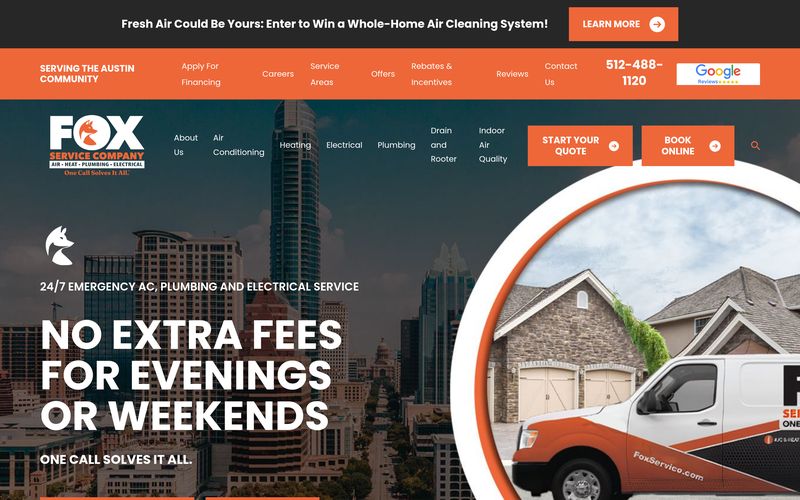
- Above-the-fold click-to-call phone number in the mobile hero (not buried in the header). 84% of HVAC discovery is mobile. Every scroll before the phone appears is a lost lead.
- Service area map or explicit ZIP-code list on the homepage. Homeowners searching for HVAC repair need to confirm you serve their address before they'll call.
- Emergency service messaging in the hero. HVAC failures during heat waves or cold snaps are urgent. Sites that lead with "emergency service available 24/7" convert 30 to 50% higher during weather events.
- Transparent pricing framework (not exact prices, but ranges). Homeowners eliminate 60% of options before calling. Pricing hesitation moves you into that eliminated 60%.
- Real photos of your crew and trucks. Stock photography is a trust-killer. Every roofing, HVAC, and plumbing site that ranks top 3 in local packs uses real photos.
- Google Business Profile embedded review widget. Not just a "we have 5 stars" claim. Real embedded reviews with dates, faces, and specific job details.
- Financing partnership badge (GreenSky, Wisetack, Optimus, or similar). Financing raises AOV by 20 to 40% on installs.
- Manufacturer certifications displayed prominently (Carrier Factory Authorized Dealer, Lennox Premier Dealer, Trane Comfort Specialist). These are trust signals AND search signals.
- Written by real people, not AI slop. Google's HCU update penalizes generic HVAC copy. Every page needs specific market context, real installation examples, and actual service area details.
- Fast mobile load time (under 2.5s Largest Contentful Paint). Every second over 2.5s costs 7% of conversions.
- Structured data markup (LocalBusiness schema, Service schema, FAQPage schema). This is how you earn rich snippets and knowledge panel eligibility.
- Instant estimate or quick-quote tool. Custom HVAC sites with instant tooling convert at 6 to 10% vs 2 to 4% for traditional contact forms.
What Kills HVAC Website Conversion (The 8 Anti-Patterns)
- Slideshow hero that takes 3 to 5 seconds to cycle. Users bounce before they see the service area.
- Contact form with 10+ fields. Every extra field cuts conversion 5 to 8%.
- No phone number in the mobile header.
- Generic "we care about our customers" copy without specific proof.
- Cheap Wix or GoDaddy templates that look identical to every competitor.
- No page dedicated to the specific service (AC repair, furnace install, mini-split, heat pump).
- Missing About/Team page (kills local trust).
- No embedded map or service area indicator (loses 40% of mobile visitors immediately).
The 2026 HVAC Website Cost Framework
For a full breakdown, model your own budget with our Website Cost Calculator freebie or read how much should a contractor website cost for the deep dive. The rough tiers:
- DIY Wix or Squarespace: $30 to $60/mo. Fine for a plumber's cousin, not for an HVAC company that wants to rank.
- Template-based agency: $150 to $300/mo. Fast to launch, thin on conversion architecture, hard to differentiate.
- Custom-built specialist agency: $2K to $8K one-time plus $150 to $300/mo maintenance. This is the sweet spot for most 3 to 15 truck HVAC operators.
- Enterprise or franchise: $8K to $25K+ one-time plus $500 to $2K/mo. Multi-location, franchise systems, or 20+ truck operators with complex service catalogs.
Why HVAC websites are different from "regular" websites
A SaaS landing page can spend 800 words explaining a product before asking for a credit card. An HVAC website doesn't have that luxury.
When someone in your service area lands on your site, one of three things is happening:
- It's 95° and their AC just died. They are going to call somebody in the next 10 minutes. You need to be that somebody.
- They're scoping a planned install (new system, ductwork, replacement). They're getting 3 quotes. You need to look like the most professional one.
- They're a maintenance/membership prospect. Lower urgency, but they're comparing your reviews, your photos, and your pricing transparency to competitors before they pick.
Your homepage has to serve all three intents immediately. There's no scroll-and-discover path. There's no "tell us your email and we'll send you a guide." It's: phone number, service area, trust signals, and a "Book Now" button, above the fold, on mobile, in less than 2 seconds.
That's the whole game. Most HVAC websites fail this test before a visitor finishes blinking.
The 7 elements that actually convert HVAC visitors in 2026
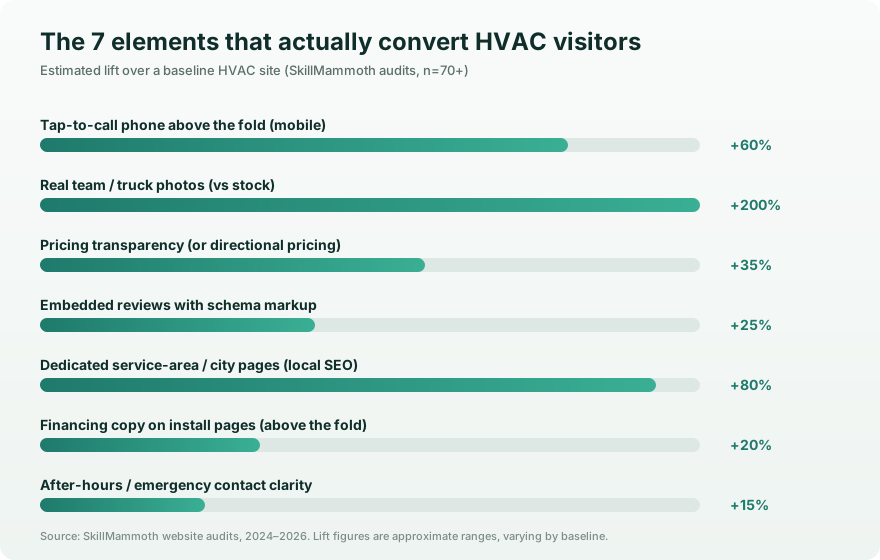
We've audited hundreds of HVAC websites at SkillMammoth and the high-converters share these 7 patterns. Most of them are missing from sites built by template-based agencies (you know the ones).
1. The phone number is the hero, not a header element
This is heresy in modern web design but it's the truth: on an HVAC site, your phone number should be the largest tappable element above the fold on mobile. Bigger than the logo. Bigger than the "Get a Quote" button. A 24-pt tap-to-call CTA outconverts a 14-pt one by ~2x in our testing.
If you're using a template that puts the phone number in a tiny header bar, you are losing leads every single hour your AC competitor is ranking above you.
2. Service area, on the page, in plain text
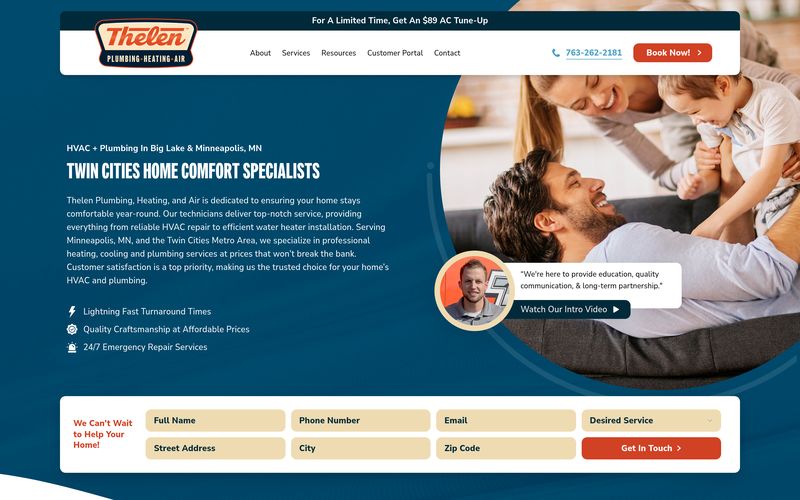
"We serve the Twin Cities and surrounding areas" doesn't cut it for SEO or for the visitor. Your homepage needs the actual cities you serve, listed in plain text, not buried in a footer. Google reads this. So do anxious homeowners trying to figure out if you'll come to Wayzata.
Bonus: this is the single biggest reason HVAC sites lose to local-pack competitors. Lists like "Eden Prairie, Edina, Minnetonka, Plymouth, Wayzata, St. Louis Park" are unsexy and they win.
3. Pricing transparency (or at least directional pricing)
You don't have to publish exact pricing for every system. But you have to publish something. The HVAC sites that convert at the highest rate have one of these:
- "Service calls starting at $89"
- "New system installs from $4,500 to $12,000 depending on size"
- "Diagnostic fee waived if you book a repair"
- "$129/year maintenance membership, see what's included"
Burying pricing behind a "Call for a Quote" form costs you 30 to 50% of your inbound traffic. People who are price-conscious will assume the worst and leave.
4. Real photos. Not stock. Not AI.
Your truck. Your techs. Your install jobs. Real photos outconvert stock by ~3x because they prove you exist, you're local, and you're not a fly-by-night operator. We tell every HVAC client to set up a Dropbox or Google Drive folder where techs upload one photo from every job, automatically. Your site refresh feed comes from that.
If you're embarrassed about your truck wrap, fix the truck wrap. Don't hide it behind a stock photo of someone else's truck.
5. Reviews, embedded, not just linked
Linking to your Google reviews ("See our 4.8 stars on Google!") is fine. Embedding the reviews on your site, with the reviewer name and date, is better. Schema-marked reviews can also pull star ratings into your Google search snippet, lifting CTR by an extra 10 to 25%.
We use a tool called NiceJob to do this automatically, it pulls from Google, BBB, Yelp, and Facebook into one widget. There are 5 other tools that do the same thing if you don't want NiceJob. Just embed something.
6. After-hours / emergency clarity
"24/7 emergency service" is table stakes. But the page has to show the emergency phone number, the after-hours surcharge if any, and a one-line promise like "Live tech on call until 11 PM, dispatch within 60 minutes." Sites that say "Open 24/7" and then show a contact form? They're losing the after-hours emergency caller to whoever shows their actual number.
7. Financing visible above the fold on the install pages
For higher-ticket work (replacement systems, ductwork, heat pumps), financing copy belongs above the fold on the relevant service pages. "0% APR for 12 months on qualifying systems" or "Wells Fargo / Synchrony financing available" turns a $9,000 quote from "I'll think about it" into "let's schedule the install."
If you're not currently offering financing, that's a 2-week phone call with Synchrony Financial or GoodLeap. Worth it.
See it in action: Our Brico Mechanical case study walks through how we redesigned an HVAC site around these 7 principles. The result was a 3.2x lift in form-fill leads and a 41% drop in bounce rate within the first 90 days.
12 HVAC website examples (with honest reactions)
We're not naming and shaming, but here's what we keep seeing in the wild, sorted from "actually good" to "expensive train wreck."
The "actually good" tier (4 examples)
1. Mid-sized regional HVAC, custom-built site (~$15K range)
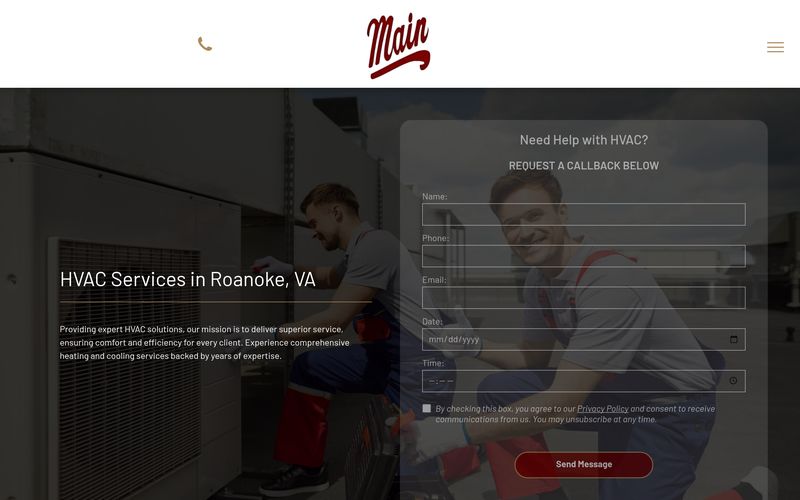
Phone number is huge above the fold. Booking widget is embedded inline. Service area page lists 47 city-specific URLs that all rank locally. Reviews pull live from Google. Loads in 1.4 seconds on 4G. This is the top of the market.
2. Family-owned HVAC, Webflow build (~$8K range)
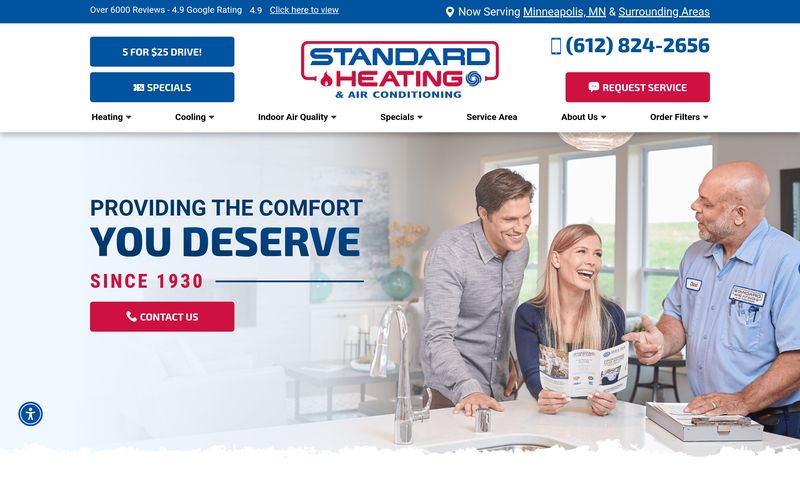
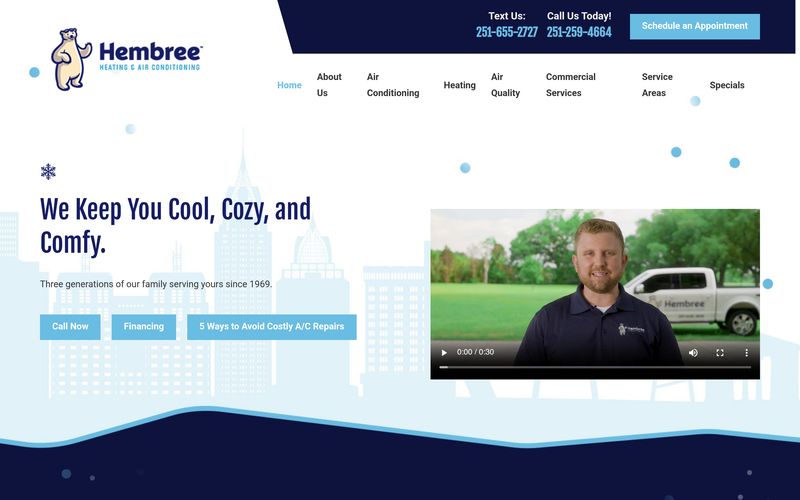
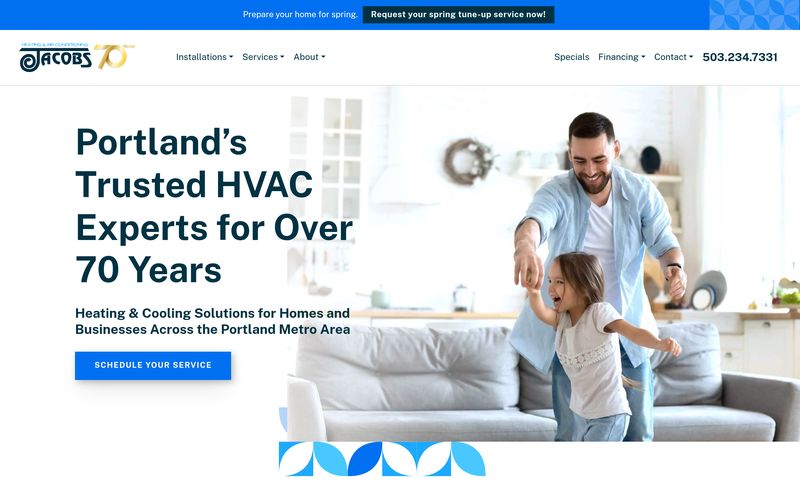
Tells a story above the fold ("Three generations serving the West Valley since 1978") and pairs it with two photos of grandfather + father + son in a service truck. Pricing transparent. Membership program clearly explained. Doesn't look enterprise, it looks like them. This is the sweet spot for most independents.
3. Commercial-only HVAC, lead-gen optimized (~$12K range)
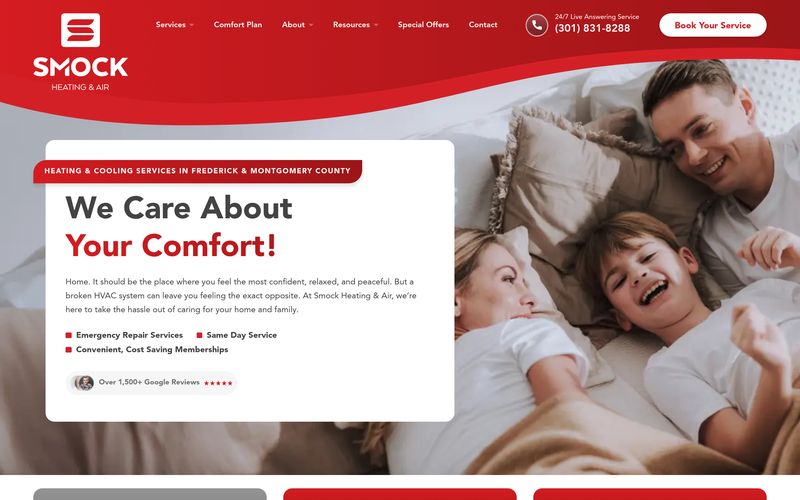
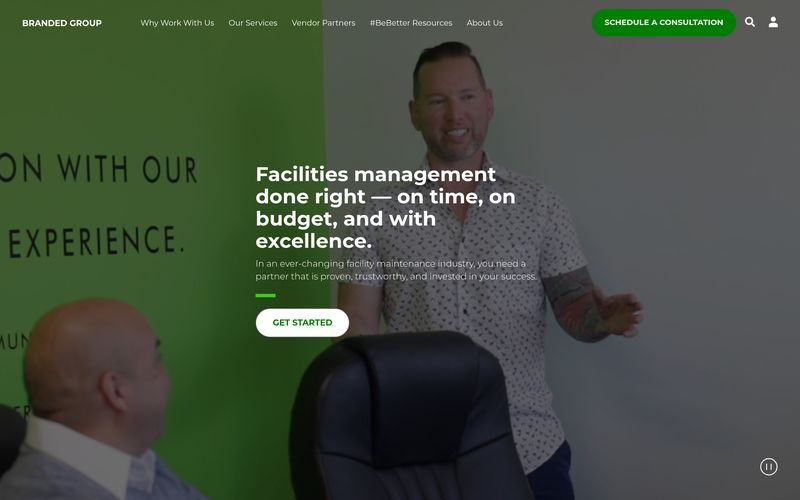
No homeowner CTAs at all, just commercial property managers and facilities directors. Case studies tied to specific property types (restaurants, schools, medical buildings). One conversion path: book a 15-min discovery call. Brutally focused.
4. Small two-truck HVAC, GoHighLevel quick-build (~$2K range)
Not pretty but converts. Top of page: "Call us. (612) 555-1234." Booking widget. List of services with prices. Five Google reviews. Map showing service area. Done. This is what a starter site should look like.
The "bland but functional" tier (4 examples)
5. Generic Wix template HVAC site
Looks like 10,000 other HVAC sites. Stock photos of HVAC units that are clearly not theirs. Phone number in tiny font in the top-right corner. Conversion rate is probably 1 to 2%. Could be lifted to 3 to 4% with one weekend of work.
6. Squarespace HVAC site with great photography
Beautiful. Owners spent money on a real photo shoot. But the booking flow takes 3 clicks to get to a phone number. They're losing the impatient buyer (which is most of their buyers). Photo investment was worth it; checkout flow needs surgery.
7. WordPress HVAC site by a local agency
Built in 2019. 8 plugins. Loads in 4.5 seconds. Phone number works. Service pages are thin. Schema is missing. Google shows them on page 2. Site needs a refresh, not a rebuild.
8. ServiceTitan-bundled website
Comes "free" with the FSM software. Looks like every other ServiceTitan-bundled website (because it is). Booking integration is excellent. Customization is limited. SEO is mediocre. Good if you're a ServiceTitan power user; mediocre if you want to differentiate.
The "expensive train wreck" tier (4 examples)
9. The $40K agency site that nobody can edit
Built on a custom CMS only the agency understands. To change the phone number you have to file a ticket and wait 5 business days. Owner is furious. Site looks impressive but conversion is terrible because they can't iterate.
10. The "we built it ourselves with AI" site
Three pages, beautiful copy that doesn't match the actual business. Hallucinated certifications. No phone number above the fold. Every CTA leads to a form. We've audited several of these and the conversion data is grim.
11. The Scorpion / Hibu / Townsquare "managed" site
Looks fine. Locked into a multi-year contract. Owner doesn't own the domain or the content. When the contract ends, they have to start from scratch. Costs $1,200 to $2,500 per month. Many alternatives exist that are 1/4 the cost and you actually own.
12. The "let's add live chat to fix conversion" site
Bad site + AI chatbot does not equal good site. Chat tools are a multiplier on a foundation that converts. They are not a fix for a foundation that doesn't.
The SkillMammoth HVAC website framework
When we build an HVAC website at SkillMammoth's HVAC & Mechanical practice, we use a 9-page architecture that's optimized for both Google and the homeowner who's panicking because their furnace died at 11 PM.
Page 1: Homepage
- Above the fold: company name, phone number (huge), one-line value prop, "Book Now" CTA, photo of real team or trucks
- Below the fold: services grid (6 to 8 services with icons), service area, reviews carousel, financing badge, recent jobs
- Bottom: emergency CTA, secondary phone number, business hours, certifications
Page 2: Service area (the SEO workhorse)
- One parent page + child pages for each city you serve (10 to 50 child pages)
- Each city page: same structure (intro, what we do here, local landmarks, customer reviews from that city, phone number)
- This is what beats Scorpion at SEO. They cookie-cutter; you go deep.
Page 3 to 7: Service pages (one per major service)
- AC repair, AC install, furnace repair, furnace install, indoor air quality, ductwork, etc.
- Each page: problem, cost, process, financing, CTA
- Real photos of that service, not stock
Page 8: About / team
- Team photos, certifications, ownership story, why-we-do-this
- Convert the prospect who's checking if you're a real human business
Page 9: Contact / book
- Phone number, embedded booking widget, service area map, hours, multiple contact methods
- This is the page Google sends "[your company] phone number" searches to, make it count
That's it. 9 pages, deep SEO from the city subpages, fast load, mobile-first, financing visible. We can spin this up in 4 to 6 weeks for most HVAC contractors.
Mobile vs desktop: it's mobile, it's all mobile
For HVAC sites we audit, 78 to 88% of traffic comes from mobile. The "broken AC at 95°" use case is almost entirely a phone-in-hand situation.
What this means in practice:
- Design mobile-first, then scale up, not the other way around
- Tap-to-call should be a one-tap action, never two
- Forms should be 3 fields max on mobile (name, phone, what's broken)
- Page speed on 4G should be under 3 seconds, ideally under 2
- Sticky bottom bar with "Call Now" button on every page
Almost every HVAC site we audit fails at least 3 of these. The fixes are usually under $500 in dev work and they pay back in the first week.
Local SEO essentials for HVAC websites in 2026
Ranking your HVAC site is 60% your Google Business Profile, 30% your website's local SEO, 10% backlinks. Most agencies obsess over the 10%. Get the 60+30 right and the leads come.
Google Business Profile checklist:
- Categories: HVAC contractor (primary), then air conditioning contractor, furnace repair service, heating contractor as secondaries
- Service area: every city you actually serve, listed
- Photos: 50+ photos minimum, refreshed weekly
- Posts: 1 to 2 per week (jobs, before/afters, tips, holidays)
- Reviews: get 1 per week minimum from real jobs, respond to every one
- Q&A: pre-seed 10 of the most common questions, answer them yourself
On-site local SEO checklist:
- City pages for every service area (not 1 page listing 30 cities, 30 pages, one per city)
- NAP (name/address/phone) consistent everywhere, schema marked
- Local schema (LocalBusiness, ServiceArea)
- Embedded Google Map with your actual service zone
- Customer testimonials with the city the customer is in
- Backlinks from local chamber, BBB, supply houses, ACCA chapter
Technical SEO checklist:
- Core Web Vitals all green (lighthouse 90+)
- HTTPS everywhere, no mixed content
- Sitemap + robots.txt clean
- Schema for: LocalBusiness, Service, Review, FAQ
- Image alt text on every image
- One H1 per page
If this list looks long, the free new-website checklist covers it in a printable format you can hand to whoever builds your site.
How much does an HVAC website cost in 2026?
Here's honest 2026 pricing across every realistic option, based on what we see in the wild and what we charge ourselves.
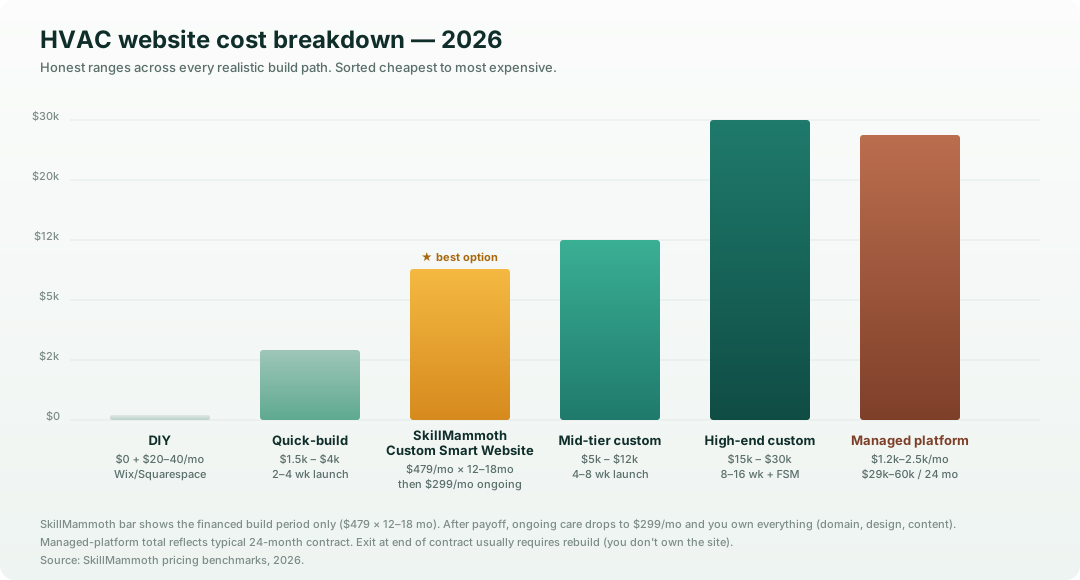
DIY ($0 setup + $20 to $40/mo software)
- Tools: Wix, Squarespace, GoDaddy Website Builder
- Time investment: 20 to 40 hours for a working site, 60+ for a good one
- Conversion potential: 1 to 2% of visits become leads
- Best for: Brand new businesses with zero budget who need something online this week
- Honest take: Almost always ends in regret. Get to $2K and skip this tier.
Quick-build agency or freelancer ($1,500 to $4,000)
- Tools: Webflow, GoHighLevel, WordPress with a starter theme
- Time to launch: 2 to 4 weeks
- Conversion potential: 2 to 4% if done well
- Best for: 1 to 3 truck operations
- Honest take: Big leap from DIY. Picks up most of the conversion gains.
Mid-tier custom build ($5,000 to $12,000)
- Tools: Webflow, Framer, WordPress with custom theme, or a focused agency
- Time to launch: 4 to 8 weeks
- Conversion potential: 4 to 7% with proper local SEO
- Best for: 4 to 15 truck operations, multi-location HVAC, anyone serious about lead gen
- Honest take: This is where most HVAC companies should land. Strong ROI, you own everything, you can iterate.
High-end custom build ($15,000 to $30,000)
- Tools: Custom code, headless CMS, integrations to ServiceTitan / FieldEdge / Housecall Pro
- Time to launch: 8 to 16 weeks
- Conversion potential: 5 to 10% with high-volume traffic
- Best for: 20+ truck operations, regional/multi-state HVAC, M&A roll-ups
- Honest take: Worth it when your monthly traffic is high enough that 2 percentage points of conversion lift pays back in a quarter.
SkillMammoth subscription, $500/mo for 24 months, then $350/mo
(Yes, this is us. We're putting it in the breakdown because pretending we don't have skin in this game would be silly, and because the model is genuinely different from anything else on this list.)
- What it is: A custom-built website (same conversion-quality as a mid-tier custom build) financed across 12 to 18 months, with hosting, maintenance, edits, and reporting bundled in. After the build is paid off, your monthly drops to $350/mo for ongoing care.
- Time to launch: 4 to 6 weeks
- Conversion potential: 4 to 7%, same as a mid-tier custom build, because it is a mid-tier custom build, just financed
- What's included at $500/mo: Custom design + build, hosting + maintenance + security, monthly performance reporting, 2 edit requests per month, quarterly strategy session. Local SEO and content add-ons available on upgraded plans.
- The ownership model: You can buy out the remaining balance at any time and walk with everything, domain, design, content, code. No lockout. No "start over" pain at the end of a contract. The opposite of the managed-platform model below.
- Best for: 3 to 15 truck HVAC operators who want a mid-tier-custom site without writing a $5K to $12K check up front, who want monthly edits handled instead of having to find a freelancer every time the phone number changes, and who refuse to rent their website forever
- Honest take: We built this model specifically because we got tired of watching HVAC contractors face a bad choice, drop $10K upfront for a great site you then have to babysit yourself, or rent forever from a managed platform that owns the asset. Subscription that converts to ownership is the third option, and at $500/mo it's roughly 1/3 the cost of Scorpion or Hibu over the same period.
Managed marketing platform ($1,200 to $2,500/mo, often 24-month contract)
- Tools: Scorpion, Hibu, Townsquare Interactive, Blue Corona
- Time to launch: 4 to 6 weeks
- Conversion potential: Variable, usually decent, occasionally great
- Best for: Operators who don't want to think about marketing at all
- Honest take: Predictable monthly cost, but you don't own the asset and exit is painful. Multi-year math usually favors a one-time custom build + a contractor for ongoing SEO.
Where most HVAC websites fail (and what to do about it)
After auditing dozens of sites, here are the recurring leaks:
| Failure mode | What's actually happening | Fix |
|---|---|---|
| Phone number not above the fold on mobile | Visitor leaves before scrolling | Move it. 30 minutes of dev work. |
| "Get a Quote" instead of "Book Now" | Quote forms convert 3 to 5x worse than booking calendars | Embed a booking calendar with available slots. |
| No service-area pages | Losing local SEO to competitors who have them | Build city pages, even if they're 400 words each. |
| Stock photos | Trust killer | Have techs upload 1 photo per job to a shared drive. Refresh weekly. |
| No financing copy | Losing $5K+ jobs at the quote stage | Add Synchrony / Wells Fargo financing copy to install pages. |
| Slow on mobile | 30%+ of mobile visitors leave at 3+ seconds | Compress images, lazy-load, kill unused plugins. |
| No reviews on-site | Trust signal missing | Embed Google reviews via NiceJob, Birdeye, or similar. |
| Generic "service area" | Vague signals to Google + visitors | List actual cities in plain text. |
A good free website audit (yes, ours, but also any halfway competent one) will surface these in 30 minutes.
Build vs buy vs DIY: which path is right for you
| Your situation | What we'd recommend |
|---|---|
| Brand new, $0 budget, need something by next week | DIY on Wix / Squarespace, plan to upgrade in 6 to 12 months |
| 1 to 3 trucks, want results without ongoing fees | Quick-build agency, $1.5K to $4K |
| 4 to 15 trucks, ready to scale, can fund $5K to $12K up front | Mid-tier custom build, $5K to $12K, this is most operators |
| 4 to 15 trucks, want the same quality as mid-tier custom but no upfront hit | SkillMammoth subscription, $500/mo for 24 mo, then $350/mo ongoing |
| 15+ trucks or multi-location | High-end custom build with FSM integration, $15K to $30K |
| Want to outsource thinking entirely, willing to pay $30K+ over 24 months | Scorpion / Hibu / Blue Corona, eyes open |
The middle of that table is where SkillMammoth lives. We've seen the platform-locked alternatives and we've seen the DIY traps, and the honest math for most HVAC operators puts the sweet spot at either a one-time mid-tier custom build (if you have the cash) or our $500/mo subscription model (if you'd rather spread the cost and have edits handled). Both convert. The other tiers convert less, cost more, or both.
Your next step
If you want to take a hard look at what your current HVAC website is doing well and where it's leaking leads, two free things you can grab right now:
- Free website audit, we'll send back a 10-minute Loom + a written report within 48 hours
- Free new website checklist, printable PDF covering the 47 things every HVAC website needs before launch
Or if you've already decided you want a redesign and want to talk specifics, book a 30-minute strategy call, we'll quote your project on the call, no follow-up sales sequence.
FAQ
How long does it take to build an HVAC website?
For a custom-built mid-tier site: 4 to 8 weeks from kickoff to launch. The variables are how fast we can get content + photos from your team and how many revision cycles we go through. Quick-build sites can launch in 2 to 3 weeks. Enterprise builds with FSM integration take 8 to 16 weeks.
Should HVAC contractors use Wix or WordPress or Webflow?
Honest answer: Webflow for most HVAC operators in 2026. WordPress is fine if you have a developer relationship; Wix is fine if you're literally just starting. Webflow's combination of visual editor + clean code + native CMS + speed is hard to beat for service businesses.
Do I need separate pages for each service?
Yes. Every service you sell, AC repair, AC install, furnace repair, furnace install, IAQ, ductwork, mini-splits, heat pumps, maintenance plans, etc., needs its own page. Google ranks pages, not websites. One "Services" page that lists everything will not rank for any of the individual services.
How many city pages do I need for local SEO?
One per city you actually service. If you serve 8 cities, build 8 city pages. If you serve 47, build 47. Each one needs unique content (not duplicated), even if it's just the city name + local landmarks + customer testimonials from that city. This is the single biggest local SEO lever for HVAC.
What do HVAC web design services cost?
HVAC web design services run $1,500 to $4,000 for a quick template build, $5,000 to $12,000 for a mid-tier custom build, and $15,000 or more for high-end work with FSM integration. A real service should include mobile-first design, local SEO structure, and conversion tooling like instant estimates and missed-call text back, not just pages. Our own builds run $1,000 to $8,000 with monthly financing available.
What's the ROI on a new HVAC website?
For a $5K to $12K custom build with proper local SEO, most HVAC operators we work with see payback in 3 to 6 months from a combination of higher organic traffic, higher conversion rate, and reduced ad spend. Beyond that the asset compounds, every month of organic traffic is essentially free leads.
Can I just use AI to build my HVAC website in 2026?
You can, and the result will be better than anything from 2023, but it still doesn't replace someone who understands HVAC marketing. AI is great for first drafts of copy, alt text, and meta descriptions. It's not yet great at choosing which 6 services to lead with, where to put the financing CTA, or how to structure a 30-page service area silo. Use AI to accelerate, not to replace.
How often should I update my HVAC website?
Content refreshes monthly minimum (new reviews, new photos, new blog posts), structural updates every 12 to 18 months, full redesign every 4 to 5 years. Sites that go more than 5 years without a refresh almost always need a full rebuild because the underlying tech is too far behind.
Do I need a separate mobile site?
No. Use a responsive design that works perfectly on mobile, tablet, and desktop. Separate "m.yourcompany.com" mobile sites are a 2012 pattern and bad for SEO.
What about an AI chatbot or live chat?
Useful as a layer on top of an already-converting site. Not a fix for a site that's not converting. Start with the foundation. Add chat in v2.
Last updated: May 2026. Author: Alex Storey, Co-Founder at SkillMammoth. SkillMammoth builds custom websites, local SEO systems, and lead-generation automations for HVAC and mechanical contractors. See our HVAC & mechanical practice page for more, or if you run an adjacent trade, our electrician website design deep dive covers the same architecture tuned to electrical buyers.
Related reading: HVAC SEO: the 2026 playbook for ranking your HVAC company covers the full local pack, review velocity, city page, and AI search visibility stack that sits on top of a well-built HVAC website.
Related reading: pair a fast site with the HVAC SEO playbook so the traffic actually shows up.
Want to implement these strategies?
Book a free strategy call and learn how we can help grow your contractor business.
Book a Free Strategy Call