 ChatGPT
TL;DR
- OpenAI launched Businesses in ChatGPT in beta on November 10, 2026. You claim and edit a listing in Business Hub.
- A local business can claim only an existing U.S. listing. Adding a new one is described for eligible online businesses only.
- Expect two approvals: a claim check by phone, email, website domain or Shopify, then a Persona identity check.
- Insights cover 28 days of mentions, website clicks and discovery topics. A blank number does not mean zero.
- Claiming "does not guarantee higher placement or sales," in OpenAI's words.
- Skip Business Agents for now. They cannot book a job.
If you run a plumbing, roofing, HVAC or electrical company, you have probably heard you can now claim your business in ChatGPT. For some contractors that is true today. For others the listing does not exist yet, and OpenAI's pages describe no way for a local business to add one.
We wrote this on November 11, 2026 from four OpenAI pages: the announcement, the help article, the product page and the terms. The feature is a beta, an early release that can change. We have not run the claim flow ourselves, and a first-hand walkthrough will be added later.
Business Hub is where you claim, edit and measure your listing
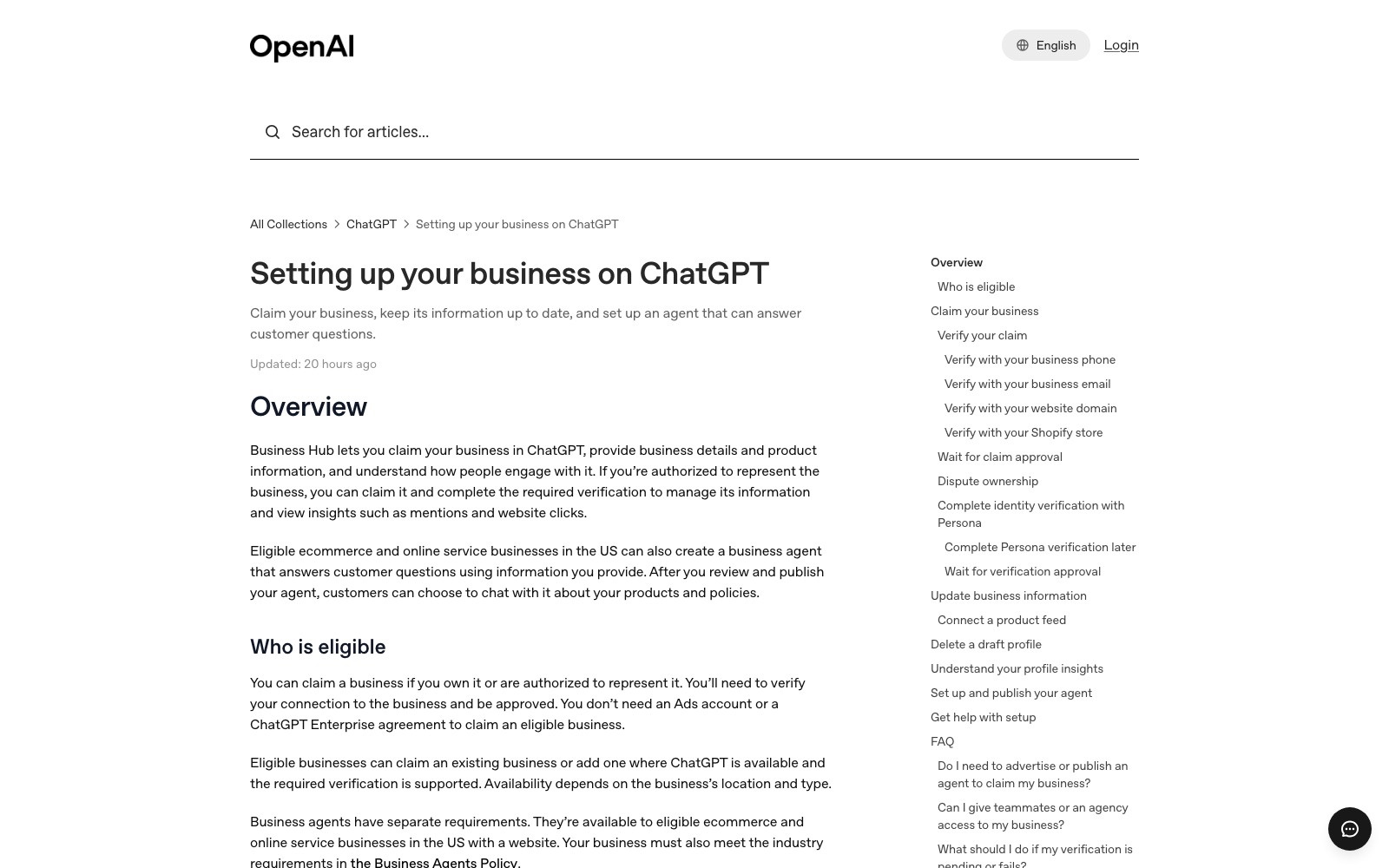
Businesses in ChatGPT is the program. Business Hub is the screen inside ChatGPT where you claim your business, manage its information and see insights. When a business appears in an answer, people can click to see its ChatGPT profile. That profile is what you are claiming.
The reason to care is reach. OpenAI's announcement counts "1.2 billion people who use ChatGPT each week."
A contractor can claim today only if a U.S. listing already exists
OpenAI's eligibility wording is narrower than the headlines. For an owner who cannot find the business, the help article says: "If you run an eligible online business, you may see an option to add it. Local stores and restaurants can currently claim only an existing U.S. listing."
| What you want to do | Local stores and restaurants | Eligible online business |
|---|---|---|
| Claim an existing listing | Yes, an existing U.S. listing | Yes |
| Add a business that is not listed | No, claim only | "May see an option to add it" |
| Edit details and see insights | After claim and Persona approval | |
| Publish a Business Agent | Not named as eligible | Eligible U.S. ecommerce and online services |
| Verdict | Search for your listing first. Everything else depends on it. | |
The column names are OpenAI's. Its pages never mention plumbers, roofers or any business that travels to the customer. Our reading is that a trade company sits on the local side of that line, so the rule is claim only. OpenAI has not spelled that out.
Three more conditions apply:
- You must own the business or be authorized to represent it.
- The product page says claiming is "initially available to eligible businesses with a website."
- Eligibility also depends on industry and location. Those rules sit in a separate Businesses in ChatGPT policy, outside the four pages behind this guide.
On cost, you do not need "an Ads account or a ChatGPT Enterprise agreement" to claim. None of the four pages lists a price, says claiming is free or says which ChatGPT plan you need.
How to claim your business in ChatGPT, step by step
These steps follow OpenAI's help article. We have not run them, so expect small differences during the beta.
- Open Business Hub. Sign in to ChatGPT and open Business Hub from the sidebar.
- Find your listing. Search for your business by name and select the listing that matches.
- Confirm the account. Confirm the ChatGPT account that will manage the listing. The admin who claims the business is the one who can add teammates or an agency later.
- Verify the claim. Choose one of the methods shown and follow the prompts.
- Wait for claim approval. OpenAI emails you a decision or a request for more information.
- Complete the Persona identity check. Select Verify with Persona and submit what it asks for.
- Wait again, then edit. OpenAI emails the Persona decision. "Review time varies," the help article says. Once approved, update your details and open Insights.
If OpenAI emailed you a claim invitation, open the personal link and sign in with the address that received it. Do not forward that invitation to give someone else access.
Four verification methods, and you only get the ones OpenAI shows you
The help article says to use a method "offered for your business," so you may not see all four.
| Method | What you do | Have ready |
|---|---|---|
| Business phone | Get a code by text message or automated call | The phone at the number shown |
| Business email | Get a code by email | The inbox associated with your business |
| Website domain | Add a TXT record to your DNS settings | Access to your domain account |
| Shopify store | Connect and log in to Shopify | The Shopify store for the business |
Codes go to the number shown or to the email address associated with your business. OpenAI's pages do not say where those details come from, or what to do if they are out of date.
The domain method uses a TXT record, a line of text added to your domain's DNS settings (where your web address is managed). Copy it exactly. If someone else manages your domain, ask them to add it and allow time for the change to appear.
No website to verify with yet?
Skill Mammoth builds contractor websites for $3,000, or $150 a month for 24 months, and runs marketing on plans from $350 a month.
The Persona identity check is what switches the profile on
An approved claim only gets you into Business Hub. You must complete identity verification with Persona, the identity check service OpenAI names, before you can publish changes to your business information, view insights or create a business agent.
OpenAI says you may need a government-issued ID, business registration information and proof that you are authorized to represent the business. The name, address and any registration or tax number should match your official business records.
OpenAI's pages disagree about the blue check. The product page says it appears "to show it's been claimed." The help article says claiming alone does not earn the badge, which appears "after your Persona verification is approved." Plan on finishing Persona.
What you can edit, and what the insights count
After both approvals, the help article lists what you can update:
- Website
- Business description
- Product or service category
- Logo
- Delivery policy and return policy
- A cover photo and "other optional details"
That list does not name a phone number, hours or a service area, the fields a contractor cares about most. They may sit under the optional details. OpenAI's pages do not say.
OpenAI reviews and publishes changes, and says ChatGPT "may also use other sources" when it answers questions about your business.
Insights show totals for the past 28 days:
- Mentions. For a local business, a mention counts when ChatGPT shows a result for that location, even if the customer does not open the listing.
- Website clicks. How often people click through to your website.
- Discovery topics. Common themes in answers that mentioned or cited your business.
You will not see what any customer typed. Insights are "only available when there are enough conversations or interactions to meet certain thresholds," and OpenAI does not publish the number. A blank metric "doesn't necessarily mean zero activity."
Claiming does not move you up in ChatGPT's answers
OpenAI says so on three pages. The product page: "ChatGPT continues to make independent recommendations and comparisons. Claiming does not guarantee higher placement or sales."
The help article adds that claiming "doesn't guarantee increased visibility," and that advertising does not influence ChatGPT's independent answers. The terms promise no "particular placement, ranking, visibility or level of distribution."
So treat a claimed profile as a way to keep your facts right. Becoming the company ChatGPT names when a homeowner asks for a roofer is separate, slower work. We cover it in how to get ChatGPT to recommend your business.
Skip Business Agents for now
A Business Agent is a chat assistant that answers customer questions from your profile, using information you provide. A trade business can skip it today, for three reasons:
- You are probably not eligible. Agents are for "eligible ecommerce and online service businesses in the US with a website." OpenAI does not define an online service business on these pages.
- It cannot book a job. An agent cannot complete purchases, make bookings or check a customer's order.
- It is optional. You can manage your information and use insights without an agent or ads.
OpenAI says it plans to expand agents "to more markets and business categories." Look again when it names home services.
Five things in the fine print an owner should read first
The Businesses in ChatGPT Terms were last updated November 9, 2026. This is a plain-words summary, so read the terms yourself and take legal questions to your own lawyer.
- The listing exists either way. OpenAI may create and display one whether or not you claim it, manage it or stop managing it.
- You do not get exclusive control. OpenAI may edit or replace your information using other sources.
- OpenAI's assistant may phone you. "By using Business Hub, you agree OpenAI's AI assistant may make calls to you on behalf of our users." The terms link an opt-out.
- Basic details stay licensed. For details you submit for public display, such as name, address and hours, the display license is "perpetual and irrevocable."
- A published profile is hard to remove. The help article says Support cannot delete, unpublish or hide one as part of a setup or ownership request.
If your listing is missing, locked or already claimed
OpenAI's pages do not say where local listings come from or how a local business gets one created. Search again under your legal name and the name on your trucks, which is our suggestion and not OpenAI's. Then contact OpenAI Support.
If you see Contact support, the listing is locked. Select it to request help with access. Franchise locations may hit this: for brands using a managed claim process, location profiles "remain locked by default."
If someone else has claimed your business, open its profile, select the more options menu and choose Dispute ownership. You then verify with Persona that you are authorized to represent the business. Claiming the main brand does not claim its locations.
What to fix first so ChatGPT has something accurate to show
Fix these first, in this order:
- Your website. Claiming is initially for businesses that have one. Put your exact name, address, phone and services on it. Our contractor website design guide covers the rest.
- A phone and an email you can reach. Verification codes go there, so make sure they reach you and not a former employee.
- Your official records. Know exactly how your name, address and registration details read before Persona asks.
- Every other place your details appear. ChatGPT may use other sources, so a correct profile next to wrong details elsewhere does not guarantee a correct answer.
That last item is ordinary local search work. Start with AI search for local business, then GEO vs SEO. To track what ChatGPT says about you over time, see AI search visibility tools.
Want the website and listings cleaned up before you claim?
Skill Mammoth, founded in 2023, builds websites and runs marketing for contractors and home service businesses, with plans from $350 a month.
Frequently asked questions
Can a plumber, roofer or HVAC company claim its business in ChatGPT?
Possibly, if a U.S. listing for the company already exists in Business Hub. OpenAI's help article says local stores and restaurants "can currently claim only an existing U.S. listing." OpenAI's pages do not mention contractors by name, so search for your listing to find out.
How much does it cost to claim your business in ChatGPT?
OpenAI's pages do not list a price for claiming a business, and they do not state that it is free. The help article says you do not need an Ads account or a ChatGPT Enterprise agreement to claim. This was accurate on November 11, 2026.
Will claiming my business make ChatGPT recommend it more often?
No. OpenAI's product page says "Claiming does not guarantee higher placement or sales," and that ChatGPT continues to make independent recommendations and comparisons. Claiming lets you manage the information you provide. Earning recommendations is separate work on your website, reviews and listings.
What if my business is not listed in ChatGPT?
OpenAI's help article says an eligible online business "may see an option to add it," while local stores and restaurants can currently claim only an existing U.S. listing. Its pages do not explain how a local listing gets created. Search under your legal name, then contact OpenAI Support.
Do contractors need a ChatGPT Business Agent?
Not today. Business Agents are available to eligible ecommerce and online service businesses in the US, and an agent cannot complete purchases, make bookings or check a customer's order. Claiming and publishing an agent are separate, so a contractor can claim the listing and skip the agent.