TL;DR
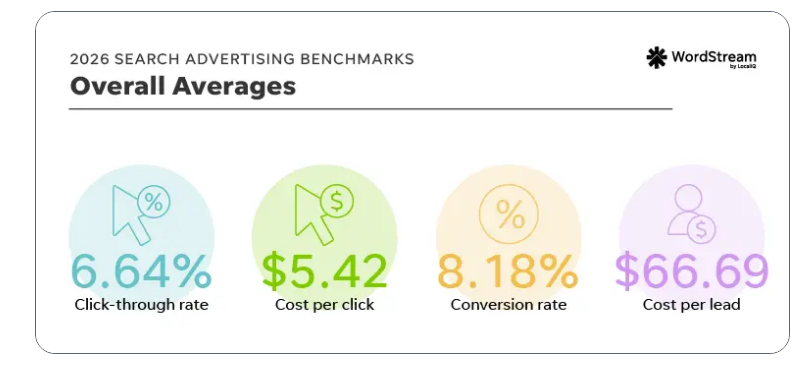
Google Ads for a small business is one Search campaign, a 15-mile radius, 20 to 40 phrase and exact match keywords, a 200-term negative list, call and form conversion tracking, and $1,000 to $1,500 a month for 90 days before you judge it. That is the whole setup, and it is the opposite of what Google's own onboarding pushes, which is Performance Max, broad match, auto-applied recommendations and a chat with a sales rep. The 2026 benchmarks say the average small-business search campaign pays $5.42 a click and $66.69 a lead, and home services pay $8.33 and $90.92. The three decisions that move your numbers are the landing page (which sets conversion rate), the negative keyword list (which sets wasted spend), and the five-minute call-back (which sets whether the lead becomes a customer). Google's sign-up credit of $500 to $1,500 is real; take it after the landing page is ready, not before.
Disclosure: Skill Mammoth manages Google Ads for contractors and local service businesses at a flat $600 a month or 12 percent of spend. This is the setup we run, written so you can run it yourself at $1,000 a month and hire it out when the budget passes $3,000. Every price here is from Google's pages on October 6, 2026 or the 2026 WordStream benchmarks; the full cost picture by industry and by search term is in how much Google Ads costs.
Decide whether Search is the right Google ad first
Google sells four things to a small business and only two of them are usually worth buying. Local Services Ads charge per lead, carry the Google Guaranteed badge and sit above everything else; for licensed home-service trades they are the first dollar, at $20 to $80 a lead, and the process is in Google Guaranteed for contractors. Search campaigns charge per click on the searches you choose and are what this post sets up. Performance Max spends across Search, YouTube, Display, Gmail and Maps using Google's AI, and Google's page recommends it first; for a local business with no conversion history it is the fastest way to turn $1,000 into form spam. Display and video are for brands with budgets to burn on awareness.
If you are in a trade LSAs cover, run them first and add Search when LSAs cap out or when you need the installation and replacement searches where people read before they call. If you are not (most retail, professional services, medical, restaurants), Search is the starting point.
The setup, in order
- Pick one goal and one conversion. Phone calls over 60 seconds for service businesses, a booked appointment or quote form for everything else. Import the call conversion from Google's call tracking or your CRM, and the form conversion from Google Tag Manager. If you cannot measure it, do not pay for it; attribution setup is in marketing attribution for home service contractors.
- One Search campaign, Search network only. Untick the Display Network and Search Partners boxes Google ticks by default. Set location to the cities or a radius you actually serve, with "presence" targeting rather than "presence or interest," which otherwise shows your plumbing ad to people in another state reading about your city.
- Twenty to forty keywords in three to five ad groups. Group by service, not by word: "water heater replacement" and "water heater installation" together, "drain cleaning" and "clogged drain" together. Use phrase and exact match only. Google will warn you that broad match "reaches more customers"; it also reaches the ones searching for jobs, schools and DIY videos.
- A negative keyword list before the first dollar. Two hundred terms: jobs, salary, school, training, free, DIY, how to, parts, manual, the names of national brands you do not sell, and every neighboring city you do not serve. Review the search terms report weekly for the first month and add to it.
- Ads that say the price, the proof and the next step. Fifteen headlines and four descriptions per ad group, with the service, the city, a number (years, reviews, a starting price) and a reason to act now. Add the call asset, the location asset tied to your Google Business Profile, four sitelinks and the structured snippets. Ads with the full asset set routinely outperform bare ones on click-through rate.
- A landing page per ad group, not the homepage. One service, one city, a phone number in the header that is tappable, a short form above the fold, three reviews with names, a license number and a photo of a real person. This page sets your conversion rate, and the conversion rate sets your cost per lead. A 4 percent page pays twice what an 8 percent page pays for the same lead.
- Budget and bidding. $33 to $50 a day for the first 90 days ($1,000 to $1,500 a month). Start on Maximize Clicks with a bid cap at roughly 70 percent of the planner's top-of-page estimate, then move to Maximize Conversions once the campaign has 30 conversions in 30 days. Target CPA comes after that, not before.
- The five-minute call-back. Harvard Business Review's audit of 2,241 companies found the average first response to a web lead took 42 hours. A text inside 60 seconds and a call inside five minutes roughly doubles the share of leads that book. The system is in contractor lead follow-up system, and it works for a dental office as well as a roofer.
Want the setup checked before the budget turns on?
Send us the campaign and the landing page. We will tell you what Google turned on behind your back and what will waste the first month.
What Google will try to change, and what to say
| Google's suggestion | Where it appears | What to do |
|---|---|---|
| "Switch to Performance Max" | Campaign creation, Recommendations tab | Decline until the Search campaign has 90 days of conversion data |
| Broad match keywords | Keyword setup, Recommendations | Keep phrase and exact; revisit at 100 conversions |
| Auto-apply recommendations | Settings, on by default | Turn off every category |
| Display Network expansion | Campaign settings checkbox | Untick |
| "Chat with Google Ads" and the onboarding call | Every page | The rep is paid on activation and spend, not on your leads. Take the credit, skip the call |
| Raise your budget to "unlock" more conversions | Recommendations, weekly email | Only after cost per lead is under 15 percent of your average ticket |
| Verdict | Every default in a new Google Ads account favors Google's revenue over your cost per lead. Build the campaign with the defaults off, and read the Recommendations tab as a list of things to decline. | |
The 90-day review
Judge the campaign at day 30 on waste (what share of spend went to search terms you would not pay for again), at day 60 on cost per lead, and at day 90 on cost per customer. Benchmarks to hold it against: $66.69 a lead across industries, $90.92 in home services, under 15 percent of your average ticket in any trade. If waste is above 20 percent at day 30, the negative list is the problem. If cost per lead is fine and cost per customer is not, the follow-up is the problem. If clicks are fine and leads are not, the landing page is the problem, and that is where the next $1,000 goes, not into the budget. When the campaign passes $3,000 a month and all three numbers are healthy, that is the point where hiring management pays for itself; below that, the fee eats the margin.
Three things to skip
Smart campaigns and the "Express" setup. The simplified flow Google offers new advertisers hides the keywords, the search terms report and the negative list. You cannot fix what you cannot see.
Buying your own brand name on day one. If nobody is bidding on your business name, you already rank first for it. Add a branded campaign only when a competitor starts bidding on you, and keep it at $2 to $5 a day.
Running ads to a site with under ten reviews. The ad gets the click and the review count loses the call. Thirty Google reviews is the floor where paid clicks start converting at the rates above; the fastest route there is in how to get 100 Google reviews. If paid search is the wrong first channel for your business, how to get contractor leads ranks the rest by cost per booked job.
Rather have it built and watched for you?
Flat $600 a month or 12 percent of spend, no contract, weekly search-term pruning and a monthly cost-per-customer report. We also say no when the site is not ready.
Frequently asked questions
How much should a small business spend on Google Ads?
$1,000 to $1,500 a month in clicks for the first 90 days is the floor where a local Search campaign produces enough data to judge. At the 2026 home-services averages of $8.33 a click and 8 percent conversion that buys 10 to 15 leads a month; emergency trades with $40 to $80 clicks should budget $1,500 or more and run Local Services Ads first.
Is Google Ads worth it for a small business?
Yes when cost per lead times close rate lands under 15 percent of the average ticket, which is most service businesses with a converting landing page and a fast call-back. No when the website has under ten reviews, no tappable phone number and no one answering within five minutes, because the ad buys clicks that never become customers.
Should a small business use Performance Max or Search?
Search first. Performance Max spends across YouTube, Display, Gmail and Maps using Google's AI and needs conversion history to aim at; without it, a local business mostly buys form spam. Run a Search campaign for 90 days with real conversion tracking, then test Performance Max with a separate budget if you want to.
How do I keep Google Ads from wasting money?
Phrase and exact match only, a 200-term negative keyword list before launch, Display Network and Search Partners unticked, auto-apply recommendations off, presence-only location targeting, and a weekly search terms review for the first month. Those six settings typically cut wasted spend from 30 to 40 percent of budget to under 10.
Does Google Ads give new businesses free credit?
Yes. As of October 6, 2026 Google offers $500 in credit after you spend $500 in the first 60 days, $1,000 after $1,500, or $1,500 after $3,000. It applies at billing setup on a new account. Claim it once the landing page converts, because the credit buys clicks, not customers.
Should I run Google Ads myself or hire an agency?
Run it yourself below $1,500 a month; a $600 management fee is 40 percent of that budget. Hire it out above $3,000 a month, where negative keyword pruning, bid control and conversion cleanup usually recover more than the fee. Between the two, a one-time setup review is the better buy than ongoing management.