TL;DR
"Integrates with QuickBooks" covers four very different things, from a one-way invoice push to a real-time two-way sync of customers, invoices and payments. Only the deep end saves you double entry. Method CRM ($35 to $97 per user) is the deepest and the only one on this page supporting QuickBooks Desktop and Online natively. Pipeline CRM ($25 to $49 per user annual) is the cheaper two-way option for Online. If you run trucks, Jobber or Housecall Pro already include a QuickBooks Online sync and you should not buy a second system. The thing to settle first is Desktop: Intuit stopped selling new Desktop Pro Plus, Premier Plus and Mac Plus subscriptions in the US on September 30, 2024, which quietly narrows your options to a handful of vendors.
Every roundup of QuickBooks CRMs lists the same dozen products and tells you they all integrate. That word is doing an enormous amount of work. One of those products writes an invoice into QuickBooks and forgets about it. Another keeps a customer record identical in both systems within seconds of an edit in either one. Both are described on the vendor's page with the same sentence, and the gap between them is several hours of admin a week.
Here is how to tell them apart before you pay for one.
The four depths of "QuickBooks integration"
| Depth | What it does | What you still retype | Typical examples |
|---|---|---|---|
| 1. One-way push | Sends finished invoices into QuickBooks | Customers, payments, any edit made in QuickBooks | Most sales CRMs via Zapier |
| 2. One-way pull | Imports your QuickBooks customer list | Everything after the import | Marketing tools, list builders |
| 3. Scheduled two-way | Reconciles both systems on a timer, often nightly | Nothing, but you live with a lag | Jobber, Housecall Pro, Kickserv |
| 4. Real-time two-way | Customers, invoices, estimates and payments match within seconds, edited from either side | Nothing | Method CRM, Pipeline CRM |
| Verdict | Depths 1 and 2 are a convenience. Depth 3 is enough for most contractors. Pay for depth 4 only when office staff work inside the CRM all day and need the ledger to be current. | ||
Settle the Desktop question first
This decides more than the feature comparison does. On September 30, 2024, Intuit stopped selling new subscriptions to QuickBooks Desktop Pro Plus, Premier Plus, Mac Plus and Desktop Enhanced Payroll in the United States. Intuit's own announcement is clear that "existing subscribers are not impacted by this change" and can keep renewing, with security updates, product updates and support continuing. QuickBooks Enterprise is unaffected, and new Enterprise customers can still buy it.
What that means for a CRM purchase is simple. The pool of tools with native Desktop support was already small, and it has not grown since, because no vendor is building a new connector for a product Intuit will not sell to new customers. If you are on Desktop and staying there, your shortlist is short. If you are moving to QuickBooks Online in the next year anyway, buy for where you are going.
Pro tip
Before you shortlist anything, open QuickBooks and count your duplicate customers. Most contractors have "Smith, John", "John Smith" and "Smith Residence" as three separate records. A two-way sync will faithfully copy all three into your new CRM and then keep them in sync forever. Clean the list first or you are paying to automate a mess.
Method CRM, the deep end
Method is the one that shows up on Intuit's own app store with the strongest numbers, holding a 4.7 out of 5 rating across roughly 1,600 five-star reviews, and it describes itself as recommended by Intuit. Its pitch is a patented sync engine that keeps customers, invoices, payments and estimates matched between Method and QuickBooks, and it supports both QuickBooks Online and QuickBooks Desktop.
Pricing runs $35 per user per month on CRM Quick Start, $59 on CRM Pro and $97 on CRM Enterprise, with 10 percent off for annual billing and a multi-entity tier that is quote-only. There is usually a promotion running at 25 percent off for three months on three or more users.
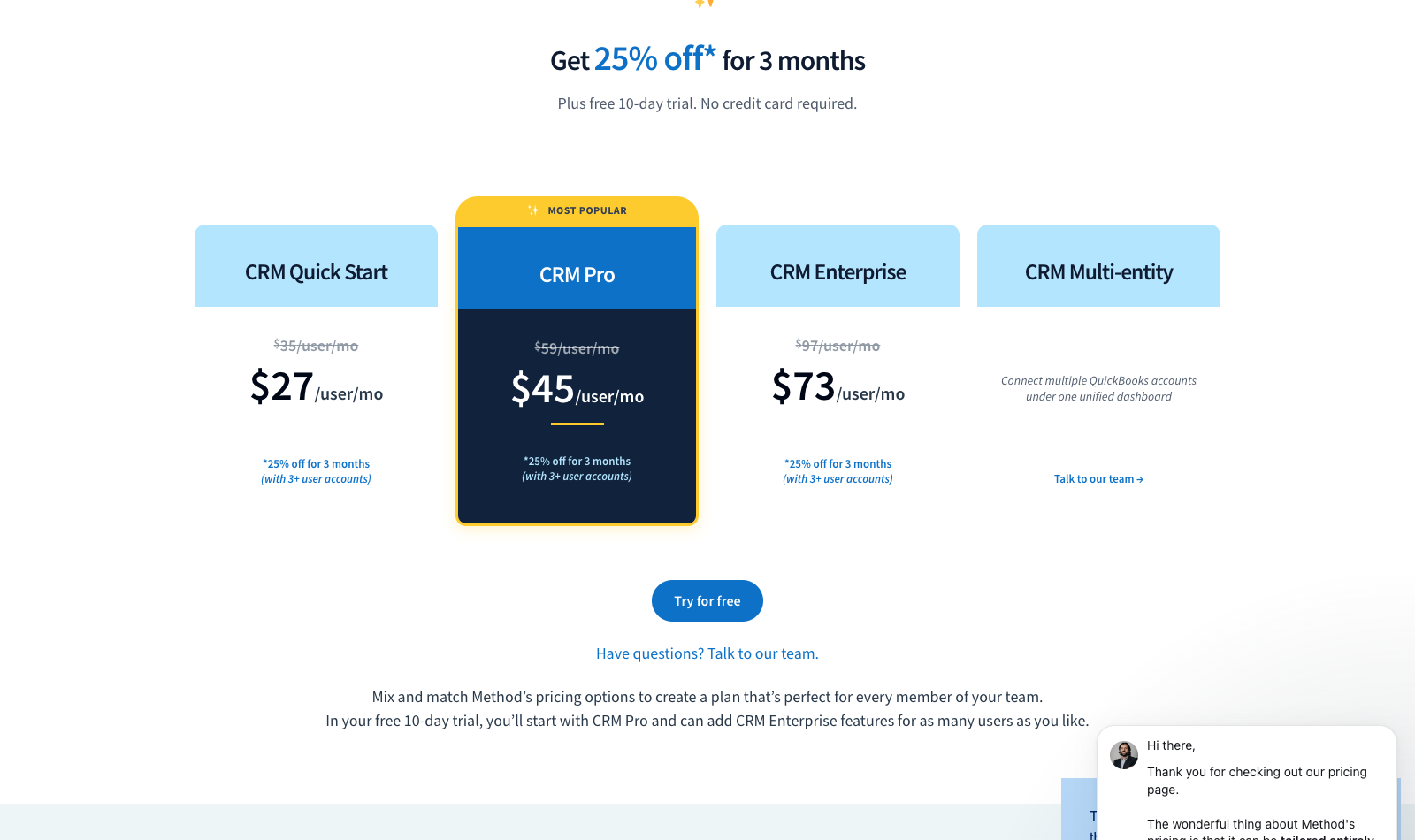
Where Method earns the premium is an office with two or more admin staff who live in the CRM. Where it does not is a two-person shop where the owner does the invoicing on a Sunday. At $59 a user for Pro, a three-seat office is $177 a month before you have scheduled a single job.
Pipeline CRM, two-way for less
Pipeline CRM advertises a two-way QuickBooks sync and costs considerably less: $25, $33 and $49 per user per month on annual billing, or $29, $39 and $59 monthly. It is a sales CRM at heart, so the deal pipeline is the centre of the product and the accounting connection hangs off it.
That shape suits commercial work where the sale takes months and the install takes days. It suits a service plumber much less, because there is no dispatch board underneath it.
Tired of typing the same customer into two systems?
We build custom dashboards that sit on top of the tools you already pay for, so the data lives in one place. Tell us what you are retyping.
If you run trucks, you probably already own this
Jobber, Housecall Pro and Kickserv all include a QuickBooks Online sync in the platform you are already paying for. Jobber runs $29, $99 and $149 a month on annual billing for a single user. Housecall Pro starts at $59 annual and bundles five users at $149. Kickserv covers five users at $60 and offers a QuickBooks Desktop connection as a $50 a month add-on, which is one of the few remaining routes to Desktop.
Buying Method or Pipeline on top of one of these is how contractors end up with two customer databases that disagree. If your complaint is that Jobber's sync runs on a schedule rather than instantly, that is a real complaint, and it is worth a lot less than $177 a month to most shops. Our guide to contractor CRM categories covers which platform shape fits which business, and the Jobber pricing breakdown has the tier detail.
Disclosure: Skill Mammoth is an official Jobber partner and readers get 20 percent off through us. No arrangement exists with any other vendor named here.
What actually breaks
Vendors demo the happy path. These are the four failures that show up in month two, in the order we see them.
Duplicate customers. Covered above, and it is the single most common reason a sync gets switched off within 60 days.
Item and service mapping. QuickBooks wants every line on an invoice mapped to a product or service item tied to an income account. CRMs let you type free text. If the mapping is not set up deliberately, everything lands in one catch-all income account and your P&L stops telling you which trade makes money.
Sales tax. Tax logic differs between the two systems more often than any vendor admits, particularly for contractors working across jurisdictions. Test with three real invoices from different towns before you trust it.
Payment application. A deposit taken in the CRM and a payment recorded in QuickBooks can both post, leaving the customer credited twice. Check the deposit workflow specifically, because it is where the money errors live.
Three to skip
Zapier as your accounting integration. It is excellent for notifications and terrible as a ledger connector, because it fires on events and has no concept of reconciling a record that changed on the other side. Use it to post a Slack message when a deal closes, not to keep your customer list honest.
Any CRM that calls QuickBooks an "integration" on the pricing page but documents it nowhere. Open the vendor's help centre and search for QuickBooks before you buy. If the only result is a marketing page, the integration is depth 1.
Building the sync yourself. QuickBooks has a capable API and a long history of breaking custom connectors on version changes. We build custom systems for a living and we still route accounting through a maintained connector wherever one exists.
Want the sync set up properly the first time?
Duplicate customers and unmapped items are what kill these projects in month two. We will clean the list and map the accounts before anything starts syncing.
If the tool you need is a dispatch board rather than a CRM, the field service software with QuickBooks sync comparison shows which plan tier on each platform actually includes the sync.
Frequently asked questions
What is the best CRM that integrates with QuickBooks?
For depth of sync, Method CRM, because it supports both QuickBooks Online and Desktop and keeps customers, invoices, estimates and payments matched in real time from $35 per user per month. For a contractor who dispatches technicians, Jobber or Housecall Pro is the better answer, since both include a QuickBooks Online sync inside a platform that also runs your schedule.
Does QuickBooks have its own CRM?
No. QuickBooks includes customer records, estimates and invoicing, which covers some CRM ground, but it has no lead pipeline, no follow-up automation and no scheduling. Intuit's approach is to let third-party CRMs connect through the QuickBooks App Store rather than build one.
Can a CRM still sync with QuickBooks Desktop?
Yes, but the list is short. Method CRM supports Desktop natively and Kickserv offers a Desktop connection as a $50 per month add-on. Intuit stopped selling new US subscriptions to Desktop Pro Plus, Premier Plus and Mac Plus on September 30, 2024, so few vendors are investing in new Desktop connectors. QuickBooks Enterprise is a separate product and is unaffected by that change.
What does two-way sync actually mean?
An edit made in either system appears in the other without anyone retyping it. Change a customer's phone number in QuickBooks and it updates in the CRM; mark an invoice paid in the CRM and QuickBooks reflects it. One-way integrations only travel in a single direction, which means the second system starts drifting out of date the moment anyone edits the first.
How much should a QuickBooks CRM integration cost?
If you already pay for a field service platform, nothing extra. A dedicated two-way CRM runs $25 to $97 per user per month depending on depth, so a three-person office lands between $75 and $291 monthly. Anything quoting a four-figure setup fee for a connector is selling implementation services, and that is worth pricing against a second opinion.