
TL;DR
Jobber pricing in 2026, billed monthly: Core $49/mo, Connect $139/mo, Grow $199/mo. Annual billing drops these to roughly $29, $99, and $149 per month (up to 40% off). Multi-user team plans run $169 to $599/mo. Common add-ons (October 2026): AI Receptionist $29/mo, Marketing Suite $99/mo, Pipeline $49/mo, extra users $29/user/mo, payment processing 2.9% + $0.30 per card transaction. Most solo operators should start on Core annual. Most 2 to 3 crew businesses need Connect. You can get 20% off for 6 months on monthly plans, or 20% off an annual plan, through our partner link: go.getjobber.com/skillmammoth. For a full walkthrough of what Jobber does well and where it falls short, read our full Jobber review. Every Jobber figure on this page is tracked in the Jobber entry of our price index, with the date it was last checked on the vendor's site.
Disclosure: SkillMammoth is an official Jobber Partner. If you sign up through our link we may earn a commission at no extra cost to you. We recommended Jobber in our published CRM guides long before the partnership. Read our announcement: SkillMammoth is now a Jobber Partner.
Jobber pricing plans explained
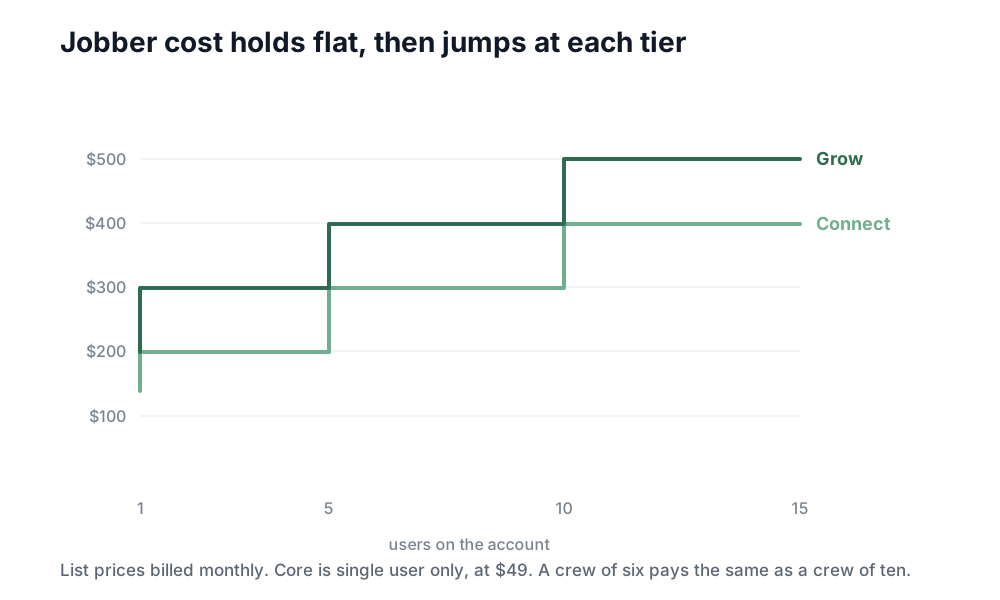
Jobber has three primary single-user plans (Core, Connect, Grow) plus larger team plans for multi-crew operations. Every plan includes a 14-day free trial and no card is required to start. Here is the full 2026 breakdown.
Single-user plans
| Plan | Monthly billing | Annual (effective monthly) | Users included | Key features unlocked |
|---|---|---|---|---|
| Core | $49/mo | $29/mo | 1 user | Scheduling, quoting, invoicing, client hub, basic reporting |
| Connect | $139/mo | $99/mo | 1 user (add more at $29 each) | Automations, online booking, QuickBooks sync, automated review requests, client reminders |
| Grow | $199/mo | $149/mo | 1 user (add more at $29 each) | Quote follow-ups, two-way text messaging, job costing, advanced reporting, task automation |
Plans by user count
Jobber does not price purely per seat. Each plan is sold in tiers by how many users are included, and extra users beyond a tier are $29/mo each. Pick the tier that fits your headcount rather than adding seats one at a time.
| Plan and users | Monthly billing | Annual (ongoing effective monthly) | Feature parity |
|---|---|---|---|
| Connect, 5 users | $199/mo | $149/mo | All Connect features |
| Connect, 10 users | $299/mo | $229/mo | All Connect features |
| Connect, 15 users | $399/mo | $299/mo | All Connect features |
| Grow, 5 users | $299/mo | $229/mo | All Grow features |
| Grow, 10 users | $399/mo | $299/mo | All Grow features |
| Grow, 15 users | $499/mo | $399/mo | All Grow features |
| Plus, 5 users | $499/mo | $399/mo | Grow plus premium support and advanced admin |
| Plus, 10 users | $599/mo | $449/mo | Grow plus premium support and advanced admin |
| Plus, 15 users | $699/mo | $529/mo | Grow plus premium support and advanced admin |
Two things to watch at checkout. The headline annual figure is an introductory rate for the first 12 months and the ongoing price is higher, which is what the annual column above reflects. There is also a separate three-month introductory discount on monthly billing. Confirm both in Jobber's checkout, because these move.
Chart: Monthly vs annual vs annual with 20% partner discount
Skip the mental math: our free Jobber cost calculator takes your team size, billing term, and add-ons and shows your real monthly price on every plan side by side.
The add-on costs nobody budgets for
The published plan price is not the total price. Every field service CRM has add-ons, and Jobber is no exception. Here are the ones you will actually run into.
- AI Receptionist: $29/mo. Cut from $99 in 2026. Answers your inbound calls, books appointments, and pushes them into Jobber. Useful once you cross roughly 30 to 50 inbound calls per week.
- Marketing Suite: $99/mo. Up from $79. Email campaigns, referral tracking, and lightweight nurture flows. Worth it if your marketing stack is only Jobber, less useful if you already run Mailchimp, MailerLite, or similar.
- Additional users: $29/user/mo. Applies on Connect and Grow single-user plans. This is why the 5, 10, and 15 user tiers exist: past a few seats, the bundled tier is cheaper than stacking $29 seats.
- Payment processing: 2.9% + $0.30 per card transaction. Industry standard, but budget for it. On $50,000 per month of card payments that is roughly $1,480 in processing fees. ACH is cheaper at 1% capped, if your customers will pay by bank transfer.
Honest framing: Jobber's add-on creep is milder than most competitors. When we break down alternatives in our Housecall Pro comparison, the pattern is that HCP's Marketing Center and Voice add-ons stack up faster. But "milder" is not "zero". Model out the AI Receptionist, Marketing Suite, and card processing before you decide Jobber fits your budget.
Which plan should you actually pick?
This is the question that matters. The plan comparison table shows features. What follows is the recommendation, by operator profile, that we give clients.
Solo, just starting out
Pick Core on annual billing. Effective $29/mo. You get scheduling, quoting, invoicing, and a client hub. That is enough to run a business, look professional, and get paid on time. Do not pay for automation you cannot yet feed with volume. (Not ready for software at all? Our free contractor invoice template covers the gap until you are.)
Solo at 30+ customers, wanting automation
Pick Connect on annual billing. Effective $99/mo ongoing. The upgrade unlock that actually pays for itself is the automated review request flow. Combined with our 100 Google reviews playbook, this pushes review velocity from 1 to 3 per month to 8 to 15+ per month within 60 days.
2 to 3 crews
Pick Connect for 5 users, or Grow depending on whether you need job costing. If jobs are quoted straightforward (flat rate installs, repeat visits, weekly maintenance), Connect for 5 users ($199/mo) is enough. If you need to track labor hours against a quote to know real margin per job, upgrade to Grow.
5+ techs
Pause before upgrading. At 5+ techs you should ask whether you have outgrown Jobber, not just outgrown your plan. Enterprise dispatch, deep price-book management, and heavy call-center workflows are what ServiceTitan does better. See Jobber vs ServiceTitan for the full framework, and expect a jump to $400 to $800+/mo when you migrate.
Install-heavy landscaping
Aspire territory, not Jobber. Crew-hour costing on multi-day install projects is where Jobber's model gets awkward. Read our best CRM for lawn care guide for the decision framework.
Jobber pricing vs competitors
| CRM | Starting price | Mid-tier | Enterprise / top tier | Best fit |
|---|---|---|---|---|
| Jobber | $49/mo (Core) | $139/mo (Connect) | $699/mo (Plus, 15 users) | Solo to 3 crews, mobile-first |
| Housecall Pro | $59/mo (Basic) | $149 to $199/mo (Essentials) | $329/mo (MAX) | Solo to 5 techs, marketing-first |
| ServiceTitan | Custom quote | ~$400 to $800+/mo typical | Enterprise pricing | 5+ techs, enterprise dispatch |
Jobber wins on entry price and setup speed (1 to 3 days versus 30 to 90 for ServiceTitan). Enterprise operations outgrow it. Marketing-heavy operators sometimes prefer Housecall Pro's built-in marketing center, though at the cost of higher monthly spend once you add features. We've given each competitor the same published-numbers treatment as this page: Housecall Pro pricing, ServiceTitan pricing, and GoHighLevel pricing for the operators weighing an all-in-one marketing platform instead.
How to get 20% off Jobber
As an official Jobber Partner, SkillMammoth has a link that unlocks 20% off for 6 months on monthly plans, or 20% off an annual plan. The 14-day free trial still applies. No coupon code, no support ticket. Sign up through the link and the discount is auto-applied.
Get 20% off Jobber
Applies to any plan. 14-day free trial included, no card required to start.
Worked savings, by plan
- Core, annual with discount: $29/mo becomes ~$23.20/mo. Save roughly $70 in year one.
- Connect, annual with discount: $99/mo becomes ~$79.20/mo. Save roughly $238 in year one.
- Grow, annual with discount: $149/mo becomes ~$119.20/mo. Save roughly $358 in year one.
- Connect for 5 users, annual with discount: $149/mo becomes ~$119.20/mo. Save roughly $358 in year one.
If you plan on staying with Jobber for the full year, annual billing plus the partner discount is the cheapest way to run it. If you want to try it month to month first, the 20% off for 6 months still applies, then it reverts to normal monthly pricing.
Making Jobber pay for itself
A CRM manages demand. It does not create demand. Jobber's ROI shows up when you feed it consistent leads and set up the systems that squeeze value from every customer:
- Review automation. Trigger a review request text within 90 minutes of every completed job. See our 100 Google reviews playbook.
- Source-field attribution. Every lead tagged with source (Google, LSA, referral, website). Read marketing attribution for contractors for the exact stack.
- Website that feeds it. Custom websites we build push form submissions into Jobber via webhook, so a lead from local SEO traffic lands in the same inbox as an LSA call. See what we build.
That is exactly what our ongoing engagements cover. If you want Jobber configured for you alongside marketing systems that keep it full, that is the fastest path.
For the dispatch-heavy alternative that publishes no prices, see Workiz pricing.
Past six people, the seat math starts favoring a flat company price; see Service Fusion pricing.
Coming from the other platform? Our Housecall Pro alternatives guide ranks six replacements by price and team size, with Jobber at the top for most crews under ten.
Jobber includes a QuickBooks Online sync on every paid plan, which is worth weighing against standalone tools. Our QuickBooks CRM integration guide ranks the options by how deep the sync actually runs, and explains why a second system usually creates two customer lists that disagree.
FAQ
How much does Jobber cost per month?
Billed monthly in 2026: Core $49, Connect $139, Grow $199 for single-user plans. User tiers run $199 (Connect, 5 users), $399 (Grow, 10 users), and $699 (Plus, 15 users). Annual billing drops these prices by roughly 30 to 40 percent.
Is there a free version of Jobber?
No. Jobber offers a 14-day free trial with no credit card required, but there is no permanent free tier. After the trial you pick a paid plan or stop using the product.
What is the cheapest Jobber plan?
Core on annual billing, which comes out to roughly $28 per month. With the 20% SkillMammoth partner discount that drops to about $22.40 per month, the cheapest way to run Jobber.
Jobber annual vs monthly billing, is annual worth it?
Yes, if you are committing to the product. Annual billing saves 30 to 40 percent over monthly across every plan. If you are still evaluating whether Jobber fits, start monthly (with the 20% partner discount for the first 6 months) and switch to annual once you are confident.
What Jobber add-ons cost extra?
AI Receptionist is $29/mo, Marketing Suite is $99/mo, the sales Pipeline add-on is $49/mo, and additional users on the single-user plans are $29/user/mo. Payment processing is 2.9% + $0.30 per card transaction, industry standard but budget for it.
Jobber vs Housecall Pro pricing?
Jobber starts at $49/mo (Core), Housecall Pro at $59/mo (Basic). Mid-tier plans are similar ($139 Jobber Connect vs $149 to $189 HCP Essentials). Housecall Pro tops out at $329/mo (MAX). Full breakdown in our SkillMammoth vs Housecall Pro comparison.
Jobber vs ServiceTitan pricing?
Jobber is transparent: $49 to $699/mo depending on plan and user count. ServiceTitan is custom-quoted, typically $400 to $800+/mo for small operations and higher for enterprise deployments. See Jobber vs ServiceTitan for when the price gap is justified.
How do I get the 20% discount?
Sign up through the SkillMammoth partner link at go.getjobber.com/skillmammoth. The discount is auto-applied at checkout: 20% off for 6 months on monthly plans, or 20% off an annual plan. No coupon code required. As required by FTC disclosure, SkillMammoth may earn a commission when you sign up through this link, at no extra cost to you. We recommended Jobber in our published CRM guides long before the partnership.
Disclosure: SkillMammoth is an official Jobber Partner. If you sign up through our link we may earn a commission at no extra cost to you. Pricing figures reflect Jobber's published rates as of 2026; confirm the exact rate at checkout because Jobber occasionally adjusts pricing.
Weighing Jobber against other platforms? See our ranked guide to the best field service software for 2026.