
 ChatGPT
TL;DR
- Jobber is the best field service CRM for solo operators up to roughly 3-crew home service businesses, full stop.
- Best-in-class mobile app, 1 to 3 day setup, clean QuickBooks sync and solid automated review requests.
- Transparent pricing: $49 to $199/mo single-user, or $199 to $699/mo for teams.
- Where it falls short: dispatch depth for 5+ techs, membership and flat-rate price book features, and roofing insurance restoration workflows.
- If you are past 5 techs, or you run insurance restoration, look at ServiceTitan or AccuLynx instead.
- Readers get 20% off for 6 months on monthly plans, or 20% off an annual plan, through our partner link: go.getjobber.com/skillmammoth.
Disclosure: SkillMammoth is an official Jobber Partner and may earn a commission from signups through our link. This review includes the real weaknesses and the operator profiles where Jobber is not the right fit.
Who we are to review this
We set up and integrate CRMs, then marketing-plumb them, for 40+ home service contractors across HVAC, plumbing, electrical, roofing, lawn care and pest control. Jobber is the tool we recommend most often, and we did so in our published guides (best CRM for HVAC, Jobber pricing breakdown) long before the partnership existed. This is an operator review, not a spec-sheet regurgitation. If you want the marketing announcement version, read SkillMammoth is now a Jobber Partner.
What the ratings actually say
Most people searching for Jobber reviews want one number. The honest answer is that the number depends heavily on which crowd you ask, and the gap between those crowds tells you more than any single score.
The figure we can verify directly is the Apple App Store, where Jobber Field Service Software (published by Octopusapp Inc) sits at 4.8 out of 5 across 20,462 ratings as of August 2026. That is a large sample for field service software, and it is worth taking seriously for one specific reason: the app is what your crew touches every day. Office software gets rated by the person who bought it. A mobile app gets rated by the technician standing in someone's driveway with cold hands.
Read app ratings carefully. A 4.8 tells you the app is pleasant to use in the field. It tells you nothing about whether the reporting will still fit you at $3M revenue, or whether dispatch holds up with eight technicians. Those are the things people leave over, and they are not what app reviews measure.
Here is where the score sits on every platform that publishes one, checked in September 2026.
| Platform | Rating | Sample | What it measures |
|---|---|---|---|
| Apple App Store | 4.8 / 5 | 20,462 ratings | The mobile app, rated by the techs who use it |
| Google Play | 4.7 / 5 | Not disclosed in aggregate | The Android app |
| G2 | 4.6 / 5 | Hundreds of reviews | Office users, buyer-side |
| Capterra | 4.6 / 5 | 1,362 reviews | Office users, the largest written sample |
| Software Advice | 4.6 / 5 | 1,372 reviews | Same Gartner pool as Capterra |
| Trustpilot | 4.3 / 5 | Smaller sample | Skews toward people with a complaint |
| Verdict | The app is loved and the office software is liked. The gap between 4.8 and 4.3 is the gap between the truck and the back office. Read the low reviews for the workflow that fails, not the score. | ||
Why the review sites disagree with each other
Software review sites run on incentives that are easy to miss. Vendors run campaigns asking happy customers to leave reviews, often with a gift card attached, which is legal and disclosed and also skews the sample toward people who were asked at a good moment. Scores cluster between 4.3 and 4.7 across most of the category as a result, which makes them nearly useless for telling two products apart.
What is worth reading is not the score but the one-star and two-star reviews, filtered to the last six months. Ignore the ones complaining about price, which tell you the reviewer picked the wrong tier. Look for repeated, specific complaints about the same workflow. Those are the real constraints, and for Jobber they cluster in predictable places that we cover in the cons section below.
What we see across client deployments
We set Jobber up for contractors, so our sample is skewed in its own way: these are businesses that chose it deliberately and had it configured properly from day one. Within that sample the pattern is consistent. Setup lands in one to three days rather than the multi-week onboarding of enterprise tools. Adoption by field crews is the highest of any platform we deploy, which matters more than any feature list because software nobody opens is worth nothing. The friction shows up later, at the point where a business outgrows the reporting, and that point arrives sooner than most owners expect.
Jobber pros (what it does well)
The mobile app is best-in-class
Techs actually use it in the field. That sounds obvious, but Housecall Pro, ServiceTitan and half the roofing CRMs fail this basic test. Laggy apps, buried buttons, offline-mode bugs. Jobber's iOS and Android apps load fast, sync reliably on spotty rural signal, and let a tech quote and invoice, collect payment and request a review from the driveway in under 3 minutes.
Setup is 1 to 3 days, not 30 to 90
Enterprise field-service tools like ServiceTitan require dedicated implementation projects with weeks of price-book building and dispatch configuration. Jobber goes live in a business week. Import your customers from a CSV, connect QuickBooks, load your services, done. That speed matters more than any feature list when you are trying to run the business, not administrate software.
Quoting and invoicing flow
Quote-to-approved-to-scheduled-to-invoiced-to-paid runs on rails. Clients approve with an e-signature, deposits collect automatically, and the invoice fires when the job is marked complete. Two-way text messaging on Grow means the whole conversation happens inside the record instead of scattered across a personal cell phone.
Client portal and online booking
The Client Hub lets homeowners approve quotes, pay invoices, request service and see their history without needing to call. Online booking (Connect and Grow) turns a Google Business Profile Book Online button into an actual scheduled appointment in your calendar. Small operators underestimate how much friction this removes.
Automated review requests
This is the feature that pays for the plan. Trigger a review request text within 90 minutes of a job being marked complete and watch your review velocity climb from 1 to 3 per month to 8 to 15+ per month. Combined with our 100 Google reviews playbook, this is the single biggest lever most contractors have.
QuickBooks sync just works
No custom mapping, no monthly reconciliation drama. Invoices, payments and clients sync bidirectionally, and if you run QuickBooks Online you can be fully closed on the books in an hour a month instead of a day.
Fair, transparent pricing
Sticker prices are on the website. There are no custom quotes, no forced annual contracts on entry plans, and the 14-day free trial requires no credit card. In a category where ServiceTitan and Aspire hide pricing behind sales calls, that transparency is a real win.
Strong support
Chat and phone support respond quickly. The knowledge base is deep and current. Higher tiers include premium support with faster response times, which starts to matter around the 5+ user mark.
Jobber cons (the honest weaknesses)
Dispatch board is thin for 5+ tech operations
Jobber's schedule view is a solid calendar. It is not a dispatch board. Once you have 5+ techs, dynamic re-routing based on job priority and drive time, capacity planning by skill, and real-time GPS tech status become daily needs. Jobber's answer is "drag the card". ServiceTitan's is a full dispatcher workstation. If you have a dispatcher-role human on payroll, Jobber will feel underpowered.
Membership and maintenance plan management is basic
HVAC shops with big maintenance plan programs (100+ active memberships) feel this fast. Renewal tracking, membership-specific pricing, and priority scheduling for members are all doable but manual. Housecall Pro and ServiceTitan both have deeper native membership modules. If plan revenue is 30%+ of your top line, this is a real gap.
No native flat-rate price book
Flat-rate books (Profit Rhino, Coolfront, Sera) integrate via third-party syncs, but Jobber has no first-party equivalent. HVAC and plumbing shops that run true flat-rate pricing at the truck often prefer platforms with a built-in book. ServiceTitan and Housecall Pro MAX have this native. Jobber does not.
Not built for roofing insurance restoration
No Xactimate ESX import, no supplement tracking, no ACV/RCV math, no supplier ordering integrations. If any meaningful piece of your revenue is insurance work, Jobber is the wrong tool. See our best CRM for roofers guide for AccuLynx and JobNimbus, which are built for this.
Add-ons add up
The base plan is not the total cost. AI Receptionist is $29/mo, Marketing Suite is $99/mo, additional users on Connect and Grow are $29/user/mo. None of it is unfair pricing, but budget the total, not the sticker. A Connect subscription with AI Receptionist and 2 extra users runs $265/mo, not $119.
Reporting depth ceiling
Standard reports (revenue, jobs, invoicing) are clean. Deep custom reports and cohort analysis are not Jobber's strength, and neither is CFO-grade financial reporting. Most operators export to a spreadsheet for anything beyond built-in dashboards. That is fine at $500K, painful at $3M.
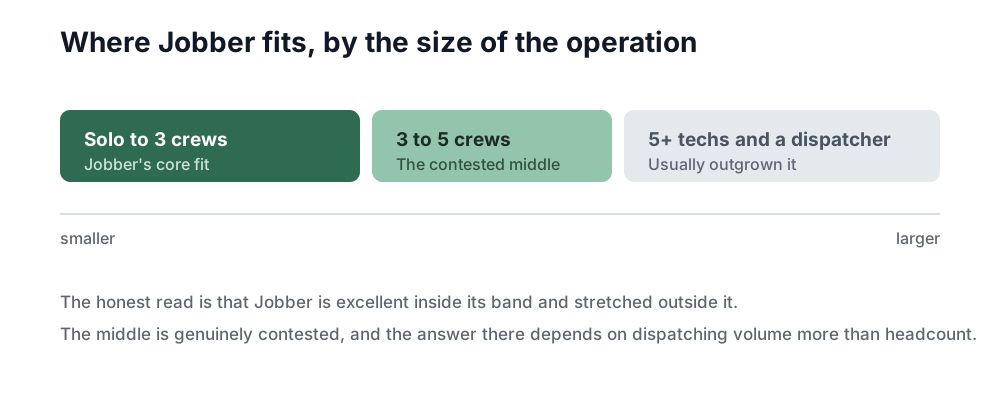
Where Jobber fits, visually
Jobber pricing (quick)
Billed monthly in 2026: Core $49/mo, Connect $139/mo, Grow $199/mo for single-user plans. Annual billing drops these to roughly $29, $99, and $149 per month. Multi-user tiers: Connect 5 users $199/mo, Grow 10 users $399/mo, Plus 15 users $699/mo. Every plan includes a 14-day free trial with no credit card required.
Common add-ons: AI Receptionist $29/mo, Marketing Suite $99/mo, extra users on single-user plans $29/user/mo. Payment processing is 2.9% + $0.30 per card transaction, industry standard. Full breakdown in our Jobber pricing 2026 guide.
The pricing detail most reviews get wrong
Before the detail, a shortcut: the Jobber cost calculator does this arithmetic for you, team size and add-ons included.
Jobber does not price purely per seat, and almost every comparison online misses this. Each plan is sold in tiers by how many users are included, and extra users beyond a tier are $29 a month each. Checked against Jobber's own pricing page:
| Plan | 1 user | 5 users | 10 users | 15 users |
|---|---|---|---|---|
| Core | $49 | — | — | — |
| Connect | $139 | $199 | $299 | $399 |
| Grow | $199 | $299 | $399 | $499 |
| Plus | — | $499 | $599 | $699 |
| Verdict | Pick the tier that fits your headcount rather than stacking $29 seats onto a smaller plan. | |||
Two things to watch at checkout. The headline annual figure is an introductory rate for the first 12 months and the ongoing price is higher, so Grow for 10 users shows $240 a month and then settles at $299. There is also a separate three-month discount on monthly billing. Confirm both before you commit, because these move.
The practical read for a 10-technician shop: Grow is $399 a month on monthly billing, or $4,788 a year. On annual it is $299 a month. Nowhere near the $199 headline that most reviews quote.
Who Jobber is right for
- Solo operators through 3-crew home service businesses. Under roughly $2M revenue is the sweet spot.
- Mobile-first operators. If your techs live in the field and you need one tool that does quoting, scheduling, invoicing and review requests from a phone, this is the answer.
- Trades: HVAC, plumbing, electrical, lawn care, cleaning, handyman, pest control, general home services, small repair-focused roofing crews.
- Anyone wanting to be live in a week, not on an implementation project.
Who should pick something else
The honest guidance. Recommending against yourself is where the trust that converts is built.
- 5+ techs needing advanced dispatch and a real sales pipeline: ServiceTitan. Read Jobber vs ServiceTitan for the full framework. Expect $400 to $800+/mo when you migrate.
- Roofing insurance restoration: AccuLynx or JobNimbus. Xactimate integration and supplement tracking are non-negotiable if insurance is a real revenue line. See our best CRM for roofers guide.
- Install-heavy landscape construction: Aspire. Crew-hour costing across multi-day install projects is where Jobber's model breaks. Our best CRM for lawn care covers the decision framework.
- Very large electrical service operations with flat-rate books: FieldEdge or ServiceTitan. Full lay of the land in best CRM for electricians.
- Businesses needing deep custom integrations beyond the standard Jobber API and Zapier. If your workflow lives inside a homegrown system, Jobber's integration surface may not stretch far enough.
Jobber vs the main alternatives (quick hits)
- vs ServiceTitan: Jobber is cheaper and simpler, and sets up roughly 30x faster. ServiceTitan is for scale, enterprise dispatch, and price-book depth. Full breakdown: Jobber vs ServiceTitan.
- vs Housecall Pro: HCP has a heavier built-in marketing suite. Jobber has a better mobile app and lower entry price. Our take: SkillMammoth vs Housecall Pro.
- vs roofing-native tools (AccuLynx, JobNimbus, Roofr): Jobber loses on insurance workflow, wins on repair-focused simplicity. See best CRM for roofers.
The verdict + how to get 20% off
Verdict: for the archetype it targets, solo through 3-crew home service, Jobber is the right recommendation more often than any other tool in this category. It is not the deepest platform, and it is not the right pick past 5 techs or inside insurance restoration. Inside its zone, nothing else matches its combination of mobile-app quality, setup speed, and transparent pricing.
Get 20% Off Jobber
20% off for 6 months on monthly plans, or 20% off an annual plan. Auto-applies at checkout, 14-day free trial included, no credit card required to start.
One important note: your CRM only manages the leads you already have. It does not create demand. Pair Jobber with a marketing engine that keeps it full. That is what our Local SEO service and integrated plans are built for. See more of our tool partnerships on the partners page.
Frequently asked questions
Is Jobber worth it in 2026?
Yes, if you are a solo operator through a 3-crew home service business under roughly $2M revenue. At that scale, the mobile app quality, 1 to 3 day setup, and transparent pricing beat every alternative on the market. Past 5 techs or inside insurance restoration, look at ServiceTitan or AccuLynx instead.
What are Jobber's biggest weaknesses?
Thin dispatch board past 5 techs, basic membership and maintenance plan management, no native flat-rate price book, no roofing insurance restoration features (Xactimate, supplements, ACV/RCV), and reporting depth that plateaus around the $3M revenue mark.
What do Jobber users actually rate it?
On the Apple App Store, Jobber Field Service Software holds 4.8 out of 5 across 20,462 ratings as of August 2026. Treat that as a verdict on the mobile app your crew uses daily rather than on reporting depth or dispatch, which are the things businesses actually leave over.
How much does Jobber cost?
Billed monthly in 2026: Core $49, Connect $139, Grow $199 for single-user plans. User tiers run $199 (Connect, 5 users), $399 (Grow, 10 users), and $699 (Plus, 15 users). Annual billing drops these by roughly 30 to 40 percent. Full breakdown in our Jobber pricing guide.
Is there a free version of Jobber?
No. Jobber offers a 14-day free trial with no credit card required, but there is no permanent free tier. After the trial you pick a paid plan or stop using the product.
Jobber vs ServiceTitan, which one?
Jobber for solo through 3-crew operations under $2M. ServiceTitan for 5+ tech operations that need enterprise dispatch, deep price-book management, and heavy call-center workflows. Expect a $400 to $800+/mo starting point on ServiceTitan versus $49 to $699/mo on Jobber. Full comparison: Jobber vs ServiceTitan.
Is Jobber good for HVAC, plumbing, and roofing?
HVAC: strong fit up to 3 crews, weakens past that or if you run a large maintenance-plan program. Plumbing: strong fit across the board for service-visit work. Roofing: fine for repair-focused shops, wrong tool for insurance restoration (use AccuLynx or JobNimbus instead, per our roofing CRM guide).
How do I get the 20% discount?
Sign up through the SkillMammoth partner link at go.getjobber.com/skillmammoth. The discount is auto-applied at checkout: 20% off for 6 months on monthly plans, or 20% off an annual plan. No coupon code required. As required by FTC disclosure, SkillMammoth is an official Jobber Partner and may earn a commission when you sign up through this link, at no extra cost to you. We recommended Jobber in our published CRM guides long before the partnership existed.
Does Jobber replace marketing?
No. Jobber manages the leads you already have. It does not generate them. A CRM without a marketing engine is a well-organized empty inbox. Pair it with Local SEO, review acquisition (100 reviews playbook), and attribution (marketing attribution for contractors) so it stays full.
Disclosure: SkillMammoth is an official Jobber Partner and may earn a commission from signups through our link. This review includes the real weaknesses and the operator profiles where Jobber is not the right fit. We recommended Jobber in our published CRM guides long before the partnership.
Jobber is only 20% of the answer
The CRM stores leads. What converts them is response speed and follow-up. Free website audit: a 10-minute Loom on your lead paths, plus a written report in 48 hours.