
 ChatGPT
TL;DR
- Electrical contractor software splits into two jobs. Service software runs the truck (dispatch, flat-rate price book, invoicing, review requests) and project software runs the job (estimates with options, job costing across rough-in and trim, progress billing, plus AIA-style pay applications for commercial work), so pick by which half of your book is growing.
- Jobber for solo to three-crew shops ($49 to $199 a month monthly, $29 to $149 annual). Housecall Pro for three to six techs who want online booking and an in-app marketing center ($59 to $299 annual).
- ServiceTitan at five techs and $2 million, especially for panel, generator or EV project sales. Quote only, budget $2,000 to $4,000 a month loaded.
- FieldEdge for flat-rate-book-centric service shops (quote only). Service Fusion for unlimited users at a flat company price ($245, $382 or $627 a month monthly).
- Knowify for commercial and project-heavy electrical contractors billing on AIA schedules ($99 or $329 a month plus $29 per extra user).
- Two electrician-specific factors decide most of these calls: flat-rate price book integration and multi-visit job costing for EV and service-upgrade work.
Skill Mammoth builds the websites and local search presence that feed these tools for electrical contractors, and watches the stack from the lead side every week. Disclosure: we are a Jobber partner and earn a commission through its links. We do not resell anything else in this guide, and we flag the operator profiles where Jobber is the wrong fit.
What electrical contractor software costs in 2026
| Platform | Published price | Users | Price book | Project billing | Best for |
|---|---|---|---|---|---|
| Jobber | $49 / $139 / $199 monthly; $29 / $99 / $149 annual | Seat bundles, $29 extra | Third party | Basic | Solo to 3 crews, service plus light install |
| Housecall Pro | $59 / $149 / $299 annual; $79 / $189 / $329 monthly | 1 / 5 / 8, then $35 to $100 each | Native, growing | Basic | 3 to 6 techs, online booking |
| Service Fusion | $245 / $382 / $627 monthly; $208 / $325 / $533 annual | Unlimited | Native | Progress billing on Pro | Larger crews on a budget |
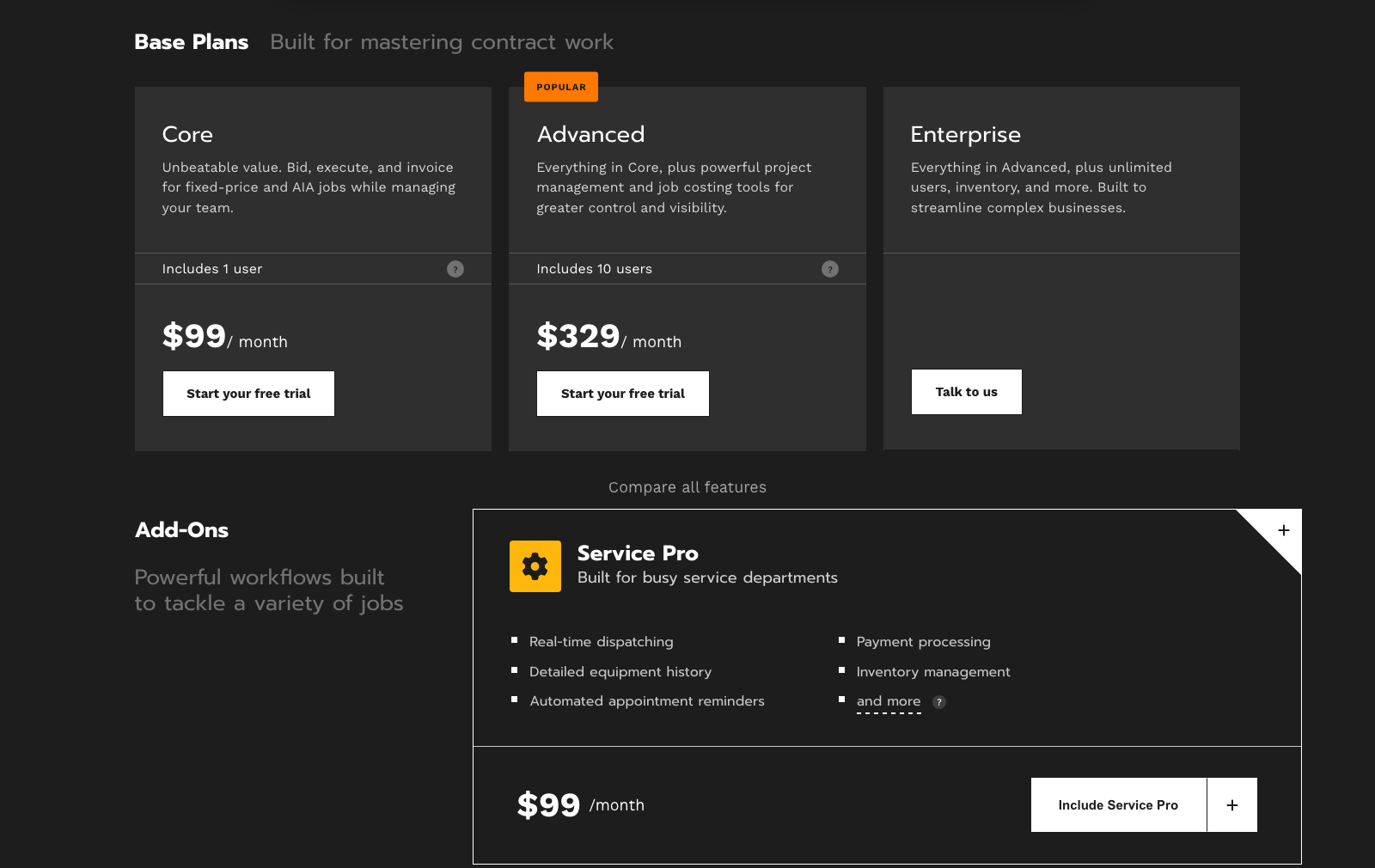
| Knowify | Core $99 (1 user), Advanced $329 (10 users), $29 per extra user; Service Pro add-on $99 | Per user above bundle | Catalog | AIA pay apps, job costing, change orders | Commercial and project-heavy shops |
| FieldEdge | Quote only | Per user | Native, best in class | Weak | Flat-rate residential service |
| ServiceTitan | Quote only; $2,000 to $4,000 a month loaded for 5 techs plus onboarding | Per user | Native with vendor sync | Strong | 5+ techs, $2M+, project sales |
| Verdict | Service-heavy: Jobber under three crews, FieldEdge or ServiceTitan above. Project-heavy or commercial: Knowify, or ServiceTitan at scale. Ten-plus people on a budget: Service Fusion. | ||||
Read this first
The two factors generalist reviews skip: flat-rate price book integration (Profit Rhino, Callahan Roach) for residential service, and multi-visit job costing for EV chargers, service upgrades, generators, or commercial work. If you sell flat-rate residential service, the price book matters more than the CRM. If projects are a growing revenue line, you need options-based proposals and job costing that service-only tools do poorly.
The buyer archetype framework
The single biggest mistake electrical operators make when buying software is shopping for the business they want in three years instead of the one they run today. Find your archetype first, then compare tools inside it.
Archetype 1: Solo owner-operator, 0 to 30 customers
You are the electrician, the estimator, the dispatcher, plus the invoicer. You need scheduling, quoting, invoicing, payments, plus a review request out to the customer the same day the job wraps. Anything else is noise. Jobber Core at $49/mo is the default recommendation for this stage. Cheap, mobile-first, and live in 1 to 3 days.
Archetype 2: 2 to 3 crews, mixed service and light install
You have a helper or two and maybe a second van, and your book is roughly half service calls and half project work (EV chargers, panel upgrades, generator installs, small remodels). You need real quoting and proposal tools for the project side plus dispatch that works for a small team. Jobber Connect or Grow ($119 or $199/mo) or Housecall Pro are both credible. Grow's automated quote follow-ups pay for themselves on higher-ticket EV and panel work.
Archetype 3: 5+ techs, $2M+ revenue
You have full-time dispatchers, a sales process, plus residential + light commercial mixed. You are losing money to unbooked calls, missed follow-ups, and thin reporting. This is where ServiceTitan earns its price tag, and there is not really a close second at this stage. FieldEdge, FieldPulse, plus Service Fusion all fall short of ServiceTitan on dispatch, pricing, or pipeline management at this scale.
Archetype 4: Flat-rate-service-heavy shop
Your book is almost all residential service calls priced from a flat-rate book (troubleshooting, breakers, outlets, fixture swaps, ceiling fans). You do not do many multi-day projects. You care about consistent tech-to-tech pricing and a book that updates itself with material cost changes. FieldEdge is the operator's pick here because of its Coolfront pricing heritage and native price-book depth.
The EV charger factor
One archetype note that matters more every year: EV charger installs are project-style jobs. A $1,200 wall connector install becomes a $3,500 job when the sub-panel upgrade attaches, and a $6,000+ job when service is upgraded. That workflow needs proper quoting, options-based proposals, and job costing, not just a work order and an invoice. If EV work is 20%+ of your book and growing, weight the decision toward tools that handle quotes and job costing well (Jobber Grow, Housecall Pro higher tiers, or ServiceTitan). See the full lead economics in our electrician SEO playbook.
The six platforms reviewed
1. Jobber
Best for: Solo to 3-crew electricians running service + light install work. Especially strong for residential-focused operators up to about $1.5M in revenue.
Pricing (monthly billing): Core $49/mo, Connect $139/mo, Grow $199/mo. Annual billing runs $29, $99, and $149 per month respectively. Prices are per base seat with add-on user pricing scaling from there.
Strengths:
- Best mobile app in field service. Techs actually use it in the truck without training drama.
- Fastest setup in the category. Live in 1 to 3 days, not 30 to 90.
- Cleanest QuickBooks Online sync. No custom chart-of-accounts mapping needed for most shops.
- Automatic review requests trigger within minutes of job completion. Single biggest lever for hitting 100+ Google reviews (see the full playbook in our review acquisition guide).
- Quoting is usable for EV/panel work at the Grow tier, with automated quote follow-ups baked in.
Weaknesses:
- Dispatch gets thin at 5+ techs. Not a replacement for ServiceTitan at scale.
- No native flat-rate price book (Profit Rhino or Callahan Roach). You can integrate via third parties, but it is not built in the way FieldEdge or ServiceTitan handle it.
- Reporting is competent for a small shop and shallow for anyone running a real sales operation.
- Job costing on multi-visit project work is functional, not powerful.
Our take: For the operator profiles above, Jobber is the default recommendation and the one we most often see clients settle on happily. Readers can get 20% off Jobber for 6 months on monthly plans, or 20% off an annual plan through our partner link: go.getjobber.com/skillmammoth. See the full plan breakdown in our Jobber pricing guide. If your shop has crossed 5 techs or a real sales team, skip to ServiceTitan below.
2. ServiceTitan
Best for: 5+ techs, $2M+ revenue, especially operations selling high-ticket panel upgrades, whole-home generators, and multi-charger EV projects.
Pricing: Custom quoted, no public rate card. From operator conversations and industry reporting, expect entry around $400 to $800+ per month for a small deployment and materially more with more seats and add-ons. Onboarding typically runs $2,500 to $10,000 depending on scope. Annual contracts are the norm.
Strengths:
- Best dispatch in the trade software category. Full-day board management, drag-and-drop, dependency logic.
- Sales pipeline is strong. Options-based proposals for panel, generator, and EV work close at higher average ticket than PDF-attach approaches.
- Native flat-rate book with vendor updates.
- Enterprise-grade reporting. Answers real business questions (marketing ROI, tech performance, offer conversion) that other tools cannot.
- Deep integrations with call tracking, financing, plus marketing platforms.
Weaknesses:
- Cost. The full loaded cost for a 5-tech shop typically lands in the $2K to $4K per month range, plus onboarding.
- Complexity. Real implementation projects, not a weekend setup.
- Overkill under $1M in revenue. Fully overpriced for a solo or single-crew operation.
Our take: If you have crossed 5 techs and lead flow is not the bottleneck, ServiceTitan pays for itself in dispatch efficiency and higher average ticket. If you are still adding techs and lead flow is uneven, delay the ServiceTitan decision until the revenue is proven. For the direct comparison, see our Jobber vs ServiceTitan operator breakdown.
3. Housecall Pro
Best for: The middle market. 3 to 6 techs, mixed residential service and light project work, operators who want an all-in-one tool with an in-app marketing center.
Pricing: Basic $59/mo (single user), Essentials $149/mo, Max $329+/mo, plus per-user add-ons. Feature-gated tiers get expensive fast when you add call tracking, price book, marketing tools, plus financing partner access. The add-on creep is the single most common Housecall Pro complaint we hear from operators.
Strengths:
- Solid all-rounder for residential service. Scheduling, invoicing, plus the mobile app are competent.
- Native online booking widget is good. Actually converts on service pages.
- Bundled marketing center (postcards, email campaigns, reviews). Useful if you have no marketing partner and want an in-app quick start.
- Growing price book depth. Better than Jobber, not as deep as ServiceTitan.
Weaknesses:
- Add-on creep. The advertised sticker price rarely reflects real all-in monthly cost.
- Mobile app quality is behind Jobber's despite years of iteration.
- Dispatch is decent for 3 to 6 techs and hits a ceiling above that.
- The in-app marketing tools are convenience, not craft. Fine for postcards, not a substitute for a real Local SEO and LSA program.
Our take: Housecall Pro shines when the online booking widget and bundled marketing center replace a stack you would otherwise buy piecemeal. It stops making sense once you either scale past 5 techs (move to ServiceTitan) or realize the marketing center is not driving qualified leads (move to Jobber and outsource the marketing engine). Our operator take on the marketing center specifically is in Housecall Pro Marketing vs an independent agency.
4. FieldEdge
Best for: Flat-rate-service-heavy electrical shops that price every call from a book. Especially strong for shops running 3 to 8 techs on residential service routes.
Pricing: Custom quoted, no public rate card. From operator reporting, typical deployments land in the $100 to $300 per user per month range, with QuickBooks integration and Coolfront pricing bundled.
Strengths:
- Best-in-category price book. Coolfront heritage makes flat-rate pricing consistent tech-to-tech.
- Strong dispatch for service-heavy operations. Board management is designed for high-call-volume days.
- Integrated agreements/service plans workflow. Useful for shops selling annual maintenance memberships.
- QuickBooks Desktop integration is stronger than most competitors, which matters for older accounting setups.
Weaknesses:
- Interface feels dated next to Jobber and Housecall Pro.
- Mobile app is functional, not delightful. Tech adoption is harder than with Jobber.
- Weaker on project work and options-based proposals. Not the right fit if EV/panel projects are a growing part of the book.
- Onboarding is a real project, though lighter than ServiceTitan.
Our take: FieldEdge is the operator's pick if your book is flat-rate service. If your book is drifting toward project work, look at Jobber Grow or ServiceTitan instead.
5. Service Fusion
Best for: Budget-conscious teams that need unlimited users at a flat company price. Especially useful for shops with a larger crew but tight software budgets.
Pricing: Flat per-company pricing, published: Starter $245 a month monthly or $208 annual, Plus $382 or $325, Pro $627 or $533, all with unlimited users. That user model is the differentiator: a ten-person shop runs Service Fusion for less than the equivalent seat count on Jobber Grow or Housecall Pro Max. The full tier breakdown, including what Plus and Pro add, is in Service Fusion pricing.
Strengths:
- Unlimited users at a flat price. Rare in the category and material for larger teams on a budget.
- Decent feature set: dispatch, invoicing, payments, price book, mobile app.
- Native QuickBooks sync (Online and Desktop).
- Text messaging and estimate flows are built in without add-ons.
Weaknesses:
- Interface feels dated. Not the tool that impresses techs in a demo.
- Mobile app is weaker than Jobber and Housecall Pro.
- Reporting is basic. Fine for a small shop, thin for anyone running a sales operation.
- Less deep set of integrations of third-party integrations.
Our take: Service Fusion wins on the unlimited-users economics for shops that have more than 5 people but do not need ServiceTitan's depth. If interface polish and mobile-first workflows matter to you (and they do to your techs), look at Jobber instead.
6. Knowify
Best for: Commercial and project-heavy electrical contractors: tenant build-outs, new construction subcontracts, multi-week service upgrades, anyone billing a general contractor on a schedule of values.
Pricing (published): Core $99 a month for one user, Advanced $329 a month for ten users, $29 per additional user on either, Enterprise by quote with unlimited users. The Service Pro add-on at $99 a month adds real-time dispatch, payment processing, equipment history, inventory, plus appointment reminders for shops that run a service department alongside the project work. GPS fleet tracking is $25 per vehicle and dashcams $25 each.
Strengths:
- Built for contract work: fixed-price and AIA-style progress billing, retainage, change orders, plus job costing by phase are native rather than bolted on.
- Bid-to-invoice in one system, with the estimate becoming the budget the job is costed against.
- Reasonable per-user pricing past the bundle, and a published rate card.
- QuickBooks sync built around job costing, which is what commercial accounting actually needs.
Weaknesses:
- Not a residential service tool on its own; the Service Pro add-on is adequate, not Jobber-grade, for dispatch and mobile.
- No flat-rate price book integration; residential service shops will fight it.
- Smaller set of integrations than the service platforms for call tracking, review automation, or marketing.
Our take: The right answer for the electrical contractor whose growth is commercial, and the wrong answer for the one whose growth is residential service. Shops that are both usually run Knowify for projects and one of the service tools for the trucks, then reconcile in QuickBooks; the paperwork that ties the two together is in our subcontractor agreement and change order templates.
Integration analysis (the electrician-specific matrix)
What actually decides whether a CRM works long-term is how cleanly it plugs into the systems around it. Here is the electrician-specific scorecard.
Flat-rate price book (Profit Rhino, Callahan Roach)
FieldEdge: Native, best in category. ServiceTitan: Native price book with vendor sync, close second. Housecall Pro: Native price book, growing depth. Jobber: No native flat-rate book; integrates via third parties. Service Fusion: Native price book, adequate for standard residential service.
QuickBooks sync
Jobber: Cleanest QuickBooks Online sync in the category. Housecall Pro: Thorough QBO sync. FieldEdge: Best of the group for QuickBooks Desktop. ServiceTitan and Service Fusion: Both sync reliably, sometimes need an accountant on the initial setup.
Call tracking (CallRail, WhatConverts)
All five have some form of CallRail integration. ServiceTitan and Housecall Pro have the deepest native tie-in, pushing recording and source data straight into the customer record. Jobber and Service Fusion connect cleanly with some manual tag discipline. FieldEdge supports it but has less polish in the record view.
Website lead webhooks
Your Local SEO traffic and Local Service Ads leads have to land in the CRM automatically or the follow-up cadence breaks. The custom electrician marketing sites we build push form submissions in with source, campaign, plus page fields intact regardless of which platform you run. See marketing attribution for home service contractors for the full webhook + tagging stack that makes cost-per-acquired-customer math possible.
Review automation
Jobber leads on review request automation quality. Housecall Pro is close behind with its marketing center. ServiceTitan handles it well when configured. FieldEdge and Service Fusion require third-party review platforms (NiceJob, Podium, or similar) for a polished flow. For the full playbook on hitting 100+ reviews, see how to get 100 Google reviews.
EV charger and permit tracking
None of the five have "EV workflow" as a native feature category, and that is fine. What matters is options-based proposals (so the sub-panel and service upgrade can be presented as add-ons at the quote stage) and job costing across visits (rough-in, energization, inspection). ServiceTitan is strongest here. Jobber Grow and Housecall Pro Max are workable. FieldEdge and Service Fusion are weaker on multi-visit project workflow.
Migration guide (when to switch, and how to not blow up your busy season)
When to switch
- Spreadsheets or paper to Jobber: You are consistently missing follow-ups or losing invoices. The switch pays back in the first month.
- Jobber to Housecall Pro or Grow tier upgrade: EV/panel project work is becoming a real revenue line and quote follow-up automation is now a bottleneck.
- Housecall Pro or Jobber to ServiceTitan: You have crossed 5 techs, dispatch is now the daily problem, and average ticket is being held back by weak proposals.
- Anything to FieldEdge: Your book has consolidated into flat-rate residential service and price book consistency is a training/quality issue.
The 4-week migration timeline
- Week 1: Export customers, open jobs, plus open invoices from the old system. Clean the customer file (dedupe, standardize addresses, phone numbers). Skip this and you inherit every problem you had.
- Week 2: Import into the new CRM, configure services and price book, set up QuickBooks sync, connect payment processor, wire call tracking and website webhooks.
- Week 3: Train the office and one lead tech. Run parallel for 7 to 10 days: new jobs in the new system, existing open jobs finish in the old.
- Week 4: Full cutover. Cancel the old subscription 30 days later, not the same day, so you can pull any missed records or historical reports.
Do not migrate during peak season. For most electrical shops that means avoid the late-spring through mid-summer stretch (AC-related electrical calls surge) and the early-winter cold snaps (heat and generator work). Winter months and shoulder seasons are the safe windows.
Your CRM is only 20% of the equation
The uncomfortable truth we tell operators every month: if your book is soft, a better CRM will not fix it. Revenue in an electrical shop is a three-part equation.
- Acquisition (marketing engine): are enough of the right people finding you and calling?
- Conversion (call handling, website, follow-up): are you closing the leads you get?
- Efficiency (CRM, ops, billing): are you running the closed jobs profitably?
The CRM sits in the third bucket. It is the smallest lever of the three. If your shop is plateauing at $500K, $1M, or $2M, the ceiling is almost always upstream. Not enough leads (fix with Local SEO, Local Service Ads, and the electrician SEO playbook around EV chargers, panel upgrades, plus generator installs) or not enough of them closing (fix with website conversion and follow-up discipline).
Our engagements at SkillMammoth build that acquisition and conversion engine, then plug it cleanly into whichever CRM you already run. See ongoing engagement pricing, the trade-specific playbook at electrician marketing consultant, or the electricians industry page. Ready to talk through your specific stack? Book a strategy call.
Decision matrix
| Your situation | Recommended platform | Reason |
|---|---|---|
| Solo, 0 to 30 customers | Jobber Core | Cheap, fast setup, best mobile app for a one-truck shop. |
| 2 to 3 crews, mixed service + light install | Jobber Connect / Grow | Quote follow-ups and review automation without ServiceTitan cost. |
| 3 to 6 techs, wants in-app marketing | Housecall Pro | Bundled marketing center, native online booking, add-on cost trade-off. |
| 5+ techs, $2M+, project sales heavy | ServiceTitan | Only platform with dispatch, pipeline, and proposal depth at that scale. |
| Flat-rate-service-heavy shop | FieldEdge | Best price book in the category, strong service dispatch. |
| 10+ users on a tight budget | Service Fusion | Unlimited users at a flat company price. |
| EV charger-focused install business | Jobber Grow or ServiceTitan | Options-based proposals and multi-visit job costing for panel-upgrade attach. |
| Commercial build-outs, GC subcontracts, AIA billing | Knowify | Progress billing, retainage, change orders, and job costing by phase are native. |
Sibling reading
This is one spoke of our software-by-trade cluster. For roofing operators, see best CRM for roofers. For HVAC operators, see best CRM for HVAC. For green industry operators, see best CRM for lawn care. For electrician-specific lead generation once your CRM is settled, see lead generation for electricians. For the full electrician SEO playbook, see electrician SEO.
If none of these fit, the problem may be category rather than vendor. Our CRM for contractors guide compares field service platforms, construction CRMs and sales CRMs side by side with live pricing, including when a general tool like HubSpot is worth its onboarding fee.
Frequently asked questions
What is the best software for an electrical contractor?
For residential service, Jobber under three crews and FieldEdge or ServiceTitan above that. For commercial and project work, Knowify, or ServiceTitan at scale. For a large crew on a tight budget, Service Fusion with its unlimited users. The deciding questions are whether you price from a flat-rate book and how much of the book is multi-visit project work.
What is the best CRM for a solo electrician?
Jobber Core at $49/mo. It is cheap, live in 1 to 3 days, has the best mobile app in the category, and covers scheduling, quoting, invoicing, payments, plus review automation without add-ons. If you are shopping tools as a one-truck operator, this is the default recommendation and where 80% of solo electricians we work with land.
What is the best CRM for 5+ tech electrical companies?
ServiceTitan, once revenue crosses $2M and dispatch has become the daily bottleneck. Nothing else in the category matches its board management, proposal engine, or reporting at scale. The cost is real ($2K to $4K per month all-in for a 5-tech shop plus onboarding) but pays back in higher average ticket and dispatch efficiency at that size.
Jobber vs ServiceTitan for electricians, which one?
Jobber for solo to 3-crew operations up to about $1.5M. ServiceTitan for 5+ techs and $2M+. In the messy middle (3 to 5 techs, $1M to $2M), Jobber Grow or Housecall Pro Max is usually the right stop before jumping to ServiceTitan. For the full head-to-head, see Jobber vs ServiceTitan.
What does electrician software cost in 2026?
Published rates: Jobber $49 to $199 a month monthly ($29 to $149 annual). Housecall Pro $59 to $299 a month annual before seat add-ons. Service Fusion $245 to $627 a month monthly ($208 to $533 annual) with unlimited users. Knowify $99 or $329 a month plus $29 per extra user. FieldEdge and ServiceTitan are quote only; a five-tech ServiceTitan shop typically lands at $2,000 to $4,000 a month loaded, plus $2,500 to $10,000 onboarding.
Do I need a flat-rate price book integration?
If your book is majority residential service (troubleshooting, breakers, fixtures, outlets), yes. A consistent flat-rate book from Profit Rhino or Callahan Roach is the single biggest driver of tech-to-tech pricing consistency and average ticket. FieldEdge and ServiceTitan have native price books. Housecall Pro and Service Fusion have functional native books. Jobber does not have a native flat-rate book but integrates via third parties.
What is the best CRM for an EV charger install business?
Weight the decision toward tools that handle quotes and job costing well. Jobber Grow, Housecall Pro Max, or ServiceTitan are the three that make sense. The workflow matters because EV installs are project-style: a $1,200 wall connector job becomes a $3,500 job with sub-panel upgrade attached, and options-based proposals close that higher-ticket work more consistently than PDF-attach quotes.
How does my CRM affect my SEO and marketing?
Directly, in three places. Review automation drives Google Business Profile reviews (see how to get 100 Google reviews). Webhook lead capture keeps website leads out of email inboxes and into a real follow-up cadence. Source-field tagging is the foundation of every attribution stack. If your CRM does not do these three things cleanly, the marketing engine leaks revenue.
Can I switch CRMs mid-season?
Yes, and thousands of shops do. The 4-week timeline above works. Just do not start the migration in the middle of your busiest 30 days. Run parallel for 7 to 10 days. Cancel the old subscription 30 days after cutover, not the same day.
What is this Jobber partner discount?
SkillMammoth is an official Jobber Partner. Readers can get 20% off Jobber for 6 months on monthly plans, or 20% off an annual plan, through our partner link: go.getjobber.com/skillmammoth. We may earn a commission if you sign up through the link. Jobber is not the right fit for every electrical operator (see the archetype and weaknesses above), and we say so plainly when it is not. Our full pricing walkthrough is in the Jobber pricing guide.
Does SkillMammoth manage or set up my CRM?
No, we do not run your CRM day to day. We build the marketing engine that feeds it (custom website, Local SEO, Local Service Ads, review workflow, attribution) and make sure lead source data flows in cleanly to whichever platform you already run. Actual CRM operation stays with your team. See what we do and do not do or book a strategy call. One exception: when none of the platforms in this guide fit, we build custom CRMs and dashboards as flat-fee projects you own.
Disclosure: SkillMammoth is a Jobber Partner and may earn a commission from signups through our link. Our recommendations are based on client experience, and we flag the operator profiles where Jobber is not the right fit.
Comparing tools beyond your trade? See our hub guide to the best field service software for a ranked top 10 across every home service category.
Want to implement these strategies?
Book a free strategy call and learn how we can help grow your contractor business.
Book a Free Strategy Call