TL;DR
Roofing CRM is its own category, and the price spread inside it is wider than in any other trade. Roofr publishes its rates: free to start, $109, $249, and $349 a month with unlimited users and $13 to $19 aerial measurement reports. RoofLink publishes one number: $400 per user per month plus a $1,500 setup fee. JobNimbus and AccuLynx publish nothing; third parties put JobNimbus at $225 to $550 a month base plus $20 to $75 per user, and AccuLynx's small-team deployments at $350 to $450 a month before add-ons. The picks: AccuLynx for insurance-restoration shops at five crews and up, JobNimbus for mixed insurance and retail at two to five crews, Roofr for retail roofers under $2 million, JobProgress for process-driven retail shops that want a customer portal, and Jobber only for repair crews that never touch a supplement. Your CRM is about 20% of the revenue equation. The marketing engine that feeds it is the rest.
Every other trade CRM guide we have written (HVAC, plumbers, electricians) can start with dispatch, invoicing, or mobile app quality. Roofing does not get that luxury. If restoration is any part of your revenue, the CRM has to speak insurance: claim status, adjuster meetings, ACV versus RCV math, depreciation release, supplement approvals, plus Xactimate ESX import. Miss any of those and your project managers live in spreadsheets. Skill Mammoth builds the websites and search presence that feed these tools for roofing companies, and we do not sell or resell any of them, so the verdicts below come from watching which platform each kind of shop ends up happy on.
What roofing CRMs cost in 2026
| Platform | Published price | What third parties report | Users | Fit |
|---|---|---|---|---|
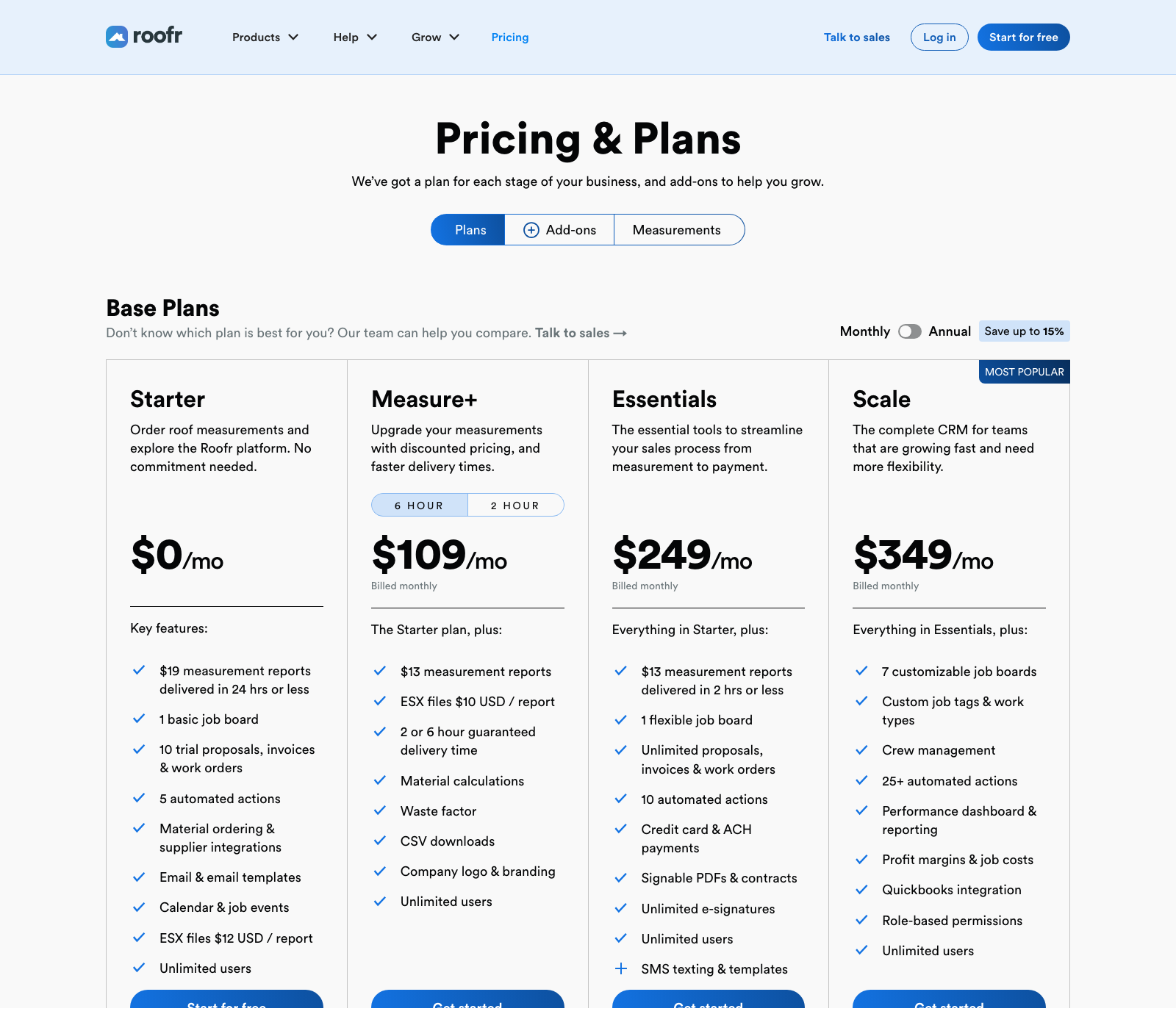
| Roofr | $0, $109, $249, $349/mo monthly; up to 15% off annual. Reports $19 (free tier) or $13. Add-ons: Instant Estimator $125, Roofr Sites $99, AI Receptionist $99 | Matches the page | Unlimited on every tier | Retail roofers under $2M |
| RoofLink | $400 per user/mo plus $1,500 setup, "everything included," no per-measurement fees | Matches the page | Per user | Sales-team retail and storm shops that want canvassing built in |
| JobNimbus | None. Essentials (3 users), Pro (10), Premium (19), Enterprise (20+), all "Request pricing" | $225 (Growing) or $550 (Established) base, plus $20 to $75 per user by role; texting $49 to $249/mo (Projul, updated Mar 2026) | Capped per tier | Mixed insurance and retail, 2 to 5 crews |
| AccuLynx | None. Pro and Elite, custom quote | $350 to $450/mo for 1 to 3 users, $900 to $1,400 for 5 to 10, implementation $500 to $5,000 (Roofing Software Guide, flagged as directional) | Per user | Insurance restoration, 5+ crews |
| JobProgress | Quote | $60 to $80 per user/mo | Per user | Process-driven retail with a customer portal |
| Jobber | $49, $139, $199/mo monthly; $29, $99, $149 annual | Matches the page | Seat bundles | Repair crews, no insurance work |
| Verdict | Two of the six publish prices, and both are cheaper per seat than the two that do not. Get JobNimbus and AccuLynx quotes in writing at your real user count, with texting and portal add-ons itemized, before comparing anything. | |||
Why roofing CRMs are their own category
The insurance workflow is the first filter, and it removes the generalist tools immediately. The second filter is the roofing-specific integration stack that generalist tools do not touch: aerial measurement ordering (EagleView, HOVER, or a native measurement service) inside the job record rather than on a separate tab; material ordering through ABC Supply, SRS, or Beacon APIs, since fewer clicks between measurement and order is real margin; per-rep commission math on every job (base, override, house share) for sales-team shops; photo documentation that organizes hundreds of claim photos by elevation and damage cause; and financing hand-offs to GreenSky, Service Finance, or Enerbank for retail closes. Those requirements are why the leaders here (AccuLynx, JobNimbus, Roofr, RoofLink, JobProgress) are roofing-native rather than adapted from plumbing software.
Find your archetype before you compare
The most common mistake is buying software for the company you want to be in three years instead of the one you run today.
Insurance-restoration operation, five or more crews
Storm work, hail belts, full replacements, PMs and supplement writers plus a materials manager. AccuLynx is the default because it was built for exactly this. JobNimbus is the credible alternative at a lower price.
Mixed insurance and retail, two to five crews
Half the book is claims, half is straight retail replacement, and you want the insurance features without enterprise money. JobNimbus wins almost every time.
Retail-focused under $2 million
No storm work, replacements sold direct to homeowners, and you need instant measurements and clean proposals plus a photo trail. Roofr is the modern value pick. JobProgress is the established alternative if the customer portal matters. RoofLink fits if you run door-knocking canvassers and want the canvass map and CRM plus production in one login.
Small repair-focused crew
Service calls, minor repairs, gutters, small tear-offs, with replacements as the exception. Jobber or Workiz serve you well because you do not need Xactimate or supplement tracking. Do not overbuy.
The six platforms, reviewed
1. AccuLynx
Best for: insurance restoration at five crews and up, storm chasers, hail-belt shops, and hybrids doing $3 million or more. Pricing: quote only, on two plans (Pro and Elite). The Elite tier carries the restoration essentials: supplement tracking, production calendar, permit and mortgage-check tracking, commissions, plus multi-location setup, which means the plan most restoration shops actually need is the one with no public price. Third-party estimates put a small team at $350 to $450 a month and a 5-to-10-user shop at $900 to $1,400, plus implementation, and every one of those sources flags its own numbers as unconfirmed. AccuPay, the customer portal, SmartDocs, plus texting are separate add-ons. Strengths: the deepest insurance workflow in the category, native EagleView ordering, direct supplier ordering with all three majors, enterprise-grade reporting. Weaknesses: cost, an interface that is functional rather than modern, real training time for new hires, and capacity you cannot use if you are under $1.5 million or under 25% insurance mix. Our take: if storm restoration is your model, AccuLynx is the default and earns its price. If it is not, keep reading.
2. JobNimbus
Best for: mixed insurance and retail shops with two to five crews and an ops person willing to own the buildout. Pricing: the pricing page lists four tiers by user cap (Essentials up to 3, Pro up to 10, Premium up to 19, Enterprise for 20-plus) with a "Request pricing" button on each and a 14-day trial with no card. Projul's March 2026 compilation reports $225 or $550 a month base plus per-user fees by role ($75 admin, $55 sales and office, $30 field, $20 subcontractor), with the Engage texting bundle at $49 to $249 a month. That structure is why a "$225 a month" JobNimbus quote for a six-person shop can land near $600. Strengths: customizable boards let you build separate retail, insurance, or service pipelines; solid claim and supplement fields; mature EagleView and HOVER integrations; a large connector marketplace including CompanyCam and Beacon PRO+. Weaknesses: the customization is also a tax, since shops without a process owner end up with a half-configured CRM nobody trusts, and the mobile app trails Roofr. Our take: the best middle-market roofing CRM for a shop that will design its process first.
3. Roofr
Best for: retail roofers under $2 million who want measurements and proposals plus payment in one modern loop without enterprise pricing. Pricing: the clearest in the category, and it changed this year. Starter is free with $19 measurement reports and ten trial proposals. Measure+ at $109 a month drops reports to $13 with guaranteed delivery times. Essentials at $249 adds unlimited proposals, invoices, e-signatures, and card and ACH payments (SMS texting is a $49 add-on there). Scale at $349 adds seven job boards, crew management, job costing, QuickBooks sync, plus 25-plus automations. Every tier has unlimited users, and annual billing takes up to 15% off. The add-on shelf is where it grows: the Instant Estimator is $125 a month, Roofr Sites $99, and the AI Receptionist $99. Strengths: the fastest measurement-to-proposal-to-payment loop in roofing, a proposal tool that closes better than PDF attachments, and the cleanest interface here. Weaknesses: lighter on insurance; ESX import and supplement tracking exist but are not the platform's DNA. Our take: the first CRM most retail roofers should try, and at unlimited users the cheapest per seat once the team passes three people.
4. RoofLink
Best for: sales-driven retail and storm shops that run canvassers and want the canvass map, CRM, measurements, plus production in one system. Pricing: published and unusual: $400 per user per month plus a $1,500 one-time setup fee, with measurements and add-ons included rather than metered. For a three-user shop that is $1,200 a month, which is Roofr Scale money three and a half times over; for a ten-user sales team it is $4,000 a month, which is where the "no per-measurement costs" line starts to matter, because a canvassing team ordering 200 reports a month on Roofr's $13 pricing adds $2,600 to Roofr's bill. Strengths: the canvassing app is the differentiator, the measurement tool is included, and the per-user model is predictable. Weaknesses: the per-user price punishes office staff and part-time users, and the setup fee is a real commitment for a two-crew shop. Our take: run the seat count and the report volume side by side against Roofr before choosing; RoofLink wins on high-volume canvassing teams and loses everywhere else on price.
5. JobProgress
Best for: process-driven retail shops that want a stage-gated workflow tool with a customer portal, sitting between Roofr and JobNimbus in depth. Pricing: quote-based, typically $60 to $80 per user per month. Strengths: the customer-facing portal, where homeowners see job status, documents, or change orders, is a differentiator most competitors do not match; workflow automation is solid; QuickBooks sync is reliable. Weaknesses: the interface feels dated next to Roofr, the integration integration marketplace is smaller than JobNimbus's, and the insurance workflow is shallower than either. Our take: underrated for retail shops that value the portal; if that feature does not matter to you, Roofr or JobNimbus is usually stronger.
6. Jobber
Best for: small repair-focused crews doing service work: leak repairs, gutters, small tear-offs, patch jobs. Not full replacements, not restoration. Pricing: transparent: Core $49, Connect $139, Grow $199 a month, or $29, $99, and $149 on annual, with seat bundles above that; the full breakdown is in our Jobber pricing guide. Strengths: the best mobile app in field service, a one-to-three-day setup, the cleanest QuickBooks Online sync, and review requests that fire within minutes of job completion, which is the biggest lever in our review acquisition playbook. Weaknesses for roofing: no Xactimate integration, no supplement or ACV/RCV workflow, no supplier ordering, manual aerial measurement attachment, and commission splits in a spreadsheet. Our take: excellent software that is a repair-crew tool inside the roofing category. Readers in that archetype get 20% off for six months on monthly plans, or 20% off annual, through our partner link at go.getjobber.com/skillmammoth.
The CRM runs the jobs. What fills it?
We build roofing websites with instant estimates, run the local SEO and review system behind them, and wire every lead into whichever CRM you chose above with its source intact. Free 10-minute audit of your current site to start.
The roofing-specific integration scorecard
Xactimate. AccuLynx has native ESX import tied to supplement tracking, best in class. JobNimbus supports ESX import with structured insurance fields. Roofr and RoofLink handle it at a basic level. JobProgress has insurance fields with lighter ESX handling. Jobber has none; if you need Xactimate, cross it off.
Aerial measurement. AccuLynx orders EagleView inside the job record and integrates HOVER. JobNimbus has mature integrations with both. Roofr's native measurement service is its flagship, with EagleView and HOVER as options. RoofLink includes its own measurement tool in the per-user price. JobProgress integrates with more click-through. Jobber is manual attach only.
Supplier ordering. AccuLynx is deepest, with ABC, SRS, plus Beacon ordering tied to job history. JobNimbus has a solid Beacon PRO+ integration with ABC and SRS via connectors. Roofr's supplier integrations are growing. JobProgress and RoofLink are available but less native. Jobber has none.
QuickBooks. Jobber is cleanest for QuickBooks Online. AccuLynx and JobNimbus are thorough but usually need an accountant on the initial chart-of-accounts mapping. Roofr's sync lives on the Scale tier and is improving. JobProgress is reliable and older-generation.
Call tracking and web leads. AccuLynx and JobNimbus have first-class CallRail integrations that push recordings and source into the customer record; Roofr, RoofLink, plus JobProgress get there through Zapier or lead-source fields; Jobber has native CallRail but needs manual source tagging. The local SEO traffic and LSA leads we send have to land in the CRM automatically with source and campaign intact, and every platform here supports a webhook or form connector that does it. The attribution stack that turns those tags into cost per acquired customer is in marketing attribution for home service contractors.
Migration: when to switch, and when not to
Move from spreadsheets or Jobber to Roofr when measurement, proposal, plus payment live across three tools and you want them in one. Move from Roofr or JobProgress to JobNimbus when insurance passes a quarter of revenue and your tool cannot handle supplements or ESX cleanly. Move from JobNimbus to AccuLynx when you cross five crews, storm work is a real revenue line, and the customization tax costs more than the sticker would. Moving down from AccuLynx to JobNimbus is rare and valid when insurance dries up in your market and the book is 80% retail.
The migration itself takes four to six weeks: two weeks to export customers, jobs, open supplements, plus open invoices and clean the customer file (the step everyone skips and regrets); a week to import, configure the price book and QuickBooks sync, and wire measurement and supplier accounts; a week of training the office and one lead PM while running parallel for seven to ten days; then full cutover, with the old subscription cancelled 30 days later rather than the same day. Do not migrate between April and September in most markets; hurricane-belt operators should flip that calendar.
Your CRM is only 20% of the equation
If your book is soft, a better CRM will not fix it. Revenue in a roofing shop is acquisition (are enough of the right people finding you), conversion (are you closing the leads you get), and efficiency (are you running closed jobs profitably). The CRM sits in the third bucket, the smallest lever of the three. Shops plateauing at $1 million, $2 million, or $5 million almost always have the ceiling upstream: not enough leads, which is what roofing SEO and how to get roofing leads fix, or not enough of them closing, which is what an instant-estimate front end like RoofMammoth and a five-minute follow-up fix. The software that generates the estimate before the CRM ever sees the lead is compared in roofing estimating software. We build that acquisition and conversion engine and plug it into whichever CRM you already run; the roofing and siding page covers what that looks like.
Decision matrix
| Your situation | Recommended CRM | Reason |
|---|---|---|
| Insurance restoration, 5+ crews | AccuLynx | Deepest claims, supplement, ESX, and supplier stack |
| Mixed insurance and retail, 2 to 5 crews | JobNimbus | Insurance features at mid-market price, customizable |
| Retail-focused under $2M | Roofr | Fastest measurement, proposal, and payment loop; unlimited users |
| Canvassing sales team, high report volume | RoofLink | Canvass app and unmetered measurements at $400 per user |
| Retail, process-driven, customer portal matters | JobProgress | Best customer-facing portal in the category |
| Small repair crew, no insurance work | Jobber | Cheap, fast setup, best mobile app for service work |
| Just starting, one crew, all retail | Roofr (free tier) | Free CRM, $19 reports, upgrade when the math flips |
Two pricing deep-dives sit alongside this guide: JobNimbus pricing, where the plans are published and the prices are not, and CompanyCam pricing for the photo layer most roofers bolt on next to the CRM.
Roofing CRMs are one of four product categories that all use the word CRM, and a company doing service work alongside replacements sometimes belongs in a different one. Our CRM for contractors guide sets out the four shapes and what each costs, and the QuickBooks CRM integration guide covers which of them sync with your accounting both ways.
Frequently asked questions
What is the best CRM for roofing companies?
It depends on the insurance mix and crew count. AccuLynx for insurance restoration at five crews and up, JobNimbus for mixed insurance and retail at two to five crews, Roofr for retail roofers under $2 million, RoofLink for canvassing sales teams, JobProgress for process-driven retail shops that want a customer portal, and Jobber only for repair crews with no claims work.
How much does a roofing CRM cost in 2026?
Roofr publishes $0 to $349 a month with unlimited users and $13 to $19 measurement reports. RoofLink publishes $400 per user per month plus a $1,500 setup fee. JobNimbus and AccuLynx are quote only; third parties report JobNimbus at $225 to $550 base plus $20 to $75 per user, and AccuLynx at $350 to $450 a month for a small team before add-ons and implementation.
AccuLynx or JobNimbus?
AccuLynx for five-plus-crew insurance restoration operations with dedicated PMs and supplement writers. JobNimbus for two-to-five-crew mixed shops with someone willing to customize the boards to your process. AccuLynx is opinionated and expensive; JobNimbus is flexible and mid-priced, and its per-role user fees are the number to get in writing.
Is Roofr good for a roofing company?
For retail-focused roofers, yes. It is the best-priced option in the category because every tier includes unlimited users. Its measurement-to-payment loop is the fastest here. It is the wrong pick for restoration-heavy shops, where Xactimate and supplement tracking are the whole job.
Do I need Xactimate integration in my roofing CRM?
If any revenue comes from insurance restoration, yes; manual ESX handling wastes hours per claim and leaks supplements. If you are 100% retail, no. Skip the platforms priced around it.
Can Jobber work for a roofing business?
For repair-focused crews doing service work, gutters, or minor tear-offs, yes. It is excellent for the price. For insurance restoration or high-volume replacements, no: it has no Xactimate, no supplement tracking, and no supplier ordering. Repair-crew readers can get 20% off through go.getjobber.com/skillmammoth.
Does Skill Mammoth set up or manage roofing CRMs?
No. We build the marketing engine that feeds the CRM (website, local SEO, LSAs, review workflow, instant estimates, attribution) and make sure lead source data flows in cleanly. Day-to-day CRM operation stays with your team. When none of these platforms fit, we build custom CRMs and dashboards as flat-fee projects you own.
Disclosure: Skill Mammoth is a Jobber Partner and may earn a commission from signups through our link. As this guide makes clear, Jobber is the right fit for a minority of roofing operations. Recommendations are based on client experience and platform fit, not commissions. Comparing tools beyond your trade? See the ranked top ten in best field service software.
Want the leads to show up already tagged?
Roofing websites that rank and estimate instantly, then push every lead into your CRM with its source attached. Flat pricing from $350 a month, no contracts.