TL;DR
Claude for Small Business is Anthropic's small-business package, launched May 13, 2026: 15 ready-to-run workflows and 15 skills that plug Claude into QuickBooks, PayPal, HubSpot, Canva, DocuSign, Google Workspace, and Microsoft 365. It runs inside Claude Cowork, the desktop app, and nothing gets sent, posted, or paid without your approval. It ships free with a paid Claude plan, which starts at $17 a month. For a service business, the real wins are the unglamorous ones: reconciling QuickBooks against PayPal, drafting collection emails, and turning your morning chaos into one brief. What it won't do is know your business. That part is still setup, and it's where most owners stall.
We run our agency on Claude, so this review comes from daily use rather than a press release. It writes first drafts of our proposals, powers the review responses and dashboards we build for clients, and sits behind the custom CRMs we ship. When Anthropic pointed all of that at small businesses specifically, we paid attention. Here's what launched, what it does well, and where you'll still want a human who has wired this up before.
What Claude for Small Business actually is
Anthropic announced it on May 13, 2026 as a package you toggle on inside Claude Cowork, their desktop app. No IT project, no consultants required to start. It ships with 15 agentic workflows across finance, operations, sales, marketing, HR, and customer service, plus 15 skills for repeatable tasks, and it connects to the tools a small business already runs on: Intuit QuickBooks, PayPal, HubSpot, Canva, DocuSign, Google Workspace, and Microsoft 365.
The control model matters more than the feature list. You pick a task, Claude proposes a plan, and you approve it before anything sends, posts, or pays. Claude also inherits your existing account permissions, so it can only touch what your login can already touch. That design answers the fear Anthropic says half of surveyed owners named as their single biggest hesitation about AI: data security.
The four workflows worth stealing, even if you never install it
The launch demos four use cases, and they map cleanly onto a service business:
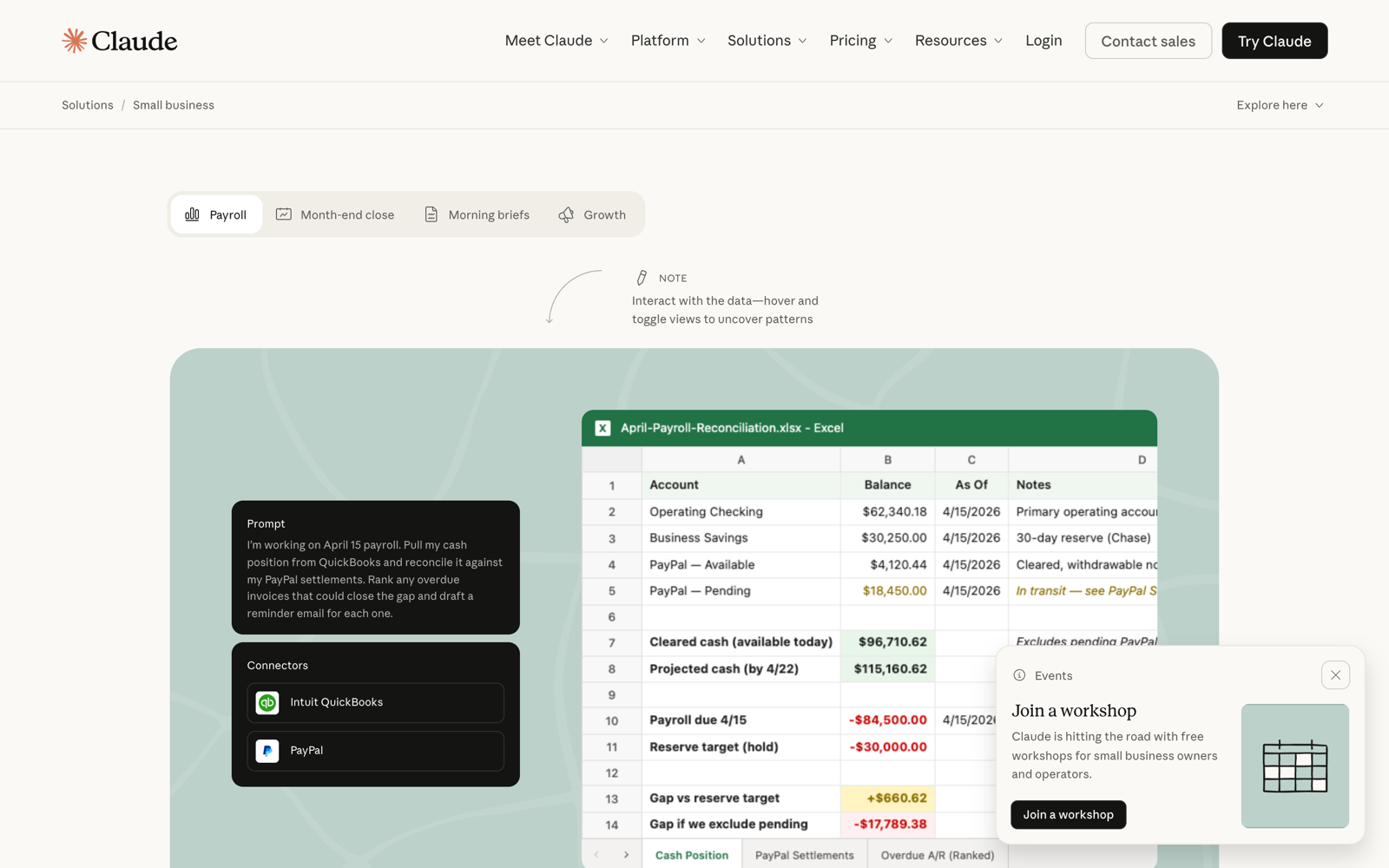
- Payroll week cash checks. Reconcile your cash position, find the gap between what's due and what's cleared, and draft a collection email for every overdue invoice that could close it.
- Month-end close. QuickBooks against PayPal, discrepancies flagged, and a plain-English narrative of your P&L instead of a report you never open.
- Morning briefs. One daily summary combining cash, pipeline, and calendar, delivered to Slack before the first job of the day.
- Campaign work. Analyze revenue trends, build the Canva assets, segment the list in HubSpot.
If you read that list and thought "that's my Sunday night," that's the point. This is back-office work, and back-office work is where AI currently earns its keep for owners. It is not going to climb a roof or quote a panel swap.
What it costs
The plugin itself is free; you need a paid Claude plan to use Cowork. Pro runs $17 a month billed annually or $20 monthly, and Team runs $20 per seat annually for 2 to 150 people. The full tier breakdown, including when Max and Team seats make sense, is in our Claude pricing guide for small businesses. Short version: most owners start on Pro and only add Team when a second person needs in.
of U.S. GDP comes from small businesses, per the figures Anthropic cited at launch. The tooling wave that hit enterprises in 2024 and 2025 is now being packaged for the businesses that actually employ half the private-sector workforce.
The honest limitations
Three things the launch page won't tell you. First, the workflows are generic on day one. "Month-end close" assumes your QuickBooks is coherent; if your chart of accounts is a junk drawer, Claude reconciles a junk drawer. Second, it's desktop-first: the full Cowork experience lives in the desktop app, not your phone, and field-heavy owners live on their phones. Third, the connectors cover the big seven tools, and small service businesses often run on the long tail: ServiceTitan, Jobber, Housecall Pro. Those need connectors from the wider directory or custom ones, which is a different project.
None of that is a reason to skip it. It's the difference between installing the thing and getting value from the thing, and it's the same gap we see with every tool in the contractor app stack.
Want this wired into your business, not just installed?
We set up AI workflows for service businesses: the connectors, the skills, and the guardrails, mapped to how your shop actually runs. Flat pricing, no retainer required.
How to start without breaking anything
The setup order that works: download the Claude desktop app, toggle on the Small Business plugin, and connect one tool, not seven. QuickBooks is the highest-value first connection for most owners because the finance workflows produce something you can verify against reality. Run the morning brief for a week. Then add the second connector. Anthropic also built a free AI Fluency for Small Businesses course with PayPal, taught by actual business owners, which is a better on-ramp than any prompt-tips thread.
And if your team is the bottleneck rather than the tooling, that's a training problem: we run hands-on AI training for exactly this, covering Claude, ChatGPT, Gemini, and Copilot on your real workflows.
Where this fits in the bigger AI picture for your business
Using AI is half the story; being found by it is the other half. The same homeowners asking Claude to reconcile invoices are asking ChatGPT which roofer to call, and that visibility game has its own rules. That side is covered in how to get ChatGPT to recommend your business and our AI search optimization service. Owners who get both sides working, AI running the back office and AI recommending them to customers, are playing a different game than the ones still debating whether this stuff is real.
Frequently asked questions
What is Claude for Small Business?
A package Anthropic launched May 13, 2026 that bundles 15 ready-to-run workflows and 15 skills into Claude Cowork, connected to QuickBooks, PayPal, HubSpot, Canva, DocuSign, Google Workspace, and Microsoft 365. You approve every action before anything sends, posts, or pays.
How much does Claude for Small Business cost?
The plugin is free; it requires a paid Claude plan. Pro is $17 a month billed annually ($20 monthly) and the Team plan is $20 per seat annually for teams of 2 to 150. There is no separate small-business SKU to buy.
Is Claude safe to connect to my QuickBooks and email?
Claude inherits your existing account permissions, so it can only access what your login already can, transfers are encrypted, and workflows require your approval before anything is sent or paid. Anthropic states business data isn't used to train models by default on business plans. The practical risk is the same as any integration: connect one tool at a time and verify the output.
What's the difference between Claude for Small Business and just using Claude?
The underlying assistant is the same. The package adds pre-built workflows and skills tuned to small-business operations plus one-toggle setup of the seven core integrations, so you start from working automations instead of a blank chat box.
Does Claude for Small Business work for contractors and trades?
The finance, brief, and marketing workflows work for any business on QuickBooks and Google or Microsoft tools. Field-service platforms like ServiceTitan, Jobber, and Housecall Pro aren't in the core seven, so trades get the most value on the money and admin side first, then extend with directory or custom connectors.
Not sure where AI actually fits in your shop?
Book a free strategy call. We'll map your workflows, tell you what to automate first, and what to skip. No slideware.