
 ChatGPT
TL;DR
- A CRM with invoicing built in costs $0 to $299 a month in 2026, and the subscription is the small number.
- Processing fees on $26,000 a month of card payments run $673 to $789 a month depending on the platform, which is more than any plan on this page.
- If you dispatch crews, Jobber Core ($29 a month annual, 2.9% + 30¢ on cards, 1% on ACH) is the pick, with Housecall Pro ($59, cards from 2.59%) close behind.
- If you sell projects and want the CRM free, HubSpot's free tier sends invoices with HubSpot payments at 2.9% and no platform fee for a year.
- If you bill retainers, HoneyBook Starter ($29) has recurring invoices and autopay on every plan.
- Nine tools are priced below from their own pages on October 11, 2026, with the fee math worked out on 40 invoices a month.
Disclosure: Skill Mammoth is a Jobber partner. Readers get 20 percent off through our link and we earn a commission if you sign up. We have no arrangement with any other vendor on this page, and every price and fee below was read off the vendor's own site on October 11, 2026.
Why the processing rate matters more than the plan price
Every CRM on this list will send an invoice. The differences that cost money: whether the invoice can repeat on a schedule and charge a saved card, the card rate, the ACH rate and whether it is capped, and whether the paid invoice lands in QuickBooks without a second person retyping it. A home service company doing $300,000 a year through card payments pays roughly $8,000 to $9,500 in processing fees across these nine platforms. The subscriptions run $348 to $3,588 a year. The fee column is the comparison most roundups leave out.
Nine CRMs with native invoicing, priced
| Tool | Cheapest tier with invoicing | Card fee | ACH fee | Recurring invoices | QuickBooks Online sync |
|---|---|---|---|---|---|
| Jobber | Core, $29 annual ($49 monthly) | 2.9% + 30¢ | 1% | Automatic card charging from Connect, $99 | Connect, $99 |
| Housecall Pro | Basic, $59 annual ($79 monthly) | From 2.59%, no per-item fee published | 1% | Recurring service plans on Max, $299 | Essentials, $149 |
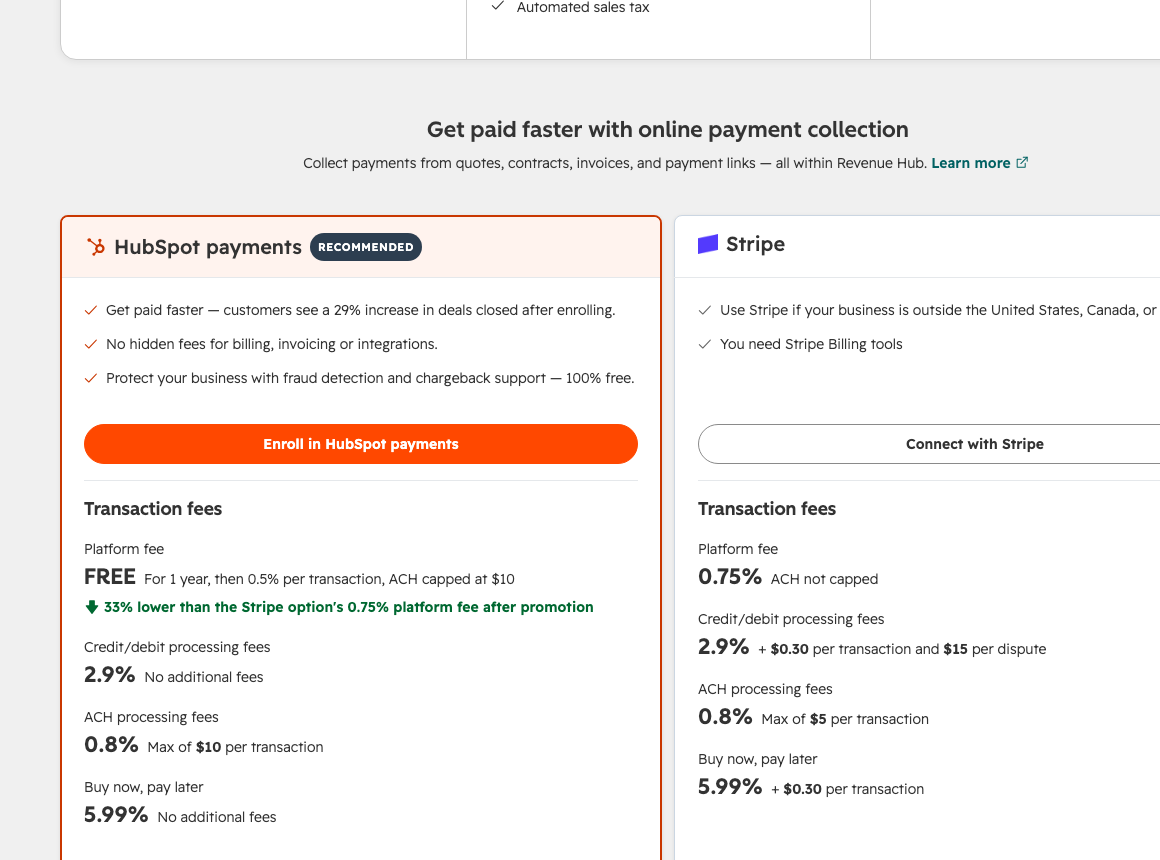
| HubSpot | Free, $0 (invoices, payment links, subscriptions) | 2.9% with HubSpot payments, plus 0.5% platform fee after year one; Stripe option 2.9% + 30¢ plus 0.75% | 0.8%, max $10; Stripe option 0.8% max $5 | Subscriptions on Free | Listed on the Revenue Hub grid; confirm the tier |
| Zoho Bigin + Zoho Books | Bigin Express $7 a user annual plus Books Free | 2.9% + 30¢ (Zoho Payments) | 0.8%, capped at $5 | Books Free | Bigin Express lists a QuickBooks integration; Books is its own ledger |
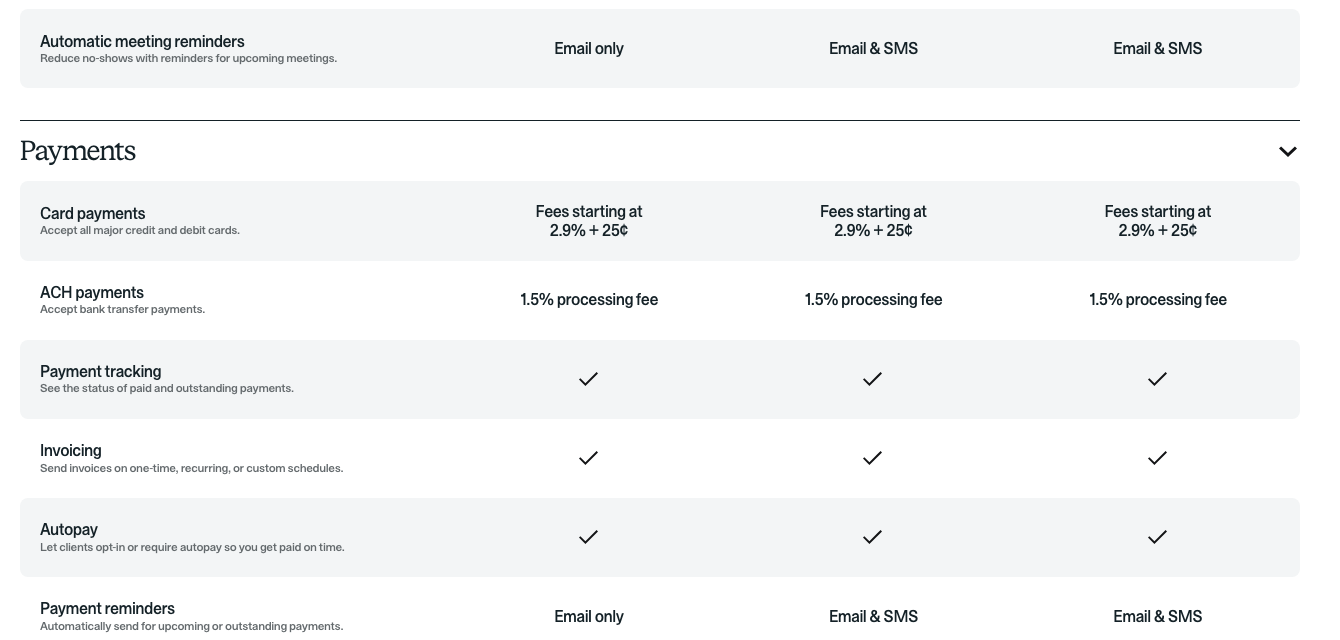
| HoneyBook | Starter, $29 annual | From 2.9% + 25¢ on the plan grid (2.7% + 10¢ in the FAQ on the same page) | 1.5% | All plans, with autopay | Essentials, $49 |
| Dubsado | Starter, $335 a year (about $28 a month) | Stripe's rate: 2.9% + 30¢ | 0.8%, capped at $5 | All plans, with autopay on Dubsado Payments | Premier, $525 a year ("popular bookkeeping software") |
| GoHighLevel | Starter, $97 monthly ($970 annual) | Stripe's rate: 2.9% + 30¢ | 0.8%, capped at $5 | Via workflow, with auto-pay | Yes, one way from HighLevel to QuickBooks |
| vcita | Kickstart, $35 annual (basic invoices) | 2.9% + 30¢ | Not published | Manage + Grow, $93 | Manage + Grow, $93 |
| Keap | $299 monthly, 2 users ($2,988 a year) | 2.99% + 30¢ (Keap Pay) | 1% up to $10, plus 30¢ | Yes | Yes, when an invoice is sent or paid |
| Verdict | Card rates cluster at 2.9 percent and the subscription spread is $0 to $299, so the decision comes down to fit (dispatch board versus sales pipeline versus client portal) and to the ACH column, where a capped 0.8 percent beats an uncapped 1.5 percent by $190 a month on 40 invoices. | ||||
The worked example: 40 invoices a month at $650
Take a two-truck plumbing or remodeling outfit sending 40 invoices a month at $650, or $26,000 of billing. Assume every customer pays by card, then look at what moving half of them to bank transfer saves.
| Platform | Card fee per $650 invoice | Monthly on 40 card invoices | Monthly if 20 pay by ACH instead | Plan on top |
|---|---|---|---|---|
| Housecall Pro (2.59%, no per-item fee) | $16.84 | $673 | $467 | $59 |
| HubSpot payments, year one (2.9%) | $18.85 | $754 | $481 | $0 |
| HoneyBook (2.9% + 25¢) | $19.10 | $764 | $577 | $29 |
| Jobber (2.9% + 30¢) | $19.15 | $766 | $513 | $29 |
| Zoho, Dubsado, GoHighLevel, vcita (2.9% + 30¢) | $19.15 | $766 | $483 (vcita ACH not published) | $7 to $97 |
| Keap Pay (2.99% + 30¢) | $19.74 | $789 | $531 | $299 |
| HubSpot payments, year two (2.9% + 0.5% platform) | $22.10 | $884 | $611 | $0 |
| Verdict | All-card, the spread between the cheapest and dearest platform is $211 a month. Moving half your customers to ACH on a capped 0.8 percent processor saves $283 a month, or $3,396 a year, which is why the ACH column outranks the card column once you pass about $15,000 a month in billing. | |||
Two caveats. Housecall Pro publishes "as low as 2.59%" with no per-transaction cents, so its real figure depends on the rate you are quoted. HubSpot's free year on the platform fee is a promotion, so budget on the year-two line.
1. Jobber: the field service pick, $29 a month
Jobber Core at $29 a month on annual billing ($49 monthly) includes quoting, invoicing and online payments at 2.9% + 30¢ on cards, 2.7% + 30¢ on Tap to Pay, and 1% on bank payments, with instant payouts an extra 1 percent. Automatic payments, which charge a saved card for recurring work such as maintenance plans and weekly service, arrive on Connect at $99, and so does the QuickBooks Online sync. On 40 invoices at $650, all paid by card, you pay $766 a month in processing, and the same customers on ACH cost $260. Our Jobber pricing breakdown covers the team tiers and the add-ons. Readers get 20 percent off through our partner link, and we earn a commission on it.
Fit: any company dispatching trucks that invoices on completion. The miss: Core has no automatic card charging, so a lawn company billing monthly needs Connect.
2. Housecall Pro: lowest published card rate, $59 a month
Basic is $59 a month annual ($79 monthly) for one user and includes invoicing with automated reminders and 24/7 customer payment. Card processing is advertised "as low as 2.59%," checks deposit free through the app, and bank payments carry a 1 percent fee. The QuickBooks Online sync lands on Essentials at $149 for five users, and recurring maintenance agreements land on Max at $299 for eight. At 2.59 percent flat, the 40-invoice example costs $673 a month, the lowest figure here, with the caveat that no per-item cents are published and the rate is quoted, not listed. See Housecall Pro pricing for what the plan-picker actually quoted us.
Fit: a crew of two to eight that wants invoicing and QuickBooks on one bill. The miss: recurring service plans sit on the $299 tier.
3. HubSpot: free invoicing, with a platform fee after year one
HubSpot moved invoices, payment links and subscriptions into the free tier of what it now calls Revenue Hub. HubSpot payments, for US, Canada and UK businesses, charges 2.9 percent on cards with no per-item fee and 0.8 percent on ACH capped at $10, with a platform fee that is free for one year and then 0.5 percent per transaction (ACH capped at $10). HubSpot payments needs Starter or above, and Sales Hub Starter is $7 a seat annual per our HubSpot pricing guide. The Stripe route works on Free at 2.9% + 30¢ plus a 0.75 percent platform fee, ACH 0.8 percent capped at $5. Quotes with e-signature need Professional at $95 a seat. A QuickBooks Online integration appears on the grid; confirm the tier before you count on it.
Fit: a design-build or commercial firm that sells over months and bills in stages. The miss: no dispatch board, and the year-two card cost ($884 on the example) is the highest on the page. Our HubSpot alternatives post ranks the exits.
Want the fee math run on your real numbers?
Bring your invoice count, average ticket and how many customers would pay by bank if you asked. Fifteen minutes gets you the annual processing cost on each platform you are considering, and whether the $29 plan or the $149 plan is the right one.
4. Zoho Bigin plus Zoho Books: the cheapest stack with a capped ACH fee
Zoho splits the job across two products. Bigin Express is $7 a user a month on annual billing ($9 monthly) and includes the Zoho Books and Zoho Invoice integration, payment links through Stripe or PayPal, and a QuickBooks integration. Zoho Books Free covers one user plus an accountant with recurring invoices and online payments included; Standard is $15 a month annual ($20 monthly) for three users. Zoho Payments, the in-house processor, charges 2.90% + 30¢ on domestic cards and 0.8 percent on ACH capped at $5, with a $15 dispute fee and 1.4 percent for instant payouts. For a solo operator that is $7 a month for a CRM that writes invoices into a free ledger, and $200 a month in ACH fees on the example if customers pay by bank.
Fit: a one-to-three person firm that would rather have Books than QuickBooks. The miss: two logins, two products to learn, and the full Zoho CRM at $14 a user is a different setup from Bigin.
5. HoneyBook: recurring invoices on every plan, $29 a month
Starter is $29 a month billed yearly and includes invoices, payments, proposals and contracts, with recurring invoices and autopay on all three tiers. The QuickBooks Online integration starts at Essentials, $49. The card rate is the thing to check on the day you sign: the plan grid says fees start at 2.9% + 25¢ while the FAQ on the same page says 2.7% + 10¢. ACH is 1.5 percent uncapped, the highest bank rate here, which turns a $650 bank transfer into a $9.75 fee against $5 on Zoho or Stripe.
Fit: a consultant, designer or small studio billing retainers and deposits. The miss: no crew scheduling, and $390 a month in ACH fees on the example if everyone pays by bank.
6. Dubsado: $335 a year, Stripe's rates
Dubsado prices annually only, $335 a year for Starter and $525 for Premier, and both include invoices and payment schedules with unlimited clients and three extra users free. Dubsado Payments runs on Stripe and, per the help center, "follows Stripe's current processing fees," which on Stripe's US page means 2.9% + 30¢ on cards and 0.8 percent ACH capped at $5. Recurring invoices with autopay are supported on Dubsado Payments for both card and ACH; PayPal cannot run autopay. The bookkeeping connection is a Premier feature, and the pricing page says "popular bookkeeping software" rather than naming QuickBooks. You cannot pass processing fees to the client, so build them into the price.
Fit: a service business with a long client intake (proposal, contract, deposit, installments). The miss: new Square connections are no longer allowed in the current version, so Stripe pricing is effectively the pricing.
7. GoHighLevel: $97 a month, invoicing included
Starter at $97 a month ($970 a year) includes "Payments and Invoicing" alongside the funnels and texting most people buy it for. Recurring invoices run through a connected gateway, Stripe in practice, with auto-pay charging a stored card after the first successful payment. There is no separate HighLevel processing rate on the pricing page, so the cost is Stripe's 2.9% + 30¢ and 0.8 percent capped ACH. The QuickBooks integration sends invoices marked as sent in HighLevel into QuickBooks and records payments as sales receipts; it is one way, drafts do not sync, and existing invoices do not sync unless you import them at setup. Usage charges for texting and AI sit on top of the $97, which our GoHighLevel pricing post itemises.
Fit: a company already on HighLevel for follow-up that wants the invoice on the same contact record. The miss: the sales-tax handling in the QuickBooks sync has open complaints on the vendor's idea board.
8. vcita: $35 a month, with the useful parts on $93
Kickstart is $35 a month on annual billing and includes online payments with basic invoices. Recurring payments, billing automation and the QuickBooks integration are on Manage + Grow at $93. vcita's own processor is 2.90% + $0.30 with one-to-two-day payouts, and the same page lists Stripe at the same rate, Square at 3.5% + 15¢ and PayPal at 2.99% + 49¢ as the connected alternatives. ACH pricing is not published.
Fit: an appointment-based firm that wants booking, invoicing and a client portal under $100. The miss: invoices on the $35 tier are marked "Basic," and the page's own 15 percent and 20 percent annual-discount claims do not agree.
9. Keap: $299 a month for two users
Keap is one plan, $299 a month billed monthly or $2,988 a year, with two user licenses and extra users at $39. One-time and recurring invoices, past-due reminders and subscription billing are included. Keap Pay, the native processor, is priced in the processing agreement updated July 1, 2026: 2.99 percent plus 30¢ on cards, and 1 percent on ACH up to $10 plus 30¢ per item. The QuickBooks Online sync pushes an invoice when it is marked sent or paid, and matches contacts on email address. On the 40-invoice example Keap Pay costs $789 a month on cards, the most of any native processor here.
Fit: a company whose sales engine is email automation. The miss: $3,588 a year of subscription for invoicing that costs $29 elsewhere.
Three to skip
Thryv. ThryvPay publishes clear rates (2.9% + 30¢ online, 2.6% + 30¢ card-present, ACH 1 percent with a $1 minimum and $9 cap). The pricing page does not. Starter at $99 lists a website builder, listings and review tools with no invoicing line, Signature is $399 ($4,068 a year), and the plan that includes estimates and invoices is not identified on the page. Confirm the tier with sales before you compare it to anything above.
Bitrix24. Invoices and estimates arrive on Professional at $199 a month annual for 100 users, and online payments at Standard, $99 for 50. The free tier has no invoicing. For a five-person shop that is $2,388 a year for a feature Jobber includes at $29, inside a product built for 100 seats.
Salesforce Starter Suite. It is $25 a user a month and its pricing page says "transaction fees apply" without saying what they are, and it names quotes and payment links but not invoices. Invoicing on Salesforce is an AppExchange purchase on top. It tops the search results for this keyword because of its size, not its invoicing.
Which one for you
| Your situation | Pick | Monthly cost on the 40-invoice example (plan plus card fees) |
|---|---|---|
| Dispatching trucks, invoicing on completion | Jobber Core, then Connect when you need automatic card charging and QuickBooks | $795 ($29 + $766) |
| Crew of five that wants the lowest card rate | Housecall Pro Essentials with QuickBooks sync | $822 ($149 + $673) |
| Project sales over months, billed in stages, no dispatch | HubSpot Free with HubSpot payments (Starter seat for the processor) | $761 year one ($7 + $754), $891 year two |
| Solo professional, wants a ledger not a QuickBooks bill | Bigin Express plus Zoho Books Free | $773 ($7 + $766), $207 if clients pay by ACH |
| Retainers and deposits, client-facing portal | HoneyBook Starter or Dubsado Starter | $793 ($29 + $764) or $794 ($28 + $766) |
| Already on HighLevel for follow-up | Add invoicing on Starter, connect QuickBooks | $863 ($97 + $766) |
| Verdict | The plan is a rounding error next to the fees. Pick the shape that matches how you sell (dispatch board, pipeline or client portal), then push every customer who will go there onto ACH, where the capped 0.8 percent processors save $3,000 a year on this volume. | |
What "QuickBooks sync" means on each one
The depth differs more than the checkmarks suggest. Jobber and Housecall Pro reconcile on a schedule in both directions. GoHighLevel is one way and skips drafts. Keap only sends an invoice once it is sent or paid. Zoho's answer is to replace QuickBooks with Books, which is fine until your accountant says otherwise. Our QuickBooks CRM integration guide sorts the four depths of sync and which contractors need the deep end.
Before buying, read the contractor CRM categories post: a sales CRM with invoicing bolted on is the wrong shape for anyone who dispatches, and a field service platform is the wrong shape for anyone selling $40,000 projects over four months. The field service software roundup covers dispatch.
The CRM collects the invoice. We fill the calendar that creates it.
Skill Mammoth builds the website and local SEO that puts a home service company in front of the customers it wants, with the map grid before and after to prove it. Pick the software above; we handle the demand.
Frequently asked questions
What is the best CRM with invoicing built in?
By business shape, from vendor pages on October 11, 2026: Jobber Core ($29 a month annual) or Housecall Pro Basic ($59) for companies dispatching crews; HubSpot Free ($0, with a $7 Starter seat for HubSpot payments) for project sales billed in stages; HoneyBook Starter ($29) or Dubsado Starter ($335 a year) for retainers and deposits; Bigin Express plus Zoho Books Free ($7) for a solo professional who wants the ledger included.
What does a CRM with invoicing and payments cost per month?
$0 (HubSpot Free, Zoho Books Free) to $299 (Keap) for the subscription, plus processing. On 40 invoices a month at $650, card fees run $673 (Housecall Pro at 2.59 percent) to $884 (HubSpot payments after the free year), so processing costs two to twenty times the plan.
Which CRM has the lowest credit card processing fee?
Housecall Pro advertises cards "as low as 2.59%" with no per-item fee published. HubSpot payments is 2.9 percent with no cents in year one, then adds a 0.5 percent platform fee. Jobber, Zoho Payments, vcita, Stripe-based tools (Dubsado, GoHighLevel) and HoneyBook's plan grid are all 2.9 percent plus 25¢ to 30¢. Keap Pay is 2.99% + 30¢.
Which CRM has the cheapest ACH or bank payments?
Zoho Payments, Stripe (Dubsado, GoHighLevel) and HubSpot's Stripe option charge 0.8 percent capped at $5, so a $650 invoice costs $5 and a $5,000 invoice costs $5. HubSpot payments is 0.8 percent capped at $10. Jobber and Housecall Pro are 1 percent uncapped. Keap Pay is 1 percent up to $10 plus 30¢. HoneyBook is 1.5 percent uncapped, which is $9.75 on a $650 invoice.
Which CRM with invoicing syncs with QuickBooks Online?
Jobber (Connect, $99), Housecall Pro (Essentials, $149), HoneyBook (Essentials, $49), vcita (Manage + Grow, $93), Keap and GoHighLevel on their standard plans. HubSpot lists a QuickBooks Online integration on its Revenue Hub grid; confirm the tier. Dubsado names "popular bookkeeping software" on Premier. Zoho uses its own Books ledger instead.
Can a CRM send recurring invoices automatically?
HoneyBook and Dubsado do it on every plan with autopay. Zoho Books includes recurring invoices on the free tier. Keap includes recurring invoices and subscriptions. GoHighLevel schedules them through a workflow action with auto-pay. Jobber charges saved cards automatically from Connect ($99). Housecall Pro's recurring service plans are on Max ($299). vcita's recurring payments are on Manage + Grow ($93).