TL;DR
CompanyCam holds a 4.7 on Capterra across 103 reviews, a 4.79 on the App Store across 31,556 ratings and a 4.7 on Google Play across 8,181, all read on October 29, 2026. Reviewers buy it for one reason, photo proof that ends disputes, and complain about one thing more than anything else, the price. Core is $63 a month on annual billing and now caps at two users, Crew is $119 with three seats, and Scale went from $199 to $249 this year. The 2026 complaints that matter are offline uploads failing on Android and slow support. If you run two trucks and already have Jobber, start with the photos Jobber gives you. If you run five or more and fight over "that dent was already there," buy Crew.
We do not sell CompanyCam and it does not pay us. We set it up for roofing and HVAC clients when a CRM's own photo tool falls short, and we have watched crews adopt it in a week and office managers curse the seat bill a quarter later. This review is every public number we could read on October 29, 2026, with the source next to it, plus the complaints that repeat often enough to be a pattern. If you only want the plan prices, our CompanyCam pricing breakdown has the seat math; this post is about whether it is worth paying.
Where the ratings come from, and why three of them are one
Search "companycam reviews" and the first page is review aggregators, two G2 pages, Reddit and the vendor's own widget. A Raken ad titled "Is CompanyCam Too Expensive?" sits above all of it, which tells you what the competition thinks the buyer is worried about. Here is every rating we could verify.
| Platform | Rating | Count | What to know |
|---|---|---|---|
| Capterra | 4.7 | 103 reviews | 75% five star, 2% one star |
| Software Advice | 4.7 | 103 reviews | Same Gartner pool as Capterra; support sub-score 4.4, value 4.5 |
| GetApp | 4.7 shown (4.66 raw) | 103 reviews | Same pool again; estimating feature rated 3.8 by 9 users |
| Apple App Store | 4.79 | 31,556 ratings | The biggest sample by far; version 10.0.68 shipped October 28, 2026 |
| Google Play | 4.7 | 8,181 ratings | 1 million-plus installs; the 2026 upload complaints live here |
| Trustpilot | 3.5 | 3 reviews | Too few to mean anything |
| BBB | A+ | 0 complaints | Not accredited; file opened October 5, 2026 |
| G2 | Not readable | About 35 reviews | Blocked to every fetch we tried; count from a search snippet |
| Verdict | Two independent samples that matter: the Gartner pool (103 written reviews) and the app stores (nearly 40,000 ratings). Both land at 4.7 or better. | ||
Capterra, Software Advice and GetApp are all Gartner Digital Markets sites showing the same 103 reviews, so quoting all three is quoting one dataset three times. Most roundups do exactly that. The app store numbers are the better signal for field use, because the people rating there are the crews, not the office.
What reviewers praise, ranked by how often it comes up
1. Photos as proof
The single most repeated reason anyone pays for this. A roofer on Software Advice wrote that they "saved money this year by showing a homeowner that the dent in their gutter was there before we roofed their house." A two-to-ten person construction company uses it "for everything from cover our butts to accountability." Insurance-claim contractors say the timestamped photo trail is the job. If you have ever lost a dispute over pre-existing damage, this is the whole pitch.
2. Crews learn it in a day
"It doesn't take a lot of effort or training to go from being a novice to an expert," from an 11-to-50 employee contractor who switched off AccuLynx's photo tool in April 2026. An office manager notes it is "simple to use despite language barrier between crews and office." For a trade with turnover, no training sessions is a real line item.
3. The CRM link
JobNimbus and AccuLynx come up most. "The fact that it works so perfectly with JobNimbus" is a five-star review in its entirety. Sales reps take photos in the field and they appear on the CRM job record, which is the workflow that saves the office an hour a day. The integrations page lists 20 names server-side, including Jobber, ServiceTitan, QuickBooks Online, Roofr and HighLevel, and claims more than 50 in total.
4. Photo reports that clients love
"It elevates us to clients as they love the photo reports." A roofing accountant put it plainly: "We do roofing so it's not like people can go outside and watch, it's dangerous." Before-and-after reports from the app do the showing for you.
A fifth theme is smaller but real: the photos stay off the phone. Crews taking 300 pictures a job stop running out of storage, and that is the reason several solo operators keep paying.
Not sure which tools your crew actually needs?
A 10-minute Loom on your website and lead handling, plus a written report in 48 hours, tells you where the leaks are before you buy another seat of anything.
What reviewers complain about, ranked
1. Price and seats
This appears inside four and five star reviews, which is the tell that it is structural rather than a bad month. "The price is a bit high and if you want to utilize some additional features you have to pay substantially more," from an administrator rating it four stars in November 2025, who adds that checklists "would need a different plan that was an additional $50 per month." "I wish it was cheaper to have more seats," five stars. "It would be nice to have a more cost effective or lite version," five stars. A landscaper on Trustpilot in June 2026: "Useful but too expensive." Nobody cites a specific increase, so the reviews are not evidence of a hike. The pricing page is, and it is below.
2. Offline mode and uploads on Android
The two most useful 2026 reviews are on Google Play, and both drew a public reply from the company. July 15, 2026, Pixel 8 Pro: "sometimes photos and videos won't upload whatsoever or take an extremely long time." August 7, 2026: "They claim photos can be taken while you're offline. I don't believe that statement anymore. I have lost a lot of important work photos." CompanyCam replied to both within three days, calling the second "not typical behavior." A Software Advice reviewer who otherwise rates it five stars adds that "when I am out in an area with a low signal, it becomes difficult to use." If your crews work rural lots with one bar of service, test offline sync during the trial on the exact phones they carry.
3. Support that answers late
The one-star reviews are almost all about this, spread from 2021 to 2024: "it was days before we received a response," "Tech Support does not exist," "a matter I have been trying to address for over 2 months." The Gartner pool scores support 4.4, its lowest sub-score. There is a counterweight, and it is recent: a May 2026 reviewer says "their support team is amazing. They even worked with us to create custom checklists." Our read is that support improved after 2024 and that the loud complaints are older than the software you would be buying.
4. Getting your photos out
The most upvoted Google Play review of all time, 193 helpful votes, is from 2021 and still describes export today: "In order to download images you have to email yourself a link and then that link leads to a zip file." The reviewer's conclusion, "It's their way of making you keep your photos only on their server," is harsh but the mechanism is accurate. The pricing page FAQ says photos are stored as long as you are a customer and can be exported before access ends. Export before you cancel, not after.
Two smaller ones: integration gaps with less common tools (one FieldPulse user found rural coordinate-based job sites did not match addresses), and a cancelled account that kept sending daily recap emails because the reviewer would "have to pay to sign up and activate account just to turn off the emails." The structural fact behind that last one is also on the pricing page: annual plans auto-renew, and cancelling mid-year keeps your access, and your bill, to the end of the term.
CompanyCam pricing on October 29, 2026
Four plans, priced per month, with the annual figure requiring a year paid up front.
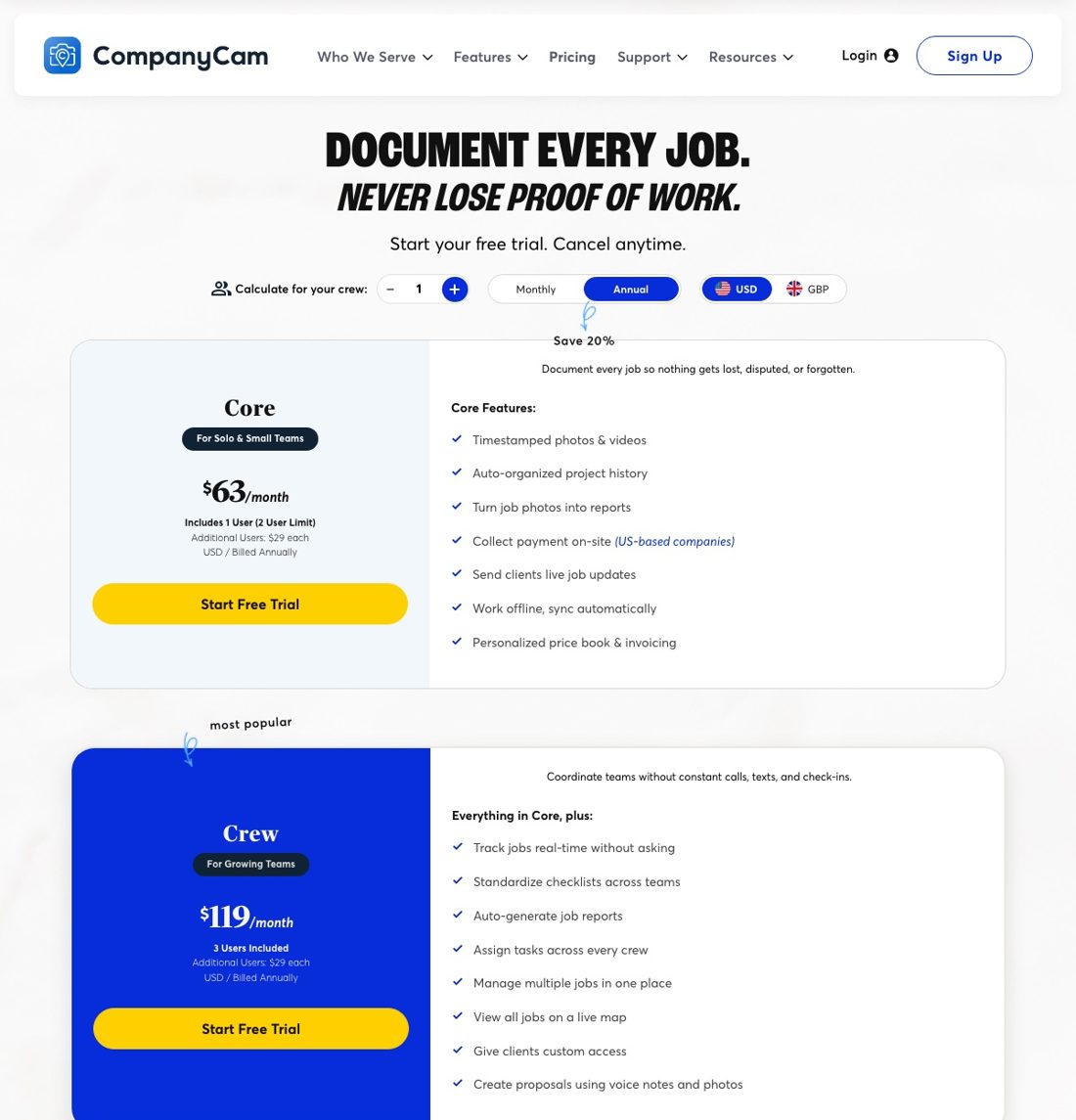
| Plan | Annual billing | Monthly billing | Seats included | Extra seat |
|---|---|---|---|---|
| Core | $63 a month | $79 a month | 1, capped at 2 | $29 annual, $34 monthly |
| Crew | $119 a month | $149 a month | 3 | $29 annual, $34 monthly |
| Scale | $249 a month | $299 a month | 3 | $29 annual, $34 monthly |
| Enterprise | Custom | Custom | 50 and up | Custom |
| Verdict | A six-person crew on Crew is $206 a month on annual billing ($119 plus three seats at $29), or $251 billed monthly. The same crew cannot be on Core at any price. | |||
Three things changed this year that the review sites have not caught up with. Scale moved from $199 to $249 a month on annual billing, a 25 percent increase. Core gained a hard two-user limit, which ends the old trick of running a small crew on the cheapest tier with $29 seats. And monthly-billed seats are $34, not $29, so a shop that refuses to prepay pays 17 percent more per person. Core also dropped from 20 AI credits to 10.
The gating is where the "pay substantially more" complaint comes from. Core gets 5 proposals and a 5-minute video limit; Crew gets 15 proposals, checklists and the live job map; Scale gets unlimited templates and reports, room measurement, subcontractor access controls and signed agreements. Review requests, Google Business Profile sync and the website gallery are add-ons on every tier, bundled as the Marketing Suite at $79 a month, down from $99. That suite overlaps with what a DataPins-style check-in tool or your marketing agency already does, so check before you pay for it twice.
Who it fits, and who should skip it
Buy it if you run five or more people in the field, do insurance or storm work, or have lost a dispute over pre-existing damage in the last year. The proof-photo use case pays for Crew on the first argument it ends, and the JobNimbus, AccuLynx and ServiceTitan integrations mean the office never asks a tech to text a picture again. Roofing companies are the core customer; the company was built inside the Hansen family roofing business in Lincoln, Nebraska in 2015, and it shows.
Skip it, for now, if you are one or two people on Jobber or Housecall Pro. Both attach photos to the job record already, Jobber's Core plan is $29 a month on annual billing, and you will not outgrow their photo tools until you have crews you do not personally see every day. Also skip it if your work is in low-signal areas and you cannot verify offline sync on your own phones during the trial, because that is the one 2026 complaint the company has not put to bed. Our best apps for contractors list and the best roofing software roundup cover the alternatives by trade.
| Alternative | What it is | Published price |
|---|---|---|
| Jobber photos | Photos on the job record inside the field service software | Core $29 a month annual, extra users $29 |
| JobNimbus | Roofing CRM with native photo storage | Not printed; quote by user tier |
| Buildertrend | Builder platform with photo and document tools | From $499 a month, unlimited users |
| Procore | Commercial platform, photos module | Not printed; priced on construction volume |
| Raken | Daily reports and field app, buying ads on this keyword | Not printed |
| Google Photos plus a shared folder | What small shops use before buying software | $1.99 a month for 100 GB, $9.99 for 2 TB |
The company behind it
CompanyCam was founded in 2015 in Lincoln, Nebraska, by Luke Hansen, who is still the CEO. It raised a $6 million Series A in October 2020, a $30 million Series B led by Insight Partners in October 2021, and an undisclosed Series C led by B Capital in August 2025, the last one announced with the phrase "a profitable track record." It bought Beam, an AI estimating and payments tool, in March 2026. The homepage claims 285,000-plus pros on 79 million jobs, up from the 140,000 it claimed in 2023. Those are the company's numbers. The practical reading is that it is not going anywhere, and that the price is more likely to keep rising than fall.
Our verdict
on Capterra, the App Store and Google Play, across more than 39,000 combined ratings, with price the top complaint on every one of them
CompanyCam is the best-reviewed photo documentation app in the trades and the ratings are earned. The question is not whether it works, it is whether your crew size clears the price. Under three people, the photo tools in your CRM are enough. At five or more, Crew at $206 a month for six seats is cheaper than one lost dispute. Either way, run the trial on the phones your crews carry, in the worst-signal lot you serve, and export a project to a zip file once so you know what leaving looks like before you commit to a year.
Frequently asked questions
Is CompanyCam worth the money?
For crews of five or more doing insurance, storm or dispute-prone work, yes. The timestamped photo trail ends arguments that cost more than the $119-a-month Crew plan. For one or two people on Jobber or Housecall Pro, the photo tools already in your CRM cover it.
What do CompanyCam reviews complain about most?
Price and per-seat cost, including inside five-star reviews. After that, offline sync and upload failures on Android in 2026, slow support in reviews from 2021 to 2024, and the zip-file-by-email photo export.
How much does CompanyCam cost in 2026?
Core $63 a month on annual billing or $79 monthly, limited to two users. Crew $119 or $149 with three seats. Scale $249 or $299 with three seats. Extra seats are $29 on annual billing and $34 on monthly. Enterprise is custom at 50-plus users.
Did CompanyCam raise prices?
Yes. Scale went from $199 to $249 a month on annual billing during 2026, Core gained a two-user cap, Core AI credits dropped from 20 to 10, and monthly-billed seats are $34 rather than $29.
Does CompanyCam work offline?
The pricing page says Core includes "work offline, sync automatically." Two Google Play reviews from July and August 2026 report lost or stalled uploads on Android, and the company replied that this is not typical. Test it on your own phones during the free trial.
Can I get my photos out if I cancel?
Yes, but export first. Photos are stored for as long as you are a customer and can be exported before access ends, through a zip file sent by email or the API. Annual plans auto-renew and a mid-year cancellation keeps the bill through the end of the term.
Which CRMs does CompanyCam integrate with?
AccuLynx, Jobber, JobNimbus, JobTread, Leap and QuickBooks Online are the featured six. ServiceTitan, Roofr, HighLevel, Eagleview, LeadPerfection and Smartsheet are also listed, and the company claims more than 50 in total.
Want the photos to turn into reviews and rankings?
We wire job photos into review requests, project pages and your Google Business Profile so every finished roof does marketing work. Published pricing, month to month.