
 ChatGPT
TL;DR
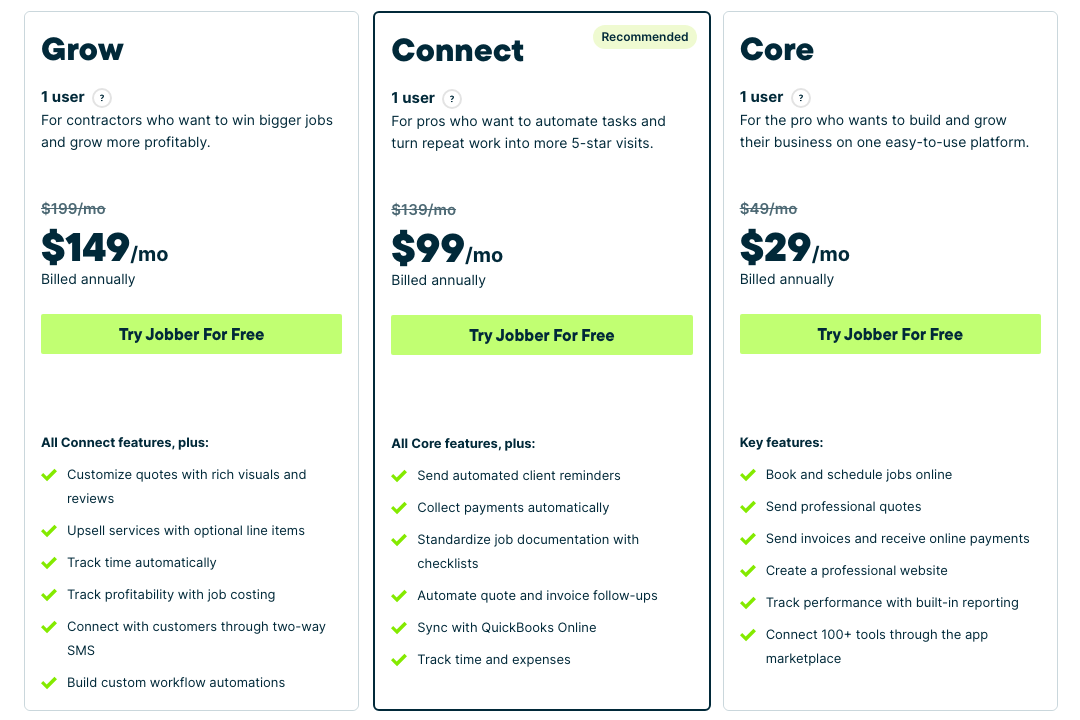
- "Field service software with QuickBooks integration" usually means the sync lives on the second tier. Jobber puts it on Connect ($99 a month, annual), one tier above Core ($29).
- Housecall Pro puts it on Essentials ($149), one tier above Basic ($59).
- The cheapest paid plan on this page with a two-way QuickBooks Online sync is Kickserv Start at $60 a month for five users. The cheapest of all is ServiceM8's free plan, capped at 30 jobs a month.
- If you run QuickBooks Desktop, the list shrinks to Kickserv Run ($119 plus $50), Housecall Pro Essentials, Workiz, FieldEdge, ServiceTitan and Intuit's own Field Service Management.
- Nine tools, priced from their own pages on October 11, 2026.
Disclosure: Skill Mammoth is a Jobber partner. Readers get 20 percent off through our link and we earn a commission when they sign up. We have no arrangement with any other vendor on this page, and every price below came from the vendor's own pricing or integration page on October 11, 2026, with the exceptions noted in the text.
Every field service vendor says it integrates with QuickBooks. Almost none put the three facts that matter on one page: which plan has the sync, which QuickBooks it talks to, and which way the data flows. Jobber's pricing page lists "Sync with QuickBooks Online" under Connect and nowhere else. Kickserv lists Online on Start and charges $50 a month more for Desktop on Run. You usually find this out after the trial, when the bookkeeper asks why invoices are not showing up.
This post covers dispatch and scheduling tools for crews. If you want a sales CRM that talks to QuickBooks, the QuickBooks CRM integration guide covers Method, Pipeline and the rest, and explains the four depths of "integration." Most field service tools sit at depth three, a scheduled or on-save push of customers, invoices and payments into QuickBooks, and that is enough for a contractor with one bookkeeper.
The four questions to ask before the demo
Online or Desktop first. Intuit stopped selling new Desktop Pro Plus, Premier Plus and Mac Plus subscriptions in the US on September 30, 2024, so new companies are on Online by default, while established shops on Desktop Enterprise are not, and four of the nine tools below do not sync with Desktop at all. Then which tier: on five of the nine, the sync is above the entry plan or costs extra, so the price in the ad is the price without it. Then direction: one-way means the field tool is the source of truth and edits in QuickBooks do not come back; two-way means they do, and on Kickserv the QuickBooks edit wins. Last, what moves. Customers, invoices and payments are table stakes. Items, timesheets and refunds are the lines that separate a sync that closes the month from one that leaves a spreadsheet behind.
Nine field service tools with QuickBooks sync, compared
| Tool | QuickBooks Online / Desktop | Tier that includes the sync | Direction | What syncs | Cheapest tier with the sync |
|---|---|---|---|---|---|
| Jobber | Online only | Connect and up (Core excluded) | One-way, Jobber to QuickBooks | Clients, products and services, timesheets, invoices, payments, refunds, tips, payouts | $99/mo annual, $139 monthly, 1 user |
| Kickserv | Online on Start; Desktop on Run and Scale for $50/mo extra | Start (Online), Run (Desktop) | Two-way; QuickBooks edits overwrite Kickserv | Customers, prospects and leads, invoices, sales orders and receipts, payments, items with inventory | $60/mo, 5 users (20% off annual) |
| Housecall Pro | Online and Desktop per the integration page | Essentials and up (Basic excluded) | Import, then automatic push to QuickBooks | Customers, invoices, line items, payments | $149/mo annual, $189 monthly, 5 users |
| ServiceM8 | Online only | All plans, including Free | Two-way for clients, items and payments; invoices raised into QuickBooks | Clients, items, invoices, payments, weekly timesheet export | Free (1 user, 30 jobs/mo); Starter $29/mo (50 jobs) |
| Service Fusion | Online per the integration page; Desktop not mentioned | All plans | Invoices and payments push to QuickBooks; customers "stay aligned" | Customers, invoices, payments | $208/mo annual, $245 monthly, unlimited users |
| Workiz | Online and Desktop | All plans (Standard and up) | One-way, Workiz to QuickBooks, after an initial import | Customers, invoices, Workiz Pay payments, financing, taxes, expense card transactions | Quote only; about $225 to $275/mo for 5 users per third parties, Feb 2026 |
| FieldEdge | Online and Desktop, all three tiers | Select and up | Real-time sync; direction not stated | Not itemized on the page | Quote only |
| ServiceTitan | Online (near real-time) and Desktop | Not stated on the pricing page; confirm with sales | Export from ServiceTitan; direction not stated | Invoices, purchase orders, transactions | Quote only; about $1,225 to $1,500/mo for a 5-tech shop by reported ranges |
| Intuit Field Service Management | Desktop Enterprise (v18+), Online, Intuit Enterprise Suite | One seat bundled with Desktop Enterprise; fees for more users | Native sync with QuickBooks | Not itemized on the page; Time Card and Preventative Maintenance are paid add-ons | Not published; third parties list $35/user/mo |
| Verdict | On QuickBooks Online with a crew of one to five: Kickserv Start ($60, two-way) or Jobber Connect ($99, one-way but syncs timesheets). On Desktop: Kickserv Run plus the Desktop add-on ($169 monthly) or Housecall Pro Essentials ($149 annual). Over ten techs, the quote-only tools earn their price on accounting depth, and ServiceTitan is the only one that also exports to Intacct and NetSuite. | ||||
1. Jobber Connect, $99 a month: the deepest sync under $100
Jobber's QuickBooks sync is on Connect ($99 a month annual, $139 monthly, one user) and the two tiers above it. Core at $29 does not have it, which is the most common surprise in this category. The sync is one-way from Jobber into QuickBooks Online and covers more than most: clients, products and services, approved timesheets for payroll, invoices, payments, refunds, tips and payouts. Because it is one-way, Jobber tells you to make edits in Jobber.
Desktop is the hard limit. Jobber's feature page says the integration is only with QuickBooks Online; Desktop customers get a one-time CSV import of clients. Connect for five users is $149 annual, extra users are $29 each, and the add-on math is in our Jobber pricing breakdown. We are a Jobber partner and earn a commission on sign-ups through our link. It ranks first because the timesheet sync and the payout reconciliation are the two lines that save a bookkeeper real hours, and no other tool under $100 moves both.
2. Kickserv Start, $60 a month: two-way sync for five users
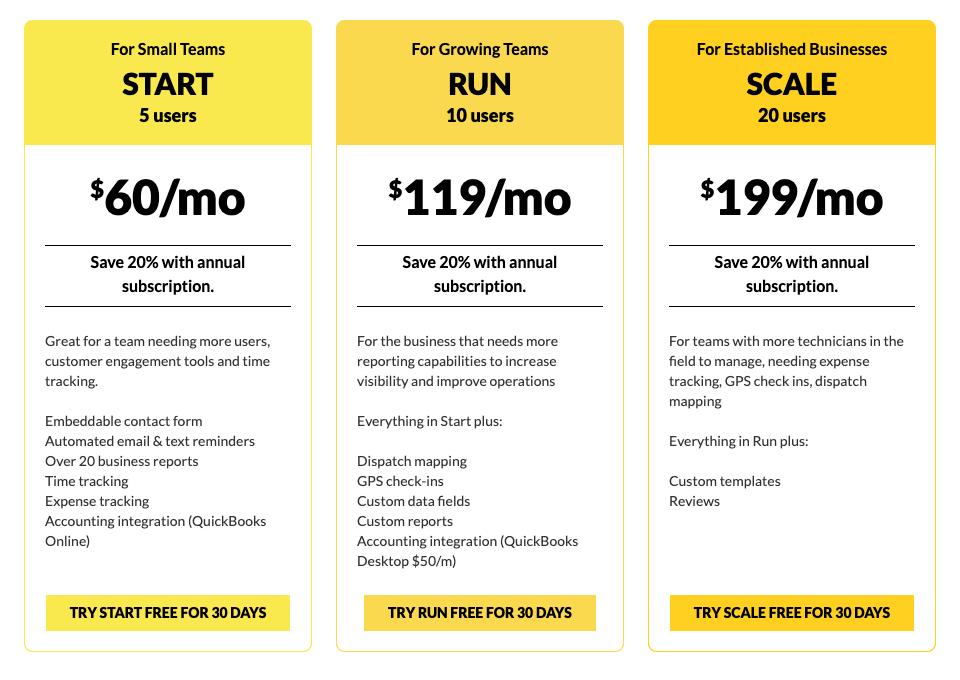
Kickserv is the cheapest two-way QuickBooks sync on this page and the only one priced for a small crew that also handles Desktop. Start is $60 a month for five users with "Accounting integration (QuickBooks Online)" on the plan card. Run is $119 for ten users and lists "Accounting integration (QuickBooks Desktop $50/m)," so a Desktop shop pays $169 a month before the 20 percent annual discount. Scale is $199 for 20 users.
The sync moves customers, prospects and leads, invoices, sales orders and sales receipts, payments, and items including inventory. Two rules from Kickserv's own page: changes made in QuickBooks overwrite Kickserv data, and online payment fees added to invoices do not sync to Desktop, which can leave a credit in QuickBooks and stall the sync. It ranks second only because the product is lighter than Jobber on the customer side (quoting, client hub, review requests). On accounting it is stronger.
3. Housecall Pro Essentials, $149 a month: Online and Desktop for a crew
Housecall Pro's pricing page lists "QuickBooks Online sync" under Essentials at $149 a month annual ($189 monthly) for five users. Basic at $59 does not include it. The integration page says the product works with both Online and Desktop, pushing invoices, customers, line items and payments automatically after an initial import, with error handling to stop duplicates. The Desktop connection runs through Intuit's Web Connector and has its own onboarding guide in the help center. Timesheets are a separate feature and the page does not say they sync.
Two things to confirm with sales, because the two pages differ in emphasis: whether Desktop is available on Essentials or held to Max ($299 annual, eight users), and whether edits in QuickBooks flow back, since the page language is "push." Our Housecall Pro pricing guide has the seat math; Essentials annual is the realistic floor for anyone with employees, and the sync is a reason to turn it on the first week rather than untangle six months of double entry later.
4. ServiceM8, free to $349: the sync is on every plan
ServiceM8 is the only product here whose free plan includes the accounting sync. Free covers one user and 30 jobs a month; Starter is $29 (50 jobs), Growing $79 (150), Premium $149 (500) and Premium Plus $349 (1,500 or more), all with unlimited users. The features grid marks "Accounting Integrations" as all plans, and the QuickBooks Online page describes clients, items and payments syncing in both directions, invoices raised directly into QuickBooks Online from the app, and tax rates coming in from QuickBooks. There is also a weekly timesheet export.
The limits are the job cap, which is the pricing unit, and no Desktop. For a solo tradesperson doing 40 jobs a month on QuickBooks Online, $29 with the sync beats Jobber Core at $29 without it, a comparison the Jobber ad does not invite.
Not sure which tier your crew needs?
Bring your tech count, whether you are on QuickBooks Online or Desktop, and what your bookkeeper retypes today. Fifteen minutes sorts out whether you need the $60 plan or the $149 one, and what the switch costs in setup time.
5. Service Fusion Starter, $208 a month: flat price, unlimited users
Service Fusion lists "QuickBooks Integration" on all three plans: Starter at $208 a month annual ($245 monthly), Plus at $325 ($382) and Pro at $533 ($627), each with unlimited users. The integration page is specific to QuickBooks Online: invoices created in Service Fusion sync to QuickBooks, payments sync automatically, and customer records stay aligned. It does not say two-way, does not mention items or timesheets, and does not mention Desktop.
The reason to pay $208 for a sync Kickserv does for $60 is the seat count. At 12 people, Service Fusion is still $208 while Housecall Pro is $299 plus $35 a seat past eight. Under six people it is the expensive option here. Ask on the demo whether Desktop is supported; the page's silence is not a no.
6. Workiz: Online and Desktop, one-way, quote only
Workiz's pricing page shows three plans (Standard, Pro, Ultimate), three "Request pricing" buttons, and "QuickBooks online sync" marked as included on all three. The integration page is clearer than most: Workiz connects to QuickBooks Online and Desktop, imports your existing data once, then flows one way from Workiz to QuickBooks. Customers, invoices, Workiz Pay payments, consumer financing, taxes and Workiz Expense Card transactions all move, and you choose which records sync and whether it runs automatically. Items and timesheets are not mentioned.
The catch is the price. Workiz does not publish one, and the third-party figures in our Workiz pricing analysis (verified February 2026) put the entry plan at about $225 to $275 a month for five users, roughly double Jobber Connect for five seats. It earns the gap if you will use the automations and the AI answering, not on the QuickBooks sync alone.
7. FieldEdge: real-time Desktop and Online, quote only
FieldEdge's pricing page has three tiers (Select, Premier, Elite), no prices, and a comparison table with a row reading "QuickBooks Online & Desktop" checked under all three. Its partner page calls FieldEdge a "QuickBooks Superior Real-Time Integration Partner" and promises no double entry. It does not list which records sync or which direction they go, and the QuickBooks one-pager it links to downloads as a PDF that would not render as text.
FieldEdge grew up inside HVAC and plumbing shops that run QuickBooks Desktop, and the real-time Desktop sync is its reputation. With eight or more techs on Desktop Enterprise and an accountant who lives in QuickBooks, it belongs on the demo list. Get the sync scope in writing.
8. ServiceTitan: the most accounting systems, the least public pricing
ServiceTitan's accounting integrations page lists QuickBooks Online ("near-real time"), QuickBooks Desktop, Sage Intacct, NetSuite, Viewpoint Vista and Spectrum, Xero, Acumatica and Foundation, plus journal entries and CSV for anything else. Its QuickBooks page says invoices and purchase orders export to QuickBooks and daily transactions sync in real time. Its pricing page lists Starter, Essentials and The Works with "Request Pricing" on each and does not mention accounting on any tier, so ask whether the export is in Starter.
Cost is why it sits at eight on a list about what the sync really costs. Our ServiceTitan pricing breakdown builds from reported ranges: $14,700 to $18,000 a year of software for a five-tech shop, plus $5,000 to $15,000 of implementation. Under ten techs that is enterprise money for an export Kickserv does for $60. Over 25 techs, with a controller who wants Intacct, nothing else on this page competes.
9. Intuit Field Service Management: built for Desktop Enterprise
This is Intuit's own product, built on Corrigo, and it dominates the search results for this keyword without being the answer for most searchers. Intuit's page says one user of Field Service Management comes with a QuickBooks Desktop Enterprise subscription, fees apply for additional users, and the sync client needs Enterprise v18 or higher. The footnote says it integrates with US QuickBooks Desktop, QuickBooks Online and Intuit Enterprise Suite. Time Card and Preventative Maintenance are add-ons that must carry the same number of paid users. Intuit does not publish the per-user price; Capterra and GetApp list $35 per user per month for one to ten users, which you should confirm with Intuit sales.
It fits a shop already paying for Desktop Enterprise that wants scheduling inside the Intuit account with no third-party sync to break. It does not fit anyone on QuickBooks Online shopping for modern dispatch: the product's six Capterra reviews average 2.8 out of 5, and every other tool on this list has a better mobile app.
Three to skip
Zuper. Zuper's site lists QuickBooks among 60-plus integrations and says invoices sync with it, but publishes no pricing page, no sync direction and no list of what moves. Third-party listings put it at $65 to $105 per user per month on annual contracts. None of that is verifiable on the vendor's own pages, so it did not make the table.
The entry plan of a product whose sync is on the next tier. Jobber Core ($29) and Housecall Pro Basic ($59) are priced to make the ad read "from $29." If you need QuickBooks, the real price is $99 and $149, and buying the entry plan to see how it goes means a month of invoices entered twice.
A general CRM connected through Zapier. A Zap that pushes a finished invoice into QuickBooks is depth one: customers, payments and any edit made in QuickBooks still get retyped. The field service software roundup explains why a crew needs a dispatch tool with the sync built in rather than a sales CRM with a connector bolted on.
Which one for you
| Your situation | Pick | Monthly cost with the sync | Why |
|---|---|---|---|
| Solo, QuickBooks Online, under 50 jobs a month | ServiceM8 Starter | $29 | Two-way sync on every plan; Jobber Core at the same price has no sync |
| 2 to 5 people, QuickBooks Online, bookkeeper edits in QuickBooks | Kickserv Start | $60 (5 users) | Two-way; QuickBooks edits win; items and inventory included |
| 2 to 5 people, QuickBooks Online, you want quoting and client comms too | Jobber Connect | $99 (1 user), $149 (5) | One-way but syncs timesheets, refunds, tips and payouts |
| 5 to 8 people on QuickBooks Desktop | Kickserv Run plus Desktop, or Housecall Pro Essentials | $169, or $149 annual | The two sub-$200 options that name Desktop |
| 10 to 20 people, flat price matters | Service Fusion Starter | $208 annual | Unlimited users; Online sync on every plan |
| Already on Desktop Enterprise, want no third-party sync | Intuit Field Service Management | One seat bundled; more by quote | Native, but a dated app |
| 25+ techs, controller wants Intacct or NetSuite | ServiceTitan | Quote; five figures a year | The only one with the full accounting roster |
| Verdict | Under ten people on QuickBooks Online, Kickserv Start at $60 or Jobber Connect at $99 is the whole decision. Desktop narrows it to Kickserv, Housecall Pro, Workiz, FieldEdge and ServiceTitan, and the first two are the only ones that print a price. | ||
Want the sync set up right the first time?
We help contractors pick the tier, map the price book to QuickBooks items and run the parallel week, then build the website and local SEO that keeps the dispatch board full. The software runs the crew; we fill the calendar.
Frequently asked questions
What is the best field service management software with QuickBooks integration?
For a crew of one to five on QuickBooks Online, Kickserv Start ($60 a month for five users, two-way sync) or Jobber Connect ($99 annual, one-way but syncs timesheets and payouts). For QuickBooks Desktop, Kickserv Run plus the $50 Desktop add-on ($169 monthly) or Housecall Pro Essentials ($149 annual). Over 25 technicians, ServiceTitan, by quote. Prices from the vendors' pages on October 11, 2026.
Which field service software plans include QuickBooks sync?
Jobber: Connect and up, not Core. Housecall Pro: Essentials and up, not Basic. Kickserv: Online on Start, Desktop on Run for $50 a month more. ServiceM8, Service Fusion, Workiz and FieldEdge: every plan. ServiceTitan: not stated on its pricing page, so confirm with sales. Intuit Field Service Management: one seat bundled with Desktop Enterprise.
Which field service software works with QuickBooks Desktop?
Kickserv (Run and Scale, $50 a month extra), Housecall Pro (per its integration page, through the Web Connector), Workiz, FieldEdge, ServiceTitan and Intuit Field Service Management (Enterprise v18 and up). Jobber, ServiceM8 and, per its integration page, Service Fusion are QuickBooks Online only. Intuit stopped selling new Desktop Pro Plus and Premier Plus subscriptions in the US on September 30, 2024, so the Desktop list is likely to keep shrinking.
Is the Jobber QuickBooks sync one-way or two-way?
One-way, from Jobber into QuickBooks Online, on the Connect plan ($99 a month annual) and up. It syncs clients, products and services, approved timesheets, invoices, payments, refunds, tips and payouts. Jobber recommends making edits in Jobber because changes made in QuickBooks do not flow back. Jobber does not sync with QuickBooks Desktop.
How much does field service software with QuickBooks integration cost?
Free (ServiceM8, 30 jobs a month) to about $1,500 a month (ServiceTitan for a five-tech shop, by reported ranges). The sub-$100 tier is ServiceM8 Starter ($29), Kickserv Start ($60) and Jobber Connect ($99). The $149 to $208 tier is Housecall Pro Essentials and Service Fusion Starter. Workiz, FieldEdge, ServiceTitan and Intuit quote only.
Do I still need a QuickBooks subscription?
Yes, for every tool on this page. Housecall Pro's integration page says it outright ("QuickBooks is not included in your Housecall Pro subscription"), and the others assume it. Intuit Field Service Management is the reverse case: the QuickBooks Desktop Enterprise subscription includes one Field Service seat, and you pay for additional dispatch users.