TL;DR
We are a Jobber partner, so read this with that in mind: most people searching for a Jobber alternative still like the software. They are leaving for one of five reasons, and each has a different best answer. Seat cost past eight people: ServiceM8 (unlimited users from $29, metered by job count) or Kickserv (20 users for $199). Two-way texting and job costing locked behind Grow at $149 a month: Housecall Pro Essentials at $149 for five users includes both. Call-heavy dispatch: Workiz. Flat company pricing above ten people: Service Fusion from $208. Past ten technicians with memberships and a price book: ServiceTitan, quote-only. If you are a solo operator on Core at $29 a month on annual billing, nothing on this list is cheaper for what Core does, and you should stay. Every price below was read from each vendor's live pricing page on October 5, 2026.
Disclosure first, because it matters more on this post than most. Skill Mammoth is an official Jobber partner, our readers get 20 percent off through our link, and we earn a commission when someone signs up. That is the opposite incentive to writing a page that helps you leave. We are writing it anyway, because we have moved clients off Jobber when it stopped fitting, and because a reader who lands on the wrong tool blames the person who recommended the last one. We have no arrangement with any other vendor named here.
First, which Jobber are you leaving?
Jobber's pricing page on October 5, 2026 lists three single-user plans and a team tier. Core is $49 a month billed monthly, $39 on a one-year commitment billed monthly, or $29 prepaid annually. Connect is $139, $119 or $99 on the same three terms. Grow is $199, $169 or $149. Plus, which starts at five users, is $499, $439 or $399. Extra users are $29 a month on every plan, and the five, ten and fifteen-user bundles (Connect for five at $199, Grow for five at $299 and ten at $399, Plus for ten at $599 and fifteen at $699, all monthly) exist because stacking $29 seats gets expensive fast. The add-ons changed this year: AI Receptionist is now $29 a month (it launched at $99), Marketing Suite is $99 (up from $79), and a new sales Pipeline add-on is $49. Card processing is 2.9 percent plus 30 cents, tap to pay 2.7 percent plus 30 cents, bank payments 1 percent, and instant payouts add another 1 percent.
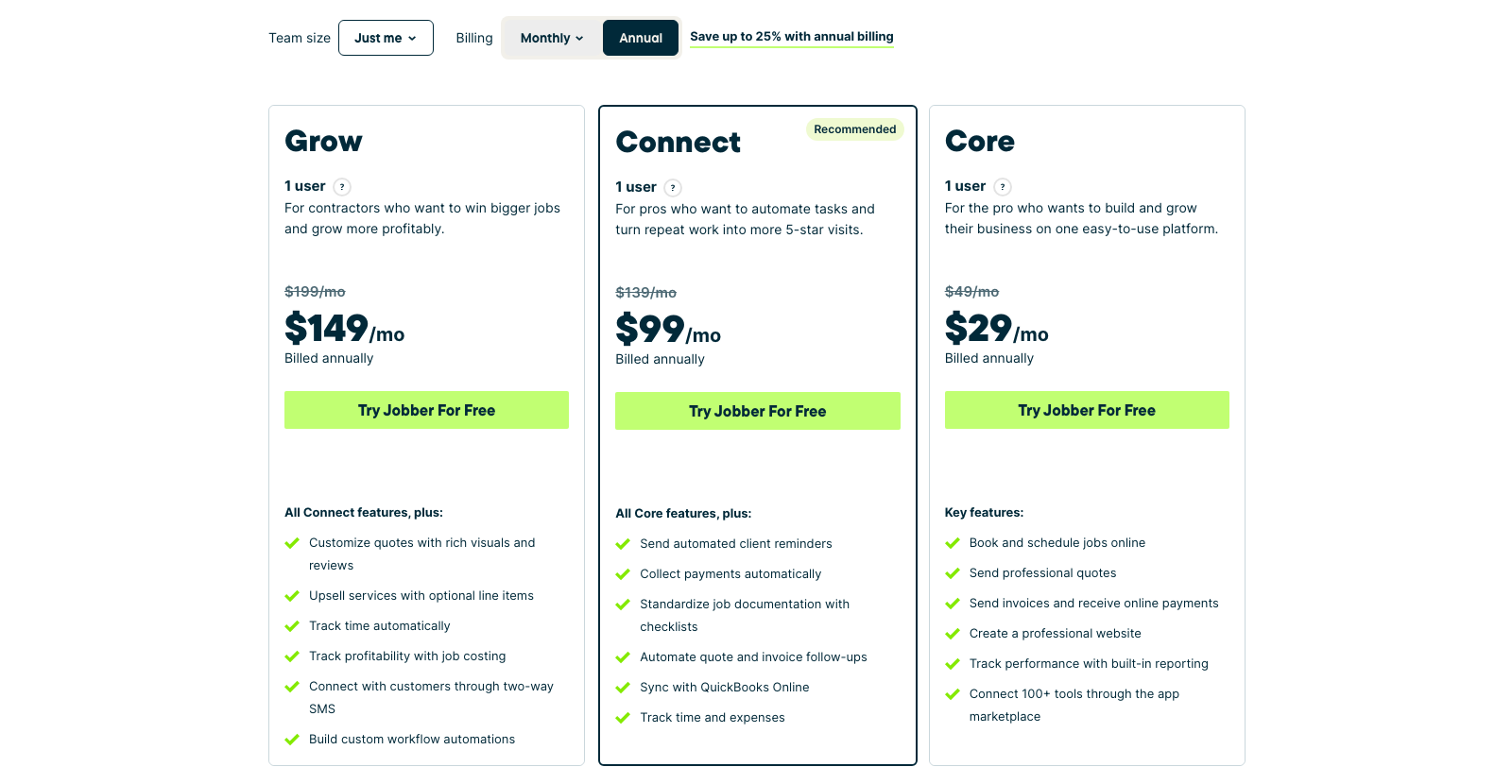
The full plan-by-plan breakdown is in our Jobber pricing guide. What matters here is which line item is pushing you out, because the five complaints we hear map to five different replacements.
| Why you are leaving | What it costs you on Jobber | Best replacement | Its price |
|---|---|---|---|
| Seat count past eight people | Plus at $499 to $699 a month, or $29 per extra seat | ServiceM8 or Kickserv | $29 to $349 unlimited users (ServiceM8); $199 for 20 users (Kickserv) |
| Two-way texting and job costing need Grow | $149 a month annual, $199 monthly, for one user | Housecall Pro Essentials | $149 annual, $189 monthly, five users |
| Phones and call tracking are bolted on | AI Receptionist $29, no native call recording | Workiz | Quote-only; third parties report $225 to $325 for five users |
| Ten to twenty people, want one flat bill | Plus for fifteen at $699 monthly | Service Fusion Plus | $325 annual, $382 monthly, unlimited users |
| Memberships, price book, multi-location dispatch | Not Jobber's strength at any price | ServiceTitan | Quote-only, annual contract, implementation fee |
| Verdict | Solo on Core at $29 or a crew of two to four on Connect: stay. The list below starts paying off at around eight people, or the day you need a feature Jobber gates behind Grow or does not build. | ||
1. Housecall Pro, for the Grow features at the Connect price
The most common upgrade pressure on Jobber comes from the feature gate between Connect and Grow, more often than from headcount. Two-way SMS, job costing, time tracking that feeds profitability, and custom workflow automations all live on Grow, which is $149 a month on annual billing for a single user. Housecall Pro's Essentials plan is the same $149 on annual ($189 monthly) and includes five users, with texting and job costing in the bundle. Basic is $59 annual or $79 monthly for one user, and MAX is $299 annual or $329 monthly for eight.
The catch is what happens above the bundle. Extra seats are $100 a month each on Essentials and $75 on MAX, which is more than triple Jobber's $29. A twelve-person shop pays $849 on Essentials. Housecall Pro is the right move for a two-to-five-person crew that wants the Grow feature set without the Grow price, and the wrong move for anyone planning to hire past eight. The head-to-head sits in Jobber vs Housecall Pro, and the seat math that drives people back out is in Housecall Pro alternatives. One more warning from our own walkthrough of their plan picker: a plumbing company with a two-to-five-person crew was quoted $299 for a team Essentials plan, not the $149 on the billboard. Price from the quote.
2. ServiceM8, if you are paying for people instead of jobs
ServiceM8 is the one tool here that removes the seat problem instead of discounting it. Every paid plan includes unlimited users and meters jobs per month instead. The Free plan covers one user and 30 jobs a month. Starter is $29 for 50 jobs, Growing is $79 for 150, Premium is $149 for 500, and Premium Plus is $349 for 1,500 or more with extra jobs at $20 each. Text messages are included on paid plans (the free plan charges 10 cents per SMS), the phone add-on starts at $19 a month, and there is no lock-in.
Run the twelve-person comparison. On Jobber that shop is on Plus for fifteen at $699 a month billed monthly. If it completes 150 jobs a month, ServiceM8 Growing is $79. The model punishes the opposite business, though: a service plumber running eight short calls a day clears 150 jobs inside a month and climbs toward Premium at $149 or Premium Plus at $349. High-ticket, low-count trades (roofing, HVAC replacement, remodeling, landscape installs) get the best of job-based pricing. ServiceM8 is also iPhone and iPad first in its heritage, so check the Android experience before moving a mixed crew.
3. Kickserv, the cheapest competent option at twenty people
Kickserv bundles seats the way Jobber used to. Start is $60 a month for five users, Run is $119 for ten, and Scale is $199 for twenty, with 20 percent off on annual billing ($48, $95.20 and $159.20) and a 30-day trial. There is also a 5 percent discount for processing $1,000 to $3,000 a month in online payments through them. Compare Scale at $199 for twenty people against Jobber Plus for fifteen at $699 and the gap is a truck payment.
You pay for that gap in polish. The mobile app, the customer-facing booking flow and the marketing tools are a step behind Jobber, and the QuickBooks Desktop integration is a $50 a month add-on rather than included (QuickBooks Online is in the base plan). For a crew that needs scheduling, dispatch, invoicing and time tracking and does not need the client experience to sell for them, Kickserv is the best value on this page.
Switching software will not fix a quiet phone.
Half the "we need a new CRM" calls we take turn out to be lead-flow problems. A fifteen-minute look at where your jobs come from decides which one you have before you migrate anything.
4. Service Fusion, for one flat bill above ten people
Service Fusion charges the company, never the head. Starter is $208 a month on annual billing or $245 monthly, Plus is $325 or $382, and Pro is $533 or $627, each with unlimited users and no contract. Starter covers scheduling, dispatch, estimates, invoicing, payments, QuickBooks and text alerts. Plus adds job photos, inventory, job costing and integrated voice and text. Pro adds the open API, custom documents, e-signatures, a customer portal and progress billing.
Below about six people it is the most expensive option here and you should ignore it. At ten to twenty it undercuts Jobber's team tiers by hundreds a month and does so without a seat meter that punishes the next hire. The add-ons that are not on the plan cards are GPS fleet tracking and the ServiceCall.ai answering service, and the exact processing rate lives behind the demo button. Our Service Fusion pricing post has the line-by-line.
5. Workiz, if your leads arrive by phone all day
Jobber treats the phone as an add-on (the $29 AI Receptionist) and does not record or track calls natively. Workiz is built around the call: tracking numbers, recording and transcripts wired into the job record, which is why locksmiths, garage door companies, appliance repair and junk removal gravitate to it. The trade-off is that Workiz does not publish prices. Its page lists Standard, Pro and Ultimate behind "Request pricing" buttons, with a seven-day trial. The most credible third-party figures put the entry plans at $225 to $325 a month for five users on monthly billing, with extra users at $55 to $65 and the Genius phone and answering add-ons at roughly $100 and $200 on top. Get the quote in writing in both monthly and annual form before comparing; the detail is in our Workiz pricing breakdown.
6. ServiceTitan, only past ten technicians
Every Jobber alternatives list includes ServiceTitan and most of them should not. It is quote-only, sold on annual contracts with implementation fees that run into the thousands, and it earns its price when membership programs, a flat-rate price book, multi-location reporting and call-center dispatch become daily work. Below roughly ten to fifteen technicians you pay enterprise prices for a third of the features you will use. If you are there, ServiceTitan pricing covers what operators actually report paying, and the sizing framework is in Jobber vs ServiceTitan.
7. Zenbooker, for booking-first businesses
Cleaning companies, detailers and anyone whose customers book online without a quote often use a tenth of Jobber and pay for all of it. Zenbooker prices by service territory instead of seats: Standard is $29 a month for two territories, Professional $79 for eight, Enterprise $149 for 36 and National $259 for 96, each with unlimited team members and unlimited bookings, month to month. It is a booking engine with dispatch and reminders attached, not a job-costing tool, so it belongs on this list only for the businesses that never needed job costing in the first place.
Three alternatives to skip
GoHighLevel as a Jobber replacement. It is marketing software with a CRM inside, not field service software. There is no dispatch board, no job costing and no technician app worth the name. Starter is $97 a month and Unlimited $297 before usage fees on texts, calls and email. It can sit beside Jobber for follow-up; it cannot replace it. The rate card is in GoHighLevel pricing.
FieldPulse, until you have a written seat price. FieldPulse is a real competitor with a good product, but its pricing page says only that it is "seat-based" and sends you to a demo. A tool you cannot price in a spreadsheet cannot be compared with the six above. Ask for the per-seat rate, the add-on prices for Engage, Operator AI and Pricebook, and the contract term in writing, then slot it into the table.
A general CRM like HubSpot. We get asked this monthly. HubSpot's Starter tier is cheap, and it has no scheduling, no dispatch, no invoicing and no technician app. Contractors who move to it end up running the field on a group text. Our HubSpot pricing post explains who it is actually for.
When to stay on Jobber
Three cases, and they cover most of the people reading this. You are a solo operator on Core at $29 a month annual: nothing above is cheaper for scheduling, quoting, invoicing and a client hub, and ServiceM8 Free caps you at 30 jobs. You are a crew of two to four on Connect and your real complaint is lead flow, not software; the automated reminders, review requests and quote follow-ups on Connect are the pieces that make a small crew look like a big one, and no competitor does the client-facing side better at that size. Or you have three years of client history, quotes and QuickBooks sync in Jobber and the thing you want is one feature on Grow; the upgrade from Connect to Grow is $50 a month on annual billing, which is less than one lost job during a migration. Our Jobber review is blunt about where it is weak, and it is still the tool we put most clients under $2M on.
Before you migrate anything
- Export clients, properties and job history from Jobber as CSV before you cancel, and keep the account on monthly billing for one overlap month. Every tool above imports customers; none of them import open quotes cleanly.
- Decide who owns QuickBooks sync during the overlap. Two tools syncing the same invoices is the fastest way to a double-booked month.
- Move the review-request automation first. It is the feature that quietly feeds your Google profile, and a 60-day gap in review velocity shows up in map rankings. The playbook is in how to get 100 Google reviews.
- Re-point every form, booking link and phone flow on your website on cutover day, not the week after. The ranked list of what else to check is in best field service software.
Want a second opinion on the switch?
We have moved crews onto and off every tool on this page. Tell us the headcount, the job count and the feature you are missing, and we will tell you which column you belong in, partnership or not.
Frequently asked questions
What is the best alternative to Jobber?
It depends on why you are leaving. For seat cost past eight people, ServiceM8 (unlimited users from $29, metered by jobs) or Kickserv (20 users for $199). For Grow-only features like two-way texting and job costing at a lower price, Housecall Pro Essentials at $149 for five users. For call-heavy dispatch, Workiz. For a flat company price above ten people, Service Fusion from $208. For memberships and a price book past ten technicians, ServiceTitan.
Is there a free alternative to Jobber?
ServiceM8 has a genuine free plan for one user and 30 jobs a month, with text messages at 10 cents each. Jobber itself has no free tier, only a 14-day trial on Grow. Past 30 jobs a month, ServiceM8 Starter at $29 matches Jobber Core's annual price with unlimited users instead of one.
Is Housecall Pro cheaper than Jobber?
For two to five people, usually yes on features per dollar: Essentials is $149 a month on annual billing for five users with texting and job costing, which Jobber gates behind Grow at $149 for one user. For one person, Jobber Core at $29 beats Housecall Pro Basic at $59. Past eight people, Housecall Pro's $75 to $100 extra seats make it the more expensive of the two.
How much does Jobber cost in 2026?
Core is $49 a month billed monthly or $29 prepaid annually, Connect $139 or $99, Grow $199 or $149, and Plus (five users) $499 or $399, with extra users at $29. Add-ons are AI Receptionist $29, Pipeline $49 and Marketing Suite $99. Card processing is 2.9 percent plus 30 cents. Figures from getjobber.com/pricing on October 5, 2026.
Can I export my data from Jobber?
Yes. Clients, properties, quotes, jobs and invoices export as CSV from the reports area, and QuickBooks Online keeps its own copy of every synced invoice. Open quotes and automations do not transfer to any competitor; rebuild those by hand after the customer import.
Why do you recommend alternatives if you are a Jobber partner?
Because the partnership pays only when Jobber fits, and a client who outgrows it blames whoever recommended it. We earn a commission on signups through our link, we get readers 20 percent off, and we still move crews to ServiceM8, Service Fusion and ServiceTitan when the headcount or the feature list says to.